
Takashi Sawanaka



Takashi Sawanaka
The default value for that option has not changed between 2.16.8 and 2.16.9.
Do you Ctrl-click a menu item when launching WinMerge from the Explorer context menu? If so, that may be the cause. After a certain version, holding down the Ctrl key...
What I wanted to say was, "Did you hold down the Ctrl key and click the explorer context menu?", As shown below.  The GIF animation below shows the difference...
Perhaps Tree Mode is disabled. Try enabling Tree Mode as follows 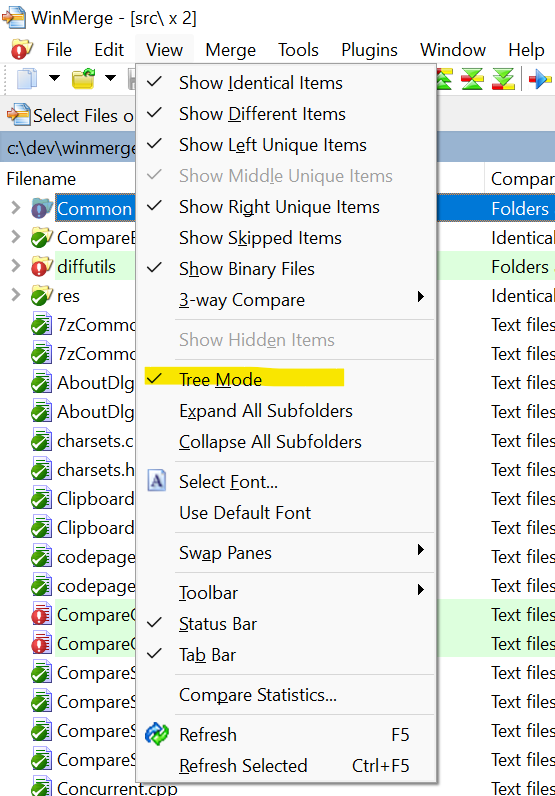
Sorry. I guess I didn't read this issue carefully. Am I correct in my understanding that you are trying to compare folders? If so, there is no side-by-side display of...
Unfortunately, WinMerge cannot exclude unique empty folders.
Related issues: #198, #1168
If WinMerge fails to create a backup, it will display a message box similar to the one below. What message do you think is appropriate? 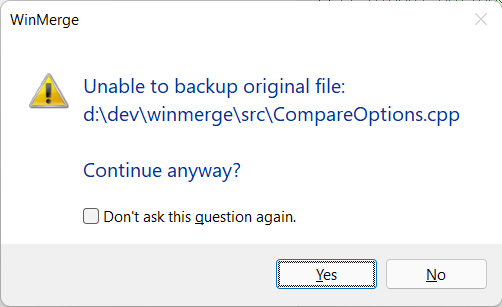
In commit 1b4fb4b, I changed it to also show the backup file path. I have made the message as follows so as not to affect translations, but if you think...
Thank you for your suggestion. I will leave the message as is for now and will consider it again in the future when there are major revisions.