winmerge
 winmerge copied to clipboard
 WinMerge
Tree View mode is disabled in v2.16.9.0 and v2.16.10.0
I updated my WinMerge installation from v2.4.0 to v2.16.10.0 and it seems like Tree View mode is disabled and cannot be enabled. Searching at SourceForge for previous versions I found out that v2.16.8.0 works fine, while v2.16.9.0 is already broken.
Using on Win 10, 64-bit.
(Thank you for making this great tool free and available for so many years!)

How did you compare the folders?
-Did you compare the folders by Explorer Shell Extension? -Did you compare the folders by drag and drop? -Did you compare the folders from the Select File or Folder window?
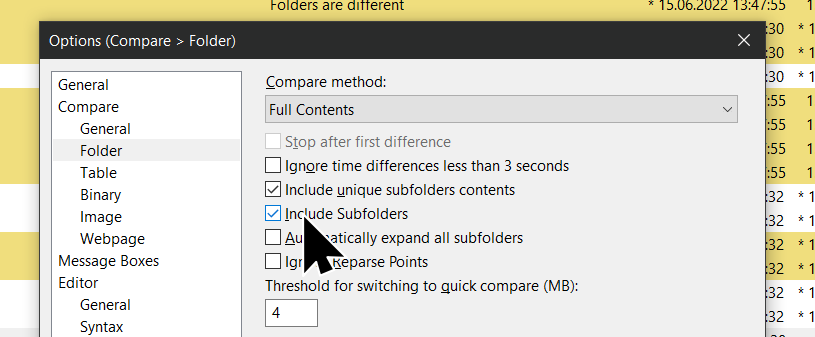
In either case, you cannot enable tree mode if Include subfolders option is disabled.
Please enable it as follows.

If you are running WinMerge from a command prompt, add the "/r" option.

From Explorer and from the Select Folder window.
Admittedly, I did not pay attention to the "Include Subfolders" option. That said, this is true for all the other versions I tried. So, did the default for this option change from v2.16.8 to v2.16.9?
The default value for that option has not changed between 2.16.8 and 2.16.9.
Just to verify I'll try to reinstall the later versions and check that point, but it'll take a few days, as I cannot spare the bandwidth right now.
OK, I removed v2.16.8.0 and installed v2.16.9.0 (64-bit). To my surprise, the tree view mode was enabled this time. I then removed v2.16.9.0 and installed v2.16.10.0 and again, the problem is there. I confirmed that the "Include Subfolder" option is enabled. The view mode menu is disabled. I then removed v2.16.10.0 and reinstalled v2.16.9.0 and lo-and-behold - the menu is disabled! It seems like v2.16.9.0 is affected by the previous version that was installed!
It gets weirder - I then moved back to v2.16.8.0 - - - just to find out that the menu option is disabled here as well! So, versions depend on settings/bugs of previously installed versions.
All that said, the uninstall and reinstall cycles were done w/o restarting Windows in between.
More observations - there seems to be a non-version-specific problem. Probably a problem in maintaining the internal state of the application.
I played some more with the various versions. When I toggle the "Include Subfolders" and "Tree View" options a couple of times, along with "Refresh"-ing the compare, I eventually do see the tree view appearing correctly on the all versions.
So, may need to track down a bug in maintaining the view mode state and file list structure.
Do you Ctrl-click a menu item when launching WinMerge from the Explorer context menu? If so, that may be the cause.
After a certain version, holding down the Ctrl key will compare folders with the reverse of the current Include Subfolders setting.
This feature only seems to cause problems and may be removed.
Mmmm -- I am not even sure what you're asking....
I select two directories from Explorer, right click and select Compare. WinMerge opens with the directory compare window.
If I press CTRL while navigating and selecting menu items, I don't see a difference in the behaviour.
Currently, I am using v2.16.10.0 which is behaving correctly after the initial mode cycling that I described above.
What I wanted to say was, "Did you hold down the Ctrl key and click the explorer context menu?", As shown below.

The GIF animation below shows the difference between a Ctrl-click and a Ctrl-less click.

I see. Yes if I press CTRL while selecting "Compare", then I see the flat view. I did not even know about this feature. This is not related to the problem I reported.
Aaaahhhhw finally! I found this😃
I had WinMerge installed for AGES! probably > 10 years and this feature was never seen! I was blown away when I finally saw this on a completely fresh install on a new machine and never managed to enable it on the old install although everything was updated. So I didn't even have this toolbar option because I disabled the toolbar icons for more space on the screen and less fuzz. So the option is here:
 then you have View >✔Tree Mode available which would be greyed out before.