
Pathik Prashant Ghugare



Pathik Prashant Ghugare
> I also have the same error. Will be following how to resolve it. For now I am following this : https://jakevdp.github.io/PythonDataScienceHandbook/index.html
> @pathikg this model is heavy sized, you can trie to keep img_size small & try once, otherwise you need high GPU memory to train your model Thanks for the...
can you share the command that you ran for doing this? like that `python detect.py ....`
> P5 models output P3, P4, and P5 prediction. P6 model output P3, P4, P5, and P6 prediction. > > train.py is used to train Detect, IDetect, IBin heads. train_aux.py...
> Is the image size really the only difference? Because I can run train.py with 1280 no problem and it works. I don't think so I was looking out for...
I tried the same on one of my use cases input image:  some part of my JSON: 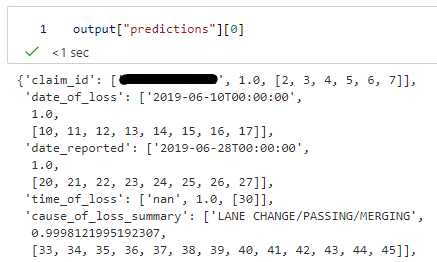 So I entered token_indexes w.r.t `date_of_loss` ```python decoder_cross_attentions = output["attentions"]["cross_attentions"] token_indexes...
> I make it done by drag the wb.py from ultralytics 8.0.0, and fix a little bug. here is how we can use the wandb in ultralytics. > > ```python...
Here's an output for the same repo when used on a CPU VM ```shell Dataset imagefolder downloaded and prepared to /home/azureuser/.cache/huggingface/datasets/imagefolder/dataset-1000-e58f8c769205d01c/0.0.0/37fbb85cc714a338bea574ac6c7d0b5be5aff46c1862c1989b20e0771199e93f. Subsequent calls will reuse this data. Dataset({ features: ['image',...
> I think the best option would be to to add some new special tokens ( , as an example) and define your own output structure that you can parse...