

 clovaai
Add bounding boxes coordinates in predictions
It could be useful to get bounding boxes coordinates from Document Information Extraction task predictions.
on conventional pipeline :

on Donut it could be something like:
{
    'predictions': [{
        'menu': [{
                'cnt': '2',
                'nm': 'ICE BLAOKCOFFE',
                'price': '82,000',
                'bbox': [xmin, ymin, xmax, ymax]
            },
            {
                'cnt': '1',
                'nm': 'AVOCADO COFFEE',
                'price': '61,000',
                'bbox': [xmin, ymin, xmax, ymax]
            },
        ],
        'total': {
            'cashprice': '200,000',
            'changeprice': '25,400',
            'total_price': '174,600',
            'bbox': [xmin, ymin, xmax, ymax]
        }
    }]
}
possible solution (I did not succeed): https://github.com/clovaai/donut/issues/16#issuecomment-1217464215

I come from #16 and I think that the way mentioned there could be a huge step towards this issue but sadly the issue has been closed. @gwkrsrch is there any chance you can share the code used to transform the outputs from https://github.com/clovaai/donut/blob/1.0.5/donut/model.py#L492 to the heatmaps shown on figure 8 of the paper? that would be incredibly helpful.
thanks! :)


So, I've found a way to generate the heatmaps from the cross attentions from the decoder. However, the attention maps correspond to each output token from the decoder and not necessarily a word i.e. the word Restaurant might consist of three tokens (Res + tau + rant) and the attention-heatmaps are very coarse and might not give precise boxes as shown in the example.
Additionally, you need to get the correspondence between the token values and the token indices and have to snoop in the transformers library Bart batch decode implementations for that.
In the example above, I've fused the attention heads, the layer heads, and the different token heatmaps with max fusion. And run a threshold on the attention areas, contour them and save the bounding-box with the largest area. Maybe someone can find a way to generate better heat maps.
I'll attach the link to the notebook I used to generate the maps. If people are interested in the code to get the token indexes to token values mapping, I can attach a modified donut/model.py as well.
https://colab.research.google.com/drive/1OzRapy23W8Ksf0AtqlkLFaVAAjJRUqbk?usp=sharing

@SamSamhuns thanks for sharing the colab
can we draw boxes on <s_docvqa> ?

It should work for docvqa as well. I've added an example in the notebook I shared above based on the code snippet below. The attention is focused on the answer from the image. But the bounding boxes from the attention maps are not very precise
question = "What is the total?"
img_path = "image.jpg"

task_prompt = f"<s_docvqa><s_question>{question}</s_question><s_answer>"
image = Image.open(img_path).convert("RGB")
output = model.inference(image=image, prompt=task_prompt, return_attentions=True)

# output["predictions"] = [{'question': 'What is the total?', 'answer': '96,000'}]

I am getting shape error and I am using the naver-clova-ix/donut-base-finetuned-docvqa model
when i ran
import torch
from PIL import Image
from donut import DonutModel

from pprint import pprint as pp


model = DonutModel.from_pretrained(
    "naver-clova-ix/donut-base-finetuned-docvqa")

if torch.cuda.is_available():
    model.half()
    device = torch.device("cuda")
    model.to(device)
else:
    model.encoder.to(torch.bfloat16)
model.eval()

question = "What is the total?"
img_path = "image.jpg"

task_prompt = f"<s_docvqa><s_question>{question}</s_question><s_answer>"
image = Image.open(img_path).convert("RGB")
output = model.inference(image=image, prompt=task_prompt, return_attentions=True)
rest of the bonding box code
and after that this shape error
RuntimeError: shape '[4, 16, 40, 30]' is invalid for input of size 307200
Refer to the Document VQA Example section from this notebook. You have to use a resized shape of [4, 16, 80, 60] for docvqa task since the final cross-attention feature map sizes differ from the document extraction task.
https://colab.research.google.com/drive/1OzRapy23W8Ksf0AtqlkLFaVAAjJRUqbk?usp=sharing
@SamSamhuns thanks for sharing this notebook its working as expected but when giving different images for example
image size (919, 998)
output["predictions"] = [{'question': 'What is the Name?', 'answer': 'nice client'}]
the output of the heatmap showing on address not on the name.
I tried to change image resolution in the colab by using image =image.resize((960,1280))
This image is without resize
 with resized image
 maybe you can add this resize code in colab
my question is how can we get multiple answers for example in the above image there are two Names From Name, To Name
Expected output [{'question': 'What is the Name?', 'answer': 'nice client', 'answer': 'Terlici Ltd.'}] or something similar
Hello @SamSamhuns Can i use your code to get multiple answers as mention above
From Name, To Name
Expected output [{'question': 'What is the Name?', 'answer': 'nice client', 'answer': 'Terlici Ltd.'}]
I tried the same on one of my use cases
input image:

some part of my JSON:
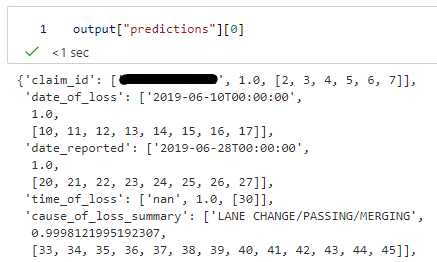
So I entered token_indexes w.r.t date_of_loss
decoder_cross_attentions = output["attentions"]["cross_attentions"]
token_indexes = [10, 11, 12, 13, 14, 15, 16, 17]
Using the code provided in the colab I got the following:

so even though I am getting correct output in the JSON, the position of the heatmap doesn't match with the position of the date present in the image
Same thing happens with other keys as well
e.g. cause of loss
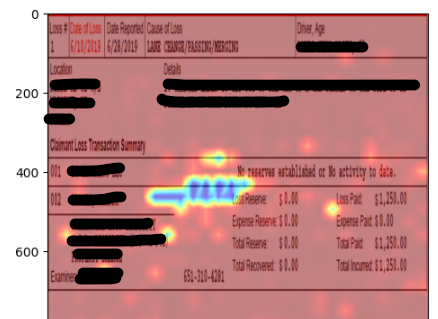
so is there anything which I am missing?

Maybe try some other saliency and feature map displaying methods from this repo https://github.com/jacobgil/pytorch-grad-cam
@SamSamhuns How do you use grad-cam to get donut bounding boxes, meaning what's the target layer? The cross attentions ?


@ariefwijaya you can find it in my fork of the repo https://github.com/SamSamhuns/donut
@ariefwijaya you can find it in my fork of the repo https://github.com/SamSamhuns/donut
@SamSamhuns Just found and tried the model_custom.py , but I got this error, is there something I missed?
  File "/Library/Frameworks/Python.framework/Versions/3.9/lib/python3.9/site-packages/transformers/modeling_utils.py", line 1105, in _init_weights
    raise NotImplementedError(f"Make sure `_init_weights` is implemented for {self.__class__}")
NotImplementedError: Make sure `_init_weights` is implemented for <class 'donut.donut.model_custom.DonutModel'>
I'm using timm==0.5.4 and transformers==4.25.1,
I tried the same on one of my use cases input image:
some part of my JSON:
So I entered token_indexes w.r.t
date_of_lossdecoder_cross_attentions = output["attentions"]["cross_attentions"] token_indexes = [10, 11, 12, 13, 14, 15, 16, 17]Using the code provided in the colab I got the following:
so even though I am getting correct output in the JSON, the position of the heatmap doesn't match with the position of the date present in the image Same thing happens with other keys as well e.g. cause of loss
so is there anything which I am missing?
I got the same issue, did you find any solution for that. it would be really helpful

https://github.com/Unstructured-IO/unstructured-inference/blob/main/unstructured_inference/models/chipper.py#L415
See the get_bounding_box function

Has anyone considered or tried training the Donut model with bounding box information included in the json? Would there be any reason why this approach cannot work given this model's architecture? If I'm not wrong the Swin trasformer used by Donut for the vision encoding half is capable of object detection and so should be encoding the location information as well.

Has anyone considered or tried training the Donut model with bounding box information included in the json? Would there be any reason why this approach cannot work given this model's architecture? If I'm not wrong the Swin trasformer used by Donut for the vision encoding half is capable of object detection and so should be encoding the location information as well.
This person (link below) has attempted just that, very interesting, however the results were not satisfying : https://github.com/ivelin/donut_ui_refexp?tab=readme-ov-file

@y-gs I would recommend this work (https://openreview.net/pdf?id=3wReeptY6X). This work was done a year ago and will appear in NAACL 2024. The model will be released by May 1st.

So, I've found a way to generate the heatmaps from the cross attentions from the decoder. However, the attention maps correspond to each output token from the decoder and not necessarily a word i.e. the word Restaurant might consist of three tokens (Res + tau + rant) and the attention-heatmaps are very coarse and might not give precise boxes as shown in the example.
@SamSamhuns Thank you for sharing your code with us. It really is a great way to visualize the cross attention.
This maybe a very beginner level issue, but I am getting this error when I tried to load a custom fine-tuned and locally saved model checkpoint:
NotImplementedError: Make sure '_init_weights' is implemented for <class 'donut.model_custom.DonutModel'>
I tried the proposed solutions at issue #184 but they didn't work me. If you have any ideas on how to resolve this issue, it'll be a big help.
My code is as follows:
import torch
from PIL import Image
from donut import DonutModelCustom #removed DonutModel as it is not used
from pprint import pprint

model = DonutModelCustom.from_pretrained("local-directory")

if torch.cuda.is_available():
    model.half()
    device = torch.device("cuda")
    model.to(device)

model.eval()

Hello, it has been a long time since I have worked with the custom fork of the Donut model if you are using that and many things might be out of sync. Unfortunately due to a lack of time on my part, I will be unable to help any time soon. Hope you resolve the issue.

@Flashness123 Hi, I think this repo https://github.com/Veason-silverbullet/ViTLP could help you.
@Veason-silverbullet Thank you, but I have developped a big finetuned donut model for extracting information from custom documents. Unfortunately the VisionEncoderDecoder is not good at ouputting any numbers. Does anyone know why? Is it because of the OCR free handshake between the encoder and decoder? Now I want to have a heatmap and extract these found but wrongly read Numbers seperately to an OCR
@SamSamhuns Thank you for your reply. I understand that the custom fork was created quite a while ago. Appreciate your work on the concept.
@Flashness123 I still haven't found any solutions but I'm starting to suspect that it's failing because my finetuned model is based on the HuggingFace implementation (VisionEncoderDecoderModel from the Transformers library). I wonder if it'll work if the finetuned model is based on the implementation by the Donut developer team.
May I ask if your finetuned model is also based on the HuggingFace implementation?