
echarts
 echarts copied to clipboard
 apache
Apache ECharts is a powerful, interactive charting and data visualization library for browser

### Version 5.2.2 ### Link to Minimal Reproduction _No response_ ### Steps to Reproduce add more lines for treemap label ### Current Behavior ### Expected Behavior the out of range...

### What problem does this feature solve? when convertToPixel function when passed along with series name , we could not get the pixel coordinates values in radar chart for example...

- [ ] I am using English in this issue. 在这个 Issue 中我使用了英文(强烈建议)。 ## General Questions - [x] Required: I have read the document and examples and tried to solve...

## Brief Information This pull request is in the type of: - [x] bug fixing - [ ] new feature - [ ] others ### What does this PR do?...

## Brief Information This pull request is in the type of: - [ ] bug fixing - [x] new feature - [ ] others ### What does this PR do?...
### What problem does this feature solve? 叶子节点太多会导致图变得非常高。所以能不能默认让叶子节点共享同一条边,让一条边对应的所有叶子节点挨个排在一起,节省空间 ### What does the proposed API look like? 增加一个属性shareEdge来控制叶子节点的显示。

### Version 4.8.0 ### Link to Minimal Reproduction _No response_ ### Steps to Reproduce The Official documents says, "Callback is supported since 4.8.0 ." BUT I test it doesn't work!...

### What problem does this feature solve? formatter中使用rich,只能先在rich中定义好富文本对象,再在formatter中去使用(比如'{a|这段文本能使用a样式}')。 希望能在formatter中使用一个计算出来的样式对象,比如 '{a|这段文本能使用a样式}' 这个a不再是预定义在rich中的对象,而是可以在formatter函数中定义的一个对象。这样在使用一些动态的字体颜色、背景色等会方便很多 ### What does the proposed API look like? 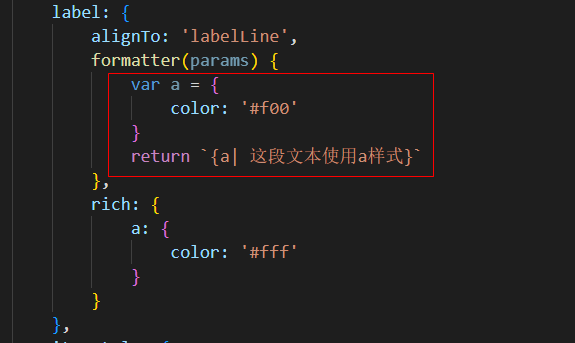 这是我想象中的样子。当formatter中没有定义a时,就使用rich中的a

### One-line summary [问题简述] 雷达图 radar rich 无效 ### 使用svg渲染情况下无效,canvas是正常的 ``` var myChart = echarts.init(document.querySelector('#main'), null, {renderer: 'svg'}); ```   ### Version & Environment [版本及环境] + ECharts version [4.x、3.8.5都不行]:...

### Version 5.5.0 ### Link to Minimal Reproduction https://echarts.apache.org/examples/zh/editor.html?code=PYBwLglsB2AEC8sDeAoWtJgDYFMBcsA2musiaRjgB5gEDkAshAMYAWOWAzjALQPAAnXAE9YAUSogcAiAFsc0MHQA05UrgBmtWHWYKw0umoC-qiqgroDNegFcQUgQQCKAZlgBqWAEYAdAFZYACpYAElnACVYAB1oLGAAd2kXb1geHwDgsMiVNXQAI0EAE2kAYWB4px0AYgBOetzLWEKBEoEAdQgisFYCbzNLazAAZTBhXAILJtgNGDB2nAgAc1ZtOmhBWQBDLEbp2cVhiAAvfB8AFgGmrAhoHAAJRZXtACYABjzYU0_NNe83gCkewoYFA9FqgKMFGMJAAugMilswFtODhtMRzJ8APRY2AgARoyDSHjLDYEz7cWwCPQEDHTel09BvK6wZlqNkUDmkLlMlk81l8wVqADsLNFIpZLxeYpQsM-TTl0JZUxBAi20E4swEskm8owwik9EKkniShZFGYMA0y0msAgBlkADktvIAGKbJEGKp0aj45AANx2thwxjoX0-MKVahVpA0AmAsgAIkiUWjQtASlQ-uaZvHZAAVNUarWyCI4Ti2LDabwmOEDUEVSAgXWq5ZLZI6e04WTA2BbKgQTgABWAty9LcGBrOdE4rC2RUSUNI3woJc90gAFCAtmrZJwAJRkJqWjUVHC-eJLLc7l0H2voFewJYyIoT9C_ej_IEsmTPT-QllCjAUEdR0bx_CBEhHyoABBAdODffVDR0ZgkRwJZBGEXtClsDMd2EABxLZmwwARgxZaAXRwIiSNcflOBAG4wBggktkQ9BZ0SAgNB2VETBZBimIAGVuM4Yw41guJmXicHvL4BmEODB0QsZkLoQMsGDXtKPkegAGtZCxThYFkW5bGMl56mUN4bN7QT7RYnA2KPSxOISAgwDI2ToSggZURkctaWjT4dOnY1GOAM1PlUsLgBNSLe3QRFkVRMB00zPo5LlYwAG4gA ### Steps to Reproduce 观察图中的数据 ### Current Behavior [ 0, 0, 0, 0, 0, 0, 0, 0, 0, 0, 7, 7,...
