
Universal_Robots_ROS_Driver
 Universal_Robots_ROS_Driver copied to clipboard
 UniversalRobots
Cannot connect to UR5e via ROS Noetic
Summary
Your issue may already be reported! Please search on the issue track before creating one.
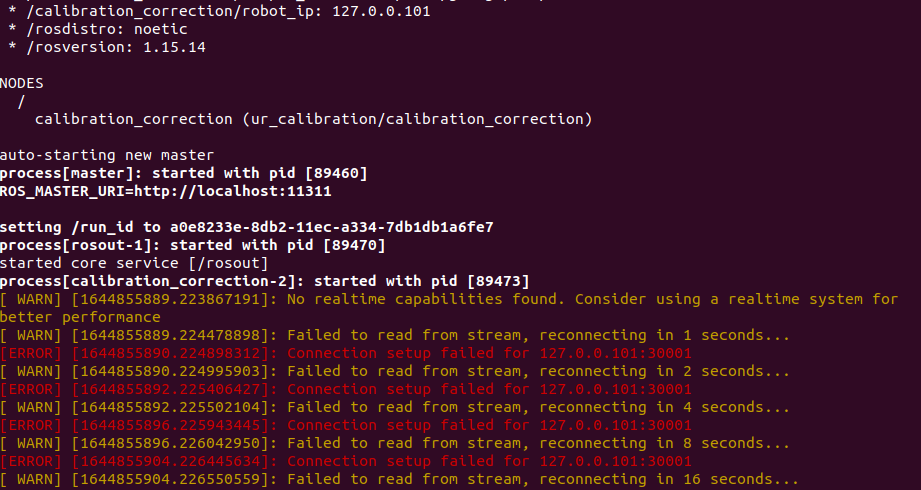
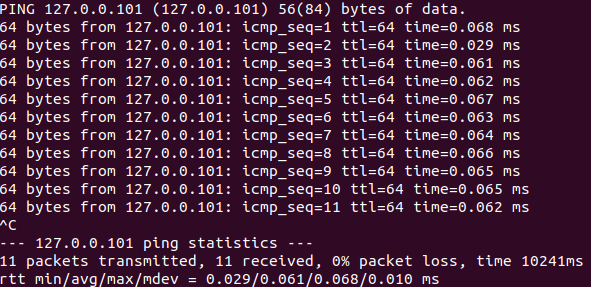
I cannot connect to UR5e through the roslaunch ur_calibration calibration_correction.launch robot_ip:=127.0.0.101 target_filename:="${HOME}/UR5/my_robot_calibration.yaml" command, although I can successfully ping the same IP address.
Versions
- ROS Driver version:
- Affected Robot Software Version(s):
- Affected Robot Hardware Version(s):
- Robot Serial Number:
- UR+ product(s) installed:
- URCaps Software version(s):
Impact & Issue details
I cannot control the UR5 with my computer. So far, I have followed step-by-step the instructions as listed here https://github.com/UniversalRobots/Universal_Robots_ROS_Driver (binary package installation). I have also manually set-up the robot IP address and subnet mask, following whatever relevant instructions I could find online as well as in the relevant issues. I think I may be missing something really basic, because it really is a fresh robot and a fresh installation of everything, but this issue has already been bothering me for many hours.

127.0.0.101 would fall in the loopback range, which is a range of IP addresses which always points to the local computer (or: the local network card on which the TCP/IP stack is configured).
You cannot use it to communicate with another host, not even if that host is on the same network and has configured 127.0.0.101 as its IP (as on that host, 127.0.0.101 would point to that host, ie: itself).
I can successfully ping the same IP address.
that would make sense, as you're essentially pinging yourself.
For ICMP echo that's OK.
But the driver will really want to 'talk' to a UR controller, and it can't, as it's trying to connect to your own PC, which will not be listening on the correct TCP ports (and is also not a UR controller).
I have also manually set-up the robot IP address and subnet mask, following whatever relevant instructions I could find online as well as in the relevant issues.
you should pick a different IP address.
If you have no existing network infrastructure, something from the 10.x.y.z range could work, or 192.168.x.y.

This issue has not been updated for a long time. If no further updates are added, this will be closed automatically. Comment on the issue to prevent automatic closing.
![github-actions[bot] avatar](https://avatars.githubusercontent.com/in/15368?v=4 "Published by a pub.dev verified publisher")
This issue has been closed due to inactivity. Feel free to comment or reopen if this is still relevant.