
Ahmad Kholid



Ahmad Kholid
I think it might be a bug if you're using the "on a specific day" option
> This is still a very serious issue @Kholid060 . I tested and my workflow executed at around 12;00:59 when I expected it at 12:00:00. > > Also: > >...
I will try to add this feature in the next update
If you select the `[all columns]`, it will automatically delete all the rows of the table 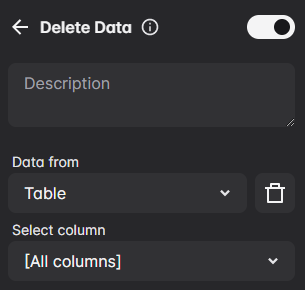
Check the workflow log to see if there's an error or not, and try `.textarea-container > #textarea` as the selector in the forms block. Or you can import this workflow...
Currently, I only rely on the workflow that I created to test the extension and I'm not used to including unit tests in my project. But I'll add unit tests...
Can you take a screenshot of the dev tools (right-click at the element and click inspect)
Try use this xpath `.//td[text()="Capscreen_Pushmsg单图"]/following-sibling::td[3]/div/div/*/button`
The **Take screenshot** block only output base64
> the local backup in settings may support storage tables & variables. > > If you can go a step further, support the entire automa configuration (including workflow, storage, settings)...