
notepad4
 notepad4 copied to clipboard
 zufuliu
Notepad4 (Notepad2⨯2, Notepad2++) is a light-weight Scintilla based text editor for Windows with syntax highlighting, code folding, auto-completion and API list for many programming languages and docu...

Hello! Please add multi-tag function, this function is very useful. is this okay? Thanks!

Hi, Release : v4.22.05r4220 (same with last) I have an issue with a feature. I can not comment lines and/or block. CTRL+/ does nothing > When I put the cursor...

Hi, first, thanks for the better notepad2 version on the market, i was expecting for so long the ability to code fold by level. I have an issue with my...

This is probably the most popular language for hardware designers and it is a super set of Verilog HDL language. Could you add the support? Really thank you. 😀

How to turn off automatic completion of brackets?

在许多阅读时都需要用到txt格式,但不论是英文、汉字,在调整段落格式 首行缩进2个字符 时,都没有什么好的办法 Tab增加缩进是选中的所有内容全部缩进;shift+Tab减少缩进是取消所有的缩进,包括首行缩进2个字符 不清楚是否有什么方法可以实现首行缩进,如果没有,请求 “在 编辑-选中文本” ,增加 “首行缩进字符” 的功能、及相应的快捷键 自动保存 如果可以,希望不仅仅是在系统休眠、关机时可以自动保存,进一步还可以在在输入完内容后立即自动保存

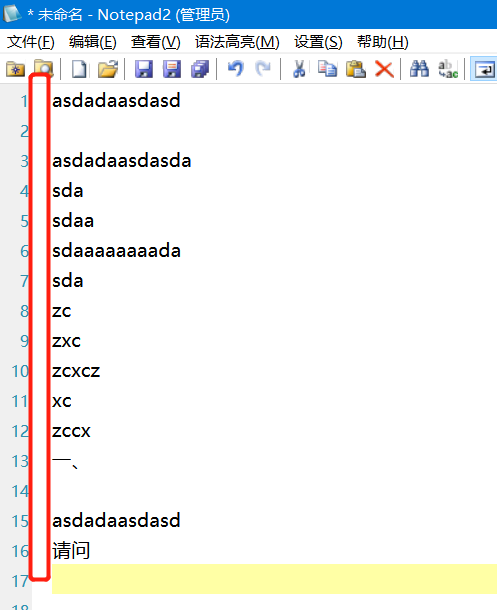 ver:4.22.05 r4220 如图所示,开启显示代码折叠功能后,在纯文本中,每行行首会有留白,这个其实对纯文本没有任何意义,甚至会造成“行首有空格没有删干净”的错觉。


It seems that case insensitive search with regex option enabled works only with ASCII characters. For example, if you enter the following text into a document: "Ä, Ö, Ü on...

1. 请求修改默认切换折叠功能(即,点击切换折叠功能) 目前的 默认切换折叠功能 是折叠/展开 级别1+级别2,其实一般都用不到,希望修改为折叠/展开 当前光标所在行 的级别(即,当前级别),或者展开所有级别(一劳永逸) 2. 在状态栏增加显示。在已经折叠的情况下,显示当前界面(仅折叠行/折叠行+其它)选中的文本等的个数、折叠行数、所有行数 借用 替换 功能,很多时候都需要筛选、修改 特定级别的文本等。在已经折叠的情况下,显示当前界面(仅折叠行/折叠行+其它)选中的文本等的个数、折叠行数、所有行数,之后个数与行数对照,可以确定筛选是否正确,不需要在界面每行查看,大大提高做事效率