




一丝
这两个字体用来测试 COLR 格式字体,其中 COLRv1 在 Chrome 中属于实验性支持。 - COLRv0 字体预览地址:https://at.alicdn.com/t/project/2445412/cb63aaf9-3da6-48ff-bf5d-bbd521afd711.html - COLRv1 预览: 
This helps us to debug and understand the specific path of the font in the system. Like resvg `--list-fonts` flag output(Mac): ```shell /Users/username/Library/Fonts/HarmonyOS_Sans_Thin.ttf: 'HarmonyOS Sans', 0, Normal, 250, Normal /Users/username/Library/Fonts/SourceHanSansSC-Normal.otf:...

For example, I have the following SVG, hoping to convert the text into a ``, and generate the corresponding SVG string. resvg can get the correct result: https://github.com/RazrFalcon/resvg/issues/364 ```svg abc12345640123456723456789010111213141516171819202122232425262728293031323334353637383940123456789010111213141516171819202122232425262728293031323334353637383940xyz...
We need to test text in different directions, such as Arabic.
https://groups.google.com/a/chromium.org/g/blink-dev/c/bEgFQrTsDso - [x] RoundRect [skia-python](https://kyamagu.github.io/skia-python/reference/skia.Canvas.html?highlight=drawrrect#skia.Canvas.drawRRect) ```js const canvas = document.createElement('canvas'); const ctx = canvas.getContext('2d'); ctx.fillRoundRect(10, 10, 50, 50, [10]); // Chrome 中当前实现是 ctx.roundRect() ctx.fillRoundRect(100, 10, 50, 50, [10, 10, 0,...
Now that we have supported COLRv0 color fonts, we can consider implementing COLRv1 fonts with gradients. Skia CL: https://skia-review.googlesource.com/c/skia/+/300558 CanvasKit Demo: https://jsfiddle.skia.org/canvaskit/48c67bde53f66a2f1e578e14b88a85bd062fdcf80c143c5eb92071233d4d86ae COLRv1 test font: http://a1.alicdn.com/alp_large_file/lt5b2.ttf font family: iconfont text:...
```html ``` To ```html ``` This is useful for font tools, e.g. https://github.com/googlefonts/picosvg/pull/60
svg2png has not been maintained for a long time, have you considered using [resvg-js](https://github.com/yisibl/resvg-js) instead of svg2png? resvg-js is almost the fastest and most compatible SVG library. In some scenarios,`resvg-js`...
## iOS ### 首字母自动大写`autocapitalize` 在 iOS 中,用户可以手动开启「首字母自动大写」功能,这样输入英文的时候,首字母便会自动大写。但是,有些时候并不希望一直是首字母大写的。比如用户名这个字段,如果字段本身就是区分大小写的,首字母自动大写往往会给用户带来麻烦。可以通过在表单元素上可以通过设置`autocapitalize="off"`来关闭。 ``` html ``` 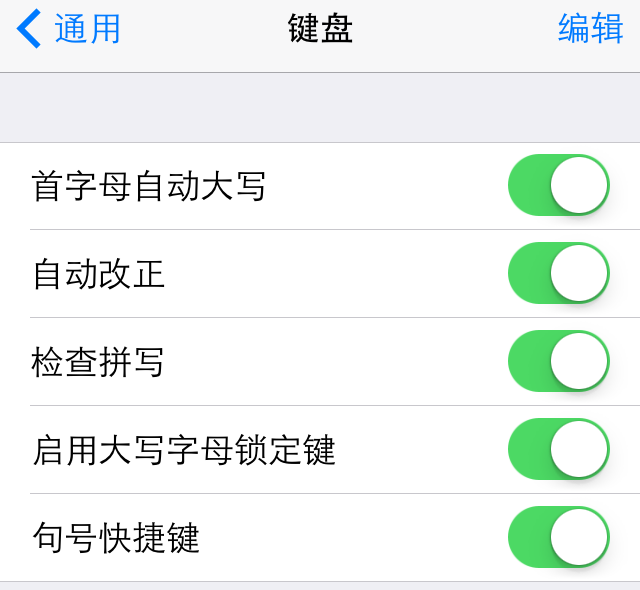 在**设置→通用→键盘**中开启「首字母自动大写」  还可以在`form`元素上设置该属性,让里面的每个元素都继承`autocapitalize`的设置。 ``` html ``` iOS 5 开始新增了很多关键字: - `none`等同于`off`。 - 当设置了`autocapitalize="words"`时,每个单词的开头字母会自动大写。 - 当设置了`autocapitalize="characters"` 时,每个字母都会大写。 - 当设置了`autocapitalize="sentences"`...
曾几何时,我们已经不再手写 HTML 标签。Emmet、Markdown 等工具让我们「健步如飞」,但是我们真的了解这些标签了吗?本文着重介绍一些我们容易忽视和用错的头部标签,特别是 iOS 等针对移动设备的一些标签。这是一篇非常基础的标签索引,其中 iOS 设备部分对设计师也有参考作用。 如果是快速开发,可以直接到 Gist 复制代码:https://gist.github.com/yisibl/7985401 以下是正文部分: ## 基本标签 - 使用 HTML5 doctype,不区分大小写。 ``` html ``` - 声明文档使用的字符编码 ``` html ``` - 更加标准的 lang 属性写法...