

 vitest-dev
infinitely running test with no answer
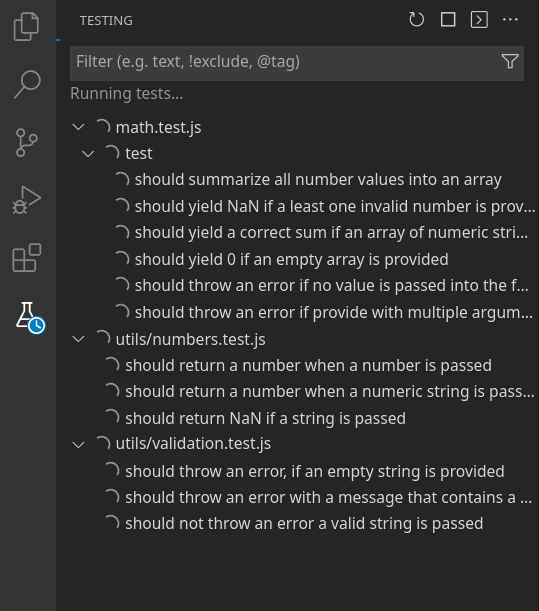
Describe the bug Vitest extension in linux OS, runs test infinitely and does not return any answer.
To Reproduce
- Installed Vitest extension
- Clicked on run all test
Expected behavior I expected to return test results but it keeps running.
Screenshots
Environment
- OS: Linux, Manjaro
- VSCode version: 1.68.1
- Vitest version: 0.22.1
- Vitest plugin version: 0.2.24 Release


can confirm.
Pnpm monorepo with nx
linux debian
CLI:
Root package.json
vitest: nx vitest
Project specific vitest: vitest --coverage
Cli passes all and stays in watch mode in dev
all tests from the extension loop indefinetly
Latest versions of vitest and vitest ext at the time of this comment

Are you sure the internal API connection is started? This may happen with wrong configuration when the --api argument doesn't attach to vitest but to another command.
Go to the Output tab of VSCode, filter it by Vitest and check where the --api argument goes.
Good output for vitest.commandLine configurations:
// Normal for single project structure  (it may start with `npx` in order to find vitest in node_modules)
vitest [file] --api [port]

// Normal for monorepo setup
// attaching `--api` to `vitest` by using `--` to end passing arguments to the previous command
[command: e.g. npm/yarn/nx etc.] -- vitest [file] --api [port]
Bad output for vitest.commandLine configurations:
// Wrongly adding unneeded `run`, would result in "Test result not found" error
vitest run [file] --api [port]

// Missing `--` before vitest, the `--api` argument goes to the command and not to vitest
[command] vitest [file] --api [port]

Are you sure the internal API connection is started? This may happen with wrong configuration when the
--apiargument doesn't attach tovitestbut to another command.Go to the
Outputtab of VSCode, filter it by Vitest and check where the--apiargument goes.Good output for
vitest.commandLineconfigurations:// Normal for single project structure (it may start with `npx` in order to find vitest in node_modules) vitest [file] --api [port] // Normal for monorepo setup // attaching `--api` to `vitest` by using `--` to end passing arguments to the previous command [command: e.g. npm/yarn/nx etc.] -- vitest [file] --api [port]Bad output for
vitest.commandLineconfigurations:// Wrongly adding unneeded `run`, would result in "Test result not found" error vitest run [file] --api [port] // Missing `--` before vitest, the `--api` argument goes to the command and not to vitest [command] vitest [file] --api [port]
In my case I'm confident this wasn't the issue, vitest would start and console.log that its listening on the designated port etc.

@Pustinyak have you used pnpm with any of your testing? I saw your comment in #47 and saw many of the issues being had here are with package managers other than npm.
I know it shouldn't matter, but I've gotten my tests to filter properly by following your advice to change to pnpm test --; however my tests still spin and spin like the API results aren't getting published even in watch mode.
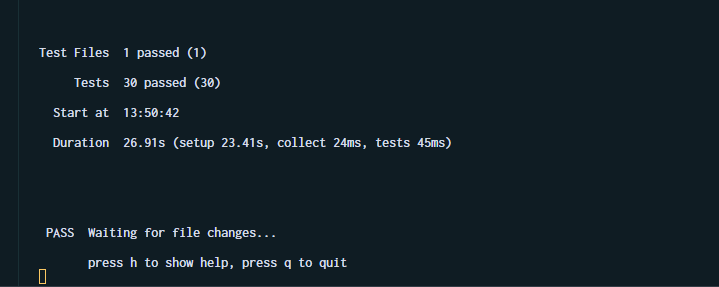


I'm iterating this and the '--api' thing is definitely an issue, as it doesn't get appended at all for most of my configuration attempts. I'm using pnpm and was trying to do it in a monorepo but simplied to a non-mono repo bare bones test vite app.
What I've noticed is that the only way I can get the --api suffix on the vite commands is as follows:
pnpm test --
where in my package.json:
"scripts": {
  "test": "vitest",
}
However this get's misparsed (windows):
vitest "D:/vite-project/src/tests/tests.spec.ts" "--api" "60092"
Note the additional quotes added, and I get the infinite spinners. I can also get the infinite spinners in many other ways which also run the tests which say they pass, but the plugin doesn't seem to get the results. I do see tonnes of WS closed spam in the window though which I don't in OSX.
FWIW on my Mac I can run the plugin fine in a pnpm monorepo without even setting the command line at all, and I don't see any output with --api involved which is now making me a bit suspicious about the above stuff. In fact it has always just worked on OSX.

Not sure if this is important but I notice in my pnpm workspace that the current working directory is different on osx (works) vs windows (fails):
OSX: [RUN.cwd] /Users/dan/Dev/app/web
Windows: [RUN.cwd] /Users/dan/Dev/app
Same issue running inside a devcontainer + workspace
I tried a whole bunch of vitest.commandLine settings including:
yarn vitest
npx vitest
yarn test:vitest
yarn test:vitest --
API seems to always start up "Start api process at port 40561"
and when adding -- I get the following warning in the Vitest output:
"warning From Yarn 1.0 onwards, scripts don't require "--" for options to be forwarded. In a future version, any explicit "--" will be forwarded as-is to the scripts."
Example logs for both running vitest on the whole project and just one test
[INFO 12:45:03 PM] Vitest Workspace [Rails]: Vitest version = 0.22.1
[INFO 12:45:44 PM] Tests run start
[INFO 12:45:44 PM] [Workspace "Rails] Run tests from workspace
[INFO 12:45:44 PM] [Execute Vitest] yarn test:vitest /workspaces/rails/app/javascript/components/timeline/Timeline.spec.ts /workspaces/rails/app/javascript/PublicPlayer.spec.ts
[INFO 12:45:44 PM] Start api process at port 40561
[INFO 12:45:44 PM] [RUN] yarn test:vitest /workspaces/rails/app/javascript/components/timeline/Timeline.spec.ts /workspaces/rails/app/javascript/PublicPlayer.spec.ts
[INFO 12:45:44 PM] [RUN.cwd] /workspaces/rails
[INFO 12:45:44 PM] WS Close
...
[INFO 12:45:45 PM] WS Close
[INFO 12:45:45 PM] yarn run v1.22.19

$ yarn vitest /workspaces/rails/app/javascript/components/timeline/Timeline.spec.ts /workspaces/rails/app/javascript/PublicPlayer.spec.ts --api 40561

[INFO 12:45:45 PM] WS Close
...
[INFO 12:45:45 PM] WS Close
[INFO 12:45:45 PM] $ /workspaces/rails/node_modules/.bin/vitest /workspaces/rails/app/javascript/components/timeline/Timeline.spec.ts /workspaces/rails/app/javascript/PublicPlayer.spec.ts --api 40561

[INFO 12:45:45 PM] WS Close
...
[INFO 12:45:47 PM] WS Close
[INFO 12:45:47 PM]

 DEV  v0.22.1 /workspaces/rails

      API started at http://localhost:40561


[INFO 12:45:47 PM] WS Close
...
[INFO 12:45:53 PM] WS Close
[INFO 12:45:53 PM] stdout | app/javascript/PublicPlayer.spec.ts > PublicPlayer > Headless > API for Recording Job > has `videoRuntime` property which returns total runtime of actions

...


 ✓ app/javascript/PublicPlayer.spec.ts  (3 tests) 191ms

stderr | unknown test

...


[INFO 12:45:53 PM] WS Close
...
[INFO 12:45:53 PM] WS Close
[INFO 12:45:53 PM]  ✓ app/javascript/components/timeline/Timeline.spec.ts  (2 tests) 100ms


Test Files  2 passed (2)

     Tests  5 passed (5)

  Start at  12:45:46

  Duration  6.64s (transform 4.71s, setup 0ms, collect 6.51s, tests 291ms)


 PASS  Waiting for file changes...

       press h to show help, press q to quit

[INFO 12:45:53 PM] WS Close
...
[INFO 12:45:58 PM] WS Close
[INFO 12:46:45 PM] Tests run start
[INFO 12:46:45 PM] [Workspace "Rails] Run tests from workspace
[INFO 12:46:45 PM] [Execute Vitest] yarn test:vitest /workspaces/rails/app/javascript/components/timeline/Timeline.spec.ts -t Timeline selects two actions
[INFO 12:46:45 PM] Start api process at port 45301
[INFO 12:46:45 PM] [RUN] yarn test:vitest /workspaces/rails/app/javascript/components/timeline/Timeline.spec.ts -t Timeline selects two actions
[INFO 12:46:45 PM] [RUN.cwd] /workspaces/rails
[INFO 12:46:45 PM] WS Close
[INFO 12:46:45 PM] WS Close
...
[INFO 12:46:46 PM] WS Close
[INFO 12:46:46 PM] yarn run v1.22.19

$ yarn vitest /workspaces/rails/app/javascript/components/timeline/Timeline.spec.ts -t 'Timeline selects two actions' --api 45301

[INFO 12:46:46 PM] WS Close
[INFO 12:46:46 PM] WS Close
[INFO 12:46:46 PM] WS Close
[INFO 12:46:46 PM] WS Close
[INFO 12:46:46 PM] $ /workspaces/rails/node_modules/.bin/vitest /workspaces/rails/app/javascript/components/timeline/Timeline.spec.ts -t 'Timeline selects two actions' --api 45301

[INFO 12:46:46 PM] WS Close
[INFO 12:46:46 PM] WS Close
...
[INFO 12:46:47 PM] WS Close
[INFO 12:46:47 PM]

 DEV  v0.22.1 /workspaces/rails

      API started at http://localhost:45301


[INFO 12:46:48 PM] WS Close
...
[INFO 12:46:53 PM] WS Close
[INFO 12:46:54 PM]  ✓ app/javascript/components/timeline/Timeline.spec.ts  (2 tests | 1 skipped) 53ms


Test Files  1 passed (1)

     Tests  1 passed | 1 skipped (2)

  Start at  12:46:47

  Duration  6.16s (transform 4.12s, setup 0ms, collect 2.93s, tests 53ms)


 PASS  Waiting for file changes...

       press h to show help, press q to quit

[INFO 12:46:54 PM] WS Close
...
[INFO 12:46:59 PM] WS Close
I'm running vitest: 0.22.1 and extension v0.2.29


Same problem here with a new project.
OS: MacOS 12.5.1 VSCode version: 1.71.0 Vitest version: 0.23.1 Vitest plugin version: 0.2.29 Preview

Have the same issue as well, working in a multi-root VSCode workspace. I've tried variations of the command (npx vitest, pnpm test --, ... It's important to note that in the Vitest output I can (very quickly) see the tests execute and pass, but I then get spammed by 500 WS Close messages and the test UI is stuck at the spinner.
OS: MacOS 12.4 VSCode version: 1.71.2 Vitest version: 0.23.4 Vitest plugin version: 0.2.29 Preview

I found out that after starting VSCode, running the tests from the "Testing" tab leads to the problem that the result is never shown and the spinners keep going.
But if I click on "Vitest" in the status bar at the bottom of the VSCode window, it starts the tests and they finish. After that it works even from the "Testing" tab. This will also recover from an already hanging test run.
OS: MacOS 13.0.1 VSCode version: 1.73.1 Vitest version: 0.25.3 Vitest plugin version: 0.2.34 Preview

I found out that after starting VSCode, running the tests from the "Testing" tab leads to the problem that the result is never shown and the spinners keep going.
But if I click on "Vitest" in the status bar at the bottom of the VSCode window, it starts the tests and they finish. After that it works even from the "Testing" tab. This will also recover from an already hanging test run.
OS: MacOS 13.0.1 VSCode version: 1.73.1 Vitest version: 0.25.3 Vitest plugin version: 0.2.34 Preview
When clicking this button, I get a WS Opened message, which I do not see in the output at all before this.
Example of logs before the button click:
[INFO 10:27:33 AM] WS Close
[INFO 10:27:34 AM] RECONNECT
[INFO 10:27:34 AM] WS Close
[INFO 10:27:34 AM] RECONNECT
[INFO 10:27:34 AM] WS Close
[INFO 10:27:34 AM] RECONNECT
[INFO 10:27:34 AM] WS Close
[INFO 10:27:34 AM] RECONNECT
[INFO 10:27:34 AM] WS Close
[INFO 10:27:34 AM] RECONNECT
[INFO 10:27:34 AM] WS Close
[INFO 10:27:34 AM] RECONNECT
[INFO 10:27:34 AM] WS Close
[INFO 10:27:34 AM] RECONNECT
[INFO 10:27:34 AM] WS Close
[INFO 10:27:34 AM] RECONNECT
[INFO 10:27:34 AM] WS Close
[INFO 10:27:34 AM] RECONNECT
[INFO 10:27:34 AM] WS Close
[INFO 10:27:35 AM]

 DEV  v0.25.4 <code location>

      API started at http://127.0.0.1:61817

Same problem here:
- running tests inside devcontainer: not working
- running the same project locally: working

Same problem here:
- OS: Ubuntu 22.94
- VSCode version: 1.71.2
- Vitest version: 0.26.3
- Vite version: 3.1.8


I got rid of the spinner by installing jsdom, which was required for tests. It was indicated when I ran vitest in the console.

For me it was because vitest in vscode could reslove my custom set in my tsconfig.json, the CLI yarn test worked fine but vscode sidebar did not.
Oddly vitest doesnt offer any kind of hint that this was the issue.
...
resolve: {
    alias: {
      '@utils': resolve(__dirname, './src/utils'),
      '@test': resolve(__dirname, './test'),
      '@src': resolve(__dirname, './src'),
    },
  },
...
To match my tconfig
...
"paths": {
      "@test/*": ["../test/*"],
      "@utils/*": ["./utils/*"],
      "@src/*": ["./*"]
    }
...

I have a similar issue, if I copy everything from vite.config.ts to vitest.config.ts and replace import { defineConfig } from "vite"; with import { defineConfig } from "vitest/config"; it starts working.
FYI I'm using alias-hq to reduce duplication:
import hq from "alias-hq";
...
export default defineConfig({
  resolve: {
    // custom aliases, @components, @assets, etc.
    alias: [...hq.get("rollup", { format: "array" })],
  },
For me it was because vitest in vscode could reslove my custom set in my tsconfig.json, the CLI
yarn testworked fine but vscode sidebar did not.Oddly vitest doesnt offer any kind of hint that this was the issue.
...
resolve: {
    alias: {
      '@utils': resolve(__dirname, './src/utils'),
      '@test': resolve(__dirname, './test'),
      '@src': resolve(__dirname, './src'),
    },
  },
...
To match my tconfig
...
"paths": {
      "@test/*": ["../test/*"],
      "@utils/*": ["./utils/*"],
      "@src/*": ["./*"]
    }
...