
ReoGrid
 ReoGrid copied to clipboard
 unvell
Fast and powerful .NET spreadsheet component, support data format, freeze, outline, formula calculation, chart, script execution and etc. Compatible with Excel 2007 (.xlsx) format and working on .NET...



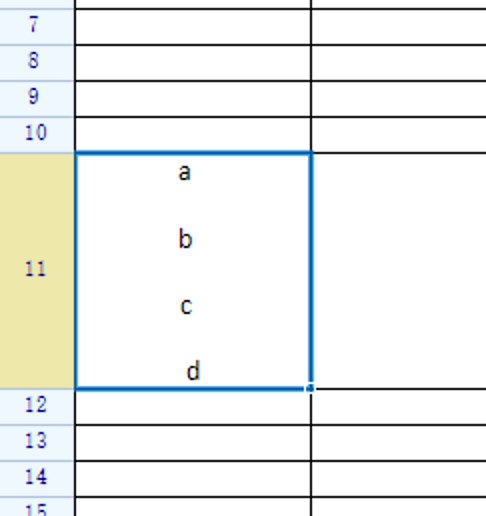 Hi Jing. Thanks for your work again. and there was an issue I found, as the above screent shot , When add line break with ctrl+enter ,the last character...

Hi - I'm running Reogrid v2.2.0 First, can I say how much I love the Reogrid control - it's become a central part of the application I'm developing. When a...

I did this with the WPF Demo in the source code for ReoGridWPF solution **Describe the bug** A clear and concise description of what the bug is. I opened an...

I created a grid with 70 sheets. I need a function to set a given sheet as a current sheet. The function I have developed works since I see the...

ReoGrid 2.0 (from reogrid.net). Windows Forms. Standard IDE: Visual Studio 2012. Visual Basic OS: WIndows 10 Brief: After Export to Excel do not work standard option "Format Cell" and problem...

**Describe the bug** The Worksheet.UsedRange property won't update when cells are deleted. **To Reproduce** Steps to reproduce the behavior: 1. Create brand new C# WPF .NET Framework project 2. MainWindow.xaml...

Drop-down boxes like this are used a lot. I hope you can increase your support. Thank you very much.

```cs OriginalExcelReogrid.Load(path, FileFormat.Excel2007); OriginalExcelReogrid.CurrentWorksheet.SetScale(0.7f); OriginalExcelReogrid.CurrentWorksheet.SetColumnsWidth(0, 1000, 120); OriginalExcelReogrid.CurrentWorksheet.SetRowsHeight(0, 1000, 30); OriginalPathHolder.Text = path; _selectedFile = path; CheckIfCanEnableConvert(); OriginalExcelReogrid.CurrentWorksheet.SelectionRangeChanged += (sender, args) => { _currentSelection = args.Range; }; ``` **Describe the...
First off thanks for your great control. I have tried two other free controls and I found yours was the only one robust enough to do what I wanted. I...
