
ReoGrid
 ReoGrid copied to clipboard
Published
20 hours ago •
 unvell
unvell
UsedRange won't update when Cell gets deleted
Describe the bug The Worksheet.UsedRange property won't update when cells are deleted.
To Reproduce Steps to reproduce the behavior:
- Create brand new C# WPF .NET Framework project
- MainWindow.xaml
<Window x:Class="TestReogrid.MainWindow"
        xmlns="http://schemas.microsoft.com/winfx/2006/xaml/presentation"
        xmlns:x="http://schemas.microsoft.com/winfx/2006/xaml"
        xmlns:d="http://schemas.microsoft.com/expression/blend/2008"
        xmlns:mc="http://schemas.openxmlformats.org/markup-compatibility/2006"
		xmlns:reoGrid="clr-namespace:unvell.ReoGrid;assembly=unvell.ReoGrid"
        xmlns:local="clr-namespace:TestReogrid"
        mc:Ignorable="d"
        Title="MainWindow" Height="450" Width="800">
    <Grid>
		<Grid.RowDefinitions>
			<RowDefinition Height="40"/>
			<RowDefinition Height="*"/>
		</Grid.RowDefinitions>


		<StackPanel Grid.Row="0" Orientation="Horizontal">
			<Button Width="100" Height="35" Margin="10 0" Click="Button_Click">UsedRange</Button>
		</StackPanel>

		<Grid Grid.Row="1">
			<reoGrid:ReoGridControl Name="grid"></reoGrid:ReoGridControl>
		</Grid>

	</Grid>
</Window>
- MainWindow.xaml.cs
using System.Windows;

namespace TestReogrid
{
	/// <summary>
	/// Interaction logic for MainWindow.xaml
	/// </summary>
	public partial class MainWindow : Window
	{
		public MainWindow()
		{
			InitializeComponent();
		}

		private void Button_Click(object sender, RoutedEventArgs e)
		{
			MessageBox.Show(grid.CurrentWorksheet.UsedRange.ToString());
		}
	}
}
-
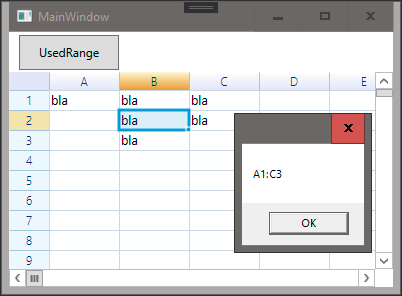
Run app + fill some cells. Display UsedRange. So far, so good:
-
Delete some cells and re-display UsedRange The result is incorrect.
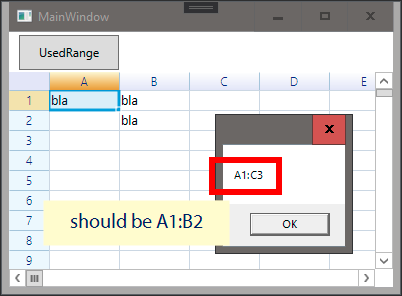
Expected behavior The UsedRange should gets updated when range gets deleted.
Edition Which edition of ReoGrid do you using?
- WPF v2.2.0 NuGet
Environment (please complete the following information):
- OS: Windows 10 Pro
- Language of OS: German
Additional context Or maybe I'm just doing it wrong... Please let me know.

