
thunder-client-support
 thunder-client-support copied to clipboard
 thunderclient
Can't access request data and resend the same request when random payload were used
Describe the bug I can't access request data and resend the same request when I use random payload via custom filter.
For example. I created custom filter for random payload generation in order to assess proper backend validation. However, after I got failed iteration and opened failed request, I can't find the data that was submitted, all I see is variable with filter definition.

If I tried to get Code Snippet of request, it will generate random payload everytime I click on it.
To Reproduce
- Use custom filter to generate random payload
async function fuzzFilter() {
    var _ = await tc.loadModule("underscore");
    var utf8 = await tc.loadModule("utf8");
    randomString = function (options) {
        var charCodes, charCodeLimit;

        options = options || {};
        charCodes = [];
        charCodeLimit = Math.pow(2, 16);

        _.times(_.random(options.maximumLength || 10), function () {
          charCodes.push(_.random(charCodeLimit));
        });

        return String.fromCharCode.apply(null, charCodes);
    };
    var res = randomString();
    return utf8.encode(res);
}
module.exports = [fuzzFilter];
- Run request with fuzzFilter for ex. in header
Expected behavior I can find exact request and resend it :)
Platform:
- OS: Windows 10 22H2
- vscode version: 1.74.1
- extension version: 2.2.0
Your Team Size Using TC: Just me

Thanks @onmywaytoheaven for reporting the bug,
just to clarify - the request you send is not saved in the sidebar?

I am running it from collection. In Thunder Client output I can see request headers for example, but it will be tough to find one when I run thousand iterations of the collection
so you want to see request details send in logs for a request that is executed from Run Collection right?
you can re-run that single request see in logs from Run collection view

Moreover, I find that sometimes custom filter is not working. For example,
function thisFilterDoesNotWork() {
    var charCodes = [
        2,
        118,
        178,
        149
    ]
    var resultedString = String.fromCharCode.apply(null, charCodes);
    console.log(resultedString);
    return resultedString;
}
If you will try to run the filter above, for ex, in header, your header will remain as {{@ | thisFilterDoesNotWork}}.
Thats because of charcode 2 in it. Deleting it will resolve a problem
so you want to see request details send in
logsfor a request that is executed from Run Collection right?you can re-run that single request see in logs from Run collection view
yes, I want to resend exactly the same request
when I have failed iteration and click on the failed request
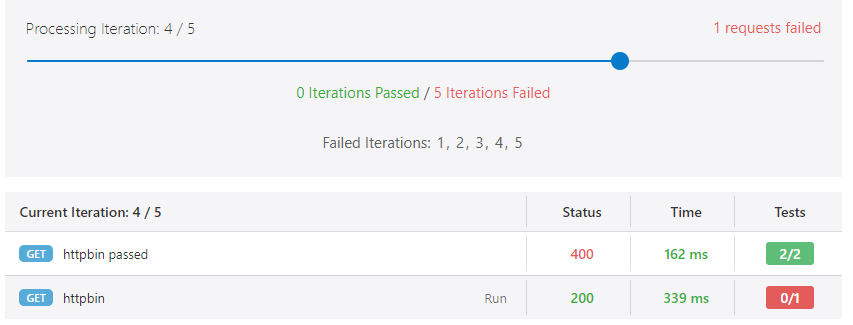 it will open it in a new tab
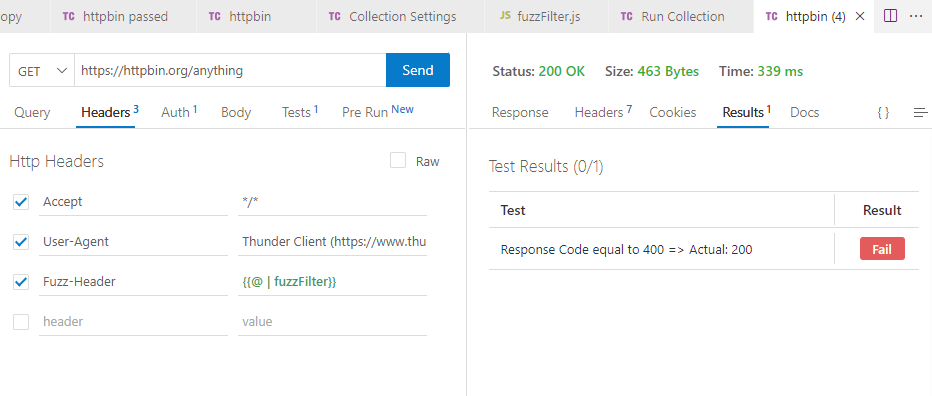 but I will not find exact request here, as you see, the value of Fuzz-Header is variable, not string
[added] and if I click on rerun, as you suggest, it will run filter again and the value of header will be not the same
Yes, its dynamic, but when your test is failed, you need the same request to validate it, right? I guess its a bit counterintuitive that when I click on Run on the failed request, I get other request and other results. My think that request can be accessed on the right pane, with response... And for ex. when you click on Run on the failed test, request should be populated with actual data, that were sended.
The purpose of dynamic value is to generate random value, and your tests needs to take this into account. When re-run a request it should still pass the all tests.
The solution you proposed will complicate things.
Yes, it should. But if request fails, I can't even know why, I can't send it again.
Well the Results tab will show why it failed and also you can re-send the request. both are possible as told the above.
Can you share screenshot your request and which tests failed?
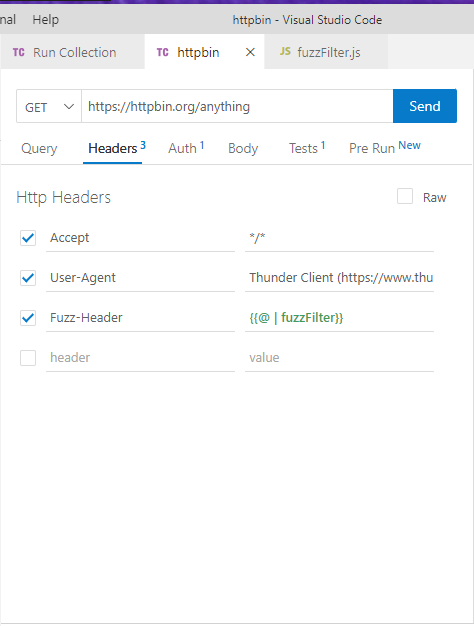
Well the
Resultstab will show why it failed and also you canre-sendthe request. both are possible as told the above.Can you share screenshot your request and which tests failed?
Its possible, but Results tab and rerunning the request would not help me to get the same result
from your screenshot, you know its failed because you 400 for responseCode, thats clear right?
Currently we dont save the dynamic values generated while sending request.
from your screenshot, you know its failed because you 400 for responseCode, thats clear right?
Currently we dont
savethe dynamic values generated while sending request.
Sure, I know the outcomes, but I don't know what was the cause. It will be great if you ever implement such feature 😊 Thank you for Thunder Client!
Sure will note your feedback, if we ever implement this feature will update here.
I look into the special characters issue your have with function - thisFilterDoesNotWork
Moreover, I find that sometimes custom filter is not working. For example,
function thisFilterDoesNotWork() {
    var charCodes = [
        2,
        118,
        178,
        149
    ]
    var resultedString = String.fromCharCode.apply(null, charCodes);
    console.log(resultedString);
    return resultedString;
}
If you will try to run the filter above, for ex, in header, your header will remain as
{{@ | thisFilterDoesNotWork}}. Thats because of charcode 2 in it. Deleting it will resolve a problem
You need to escape the resultedString for this to work. dont know how to escape this special char, try JSON.stringify