
thunder-client-support
 thunder-client-support copied to clipboard
 thunderclient
Does not save when using workspaces with remote files
Describe the bug It does not do anyhting when adding collections. We need to distribute the API tests with the project.
To Reproduce
Workspace is created using the plugin liveecommerce.vscode-remote-workspace
config file for the project test.code-workspace
{
    "folders": [
        {
            "uri": "ftps://user:pw@host/",
            "name": "FTP Folder"
        }
    ],
    "settings": {
        "thunder-client.loadFromProject": true,
        "thunder-client.workspaceRelativePath": "./FTP Folder/username/.vscode"
    }
}
Expected behavior it should work :)
Platform:
- OS: MacOS 11.6
- vscode version: 1.61.1
- extension version: v1.9.1
Solution: It probably relates to https://code.visualstudio.com/api/references/vscode-api#FileSystemProvider support is required

Hi @BananaAcid, I think the issue related to remote file paths,
please set this setting as mentioned in the below comment
https://github.com/rangav/thunder-client-support/issues/158#issuecomment-851058322

tried to add the mentioned config, thunder client does not save into the workspace ... it does nothing - just showing the user saved config. (2) loadFromProject=true still shows a blank tab when trying to add a request.
config file for the project test.code-workspace
{
    "folders": [
        {
            "uri": "ftps://user:pw@host/",
            "name": "FTP Folder"
        }
    ],
    "settings": {
        "remote.extensionKind": {
            "rangav.vscode-thunder-client": ["ui"]
        }
    }
}
(2) tried adding the loadFromProject=true
settings: {
        "thunder-client.loadFromProject": true,
        ... remote.extensionKind ...
and also tried it with "thunder-client.workspaceRelativePath": "./FTP Folder/username/.vscode" and any possible path I could think of ...
Any more ideas for me to try out to make it work with vscode's virtual workspaces spec?
Hi @BananaAcid remove workspace relative path setting, set it to empty and try
that path could be wrong
@rangav updated my previous code block to match my problem description more.
"remote.extensionKind" just does nothing, is there a special place to add it or write it within a .code-workspace file?
You need to add those settings to settings.json File located in .vscode Folder
https://code.visualstudio.com/docs/getstarted/settings
Settings needed
"thunder-client.loadFromProject"
"remote.extensionKind"
Seems like the settings.json does nothing when using workspaces, as it seems. It does something at least, as I mentioned above, but the thunder options pane stays blank. In case you got a working remote workspace, It would be wonderful to provide it here, so I can figure out the differences.
I dont have a remote workspace currently.
Can you share your settings.json values here and where its located?
https://code.visualstudio.com/docs/remote/ssh#_advanced-forcing-an-extension-to-run-locally-remotely
Does it work with local workspace?
For the settings values, please read the first and second post of mine. :)
I am not sure, what to do with the provided link - I am not sure how to help you with that. Do you have any specific info for me how to help?
the one your shared does not look like proper settings file, it should look like below
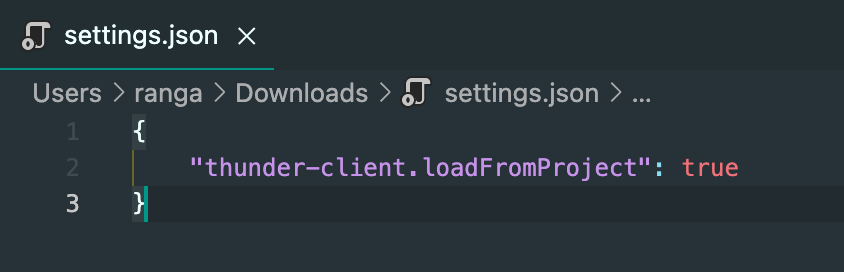
if you want you can do screenshare using zoom or any other tool, we can go through the steps
The settings key was some where in the docs for .code-workspace files.
It is pretty easy to try out, I will prepare a workspace file (with above config) with the remote workspace extension and a test FTP -
remote-space-test.code-workspace.txt
How to use:
- remove the
.txtext. - doubleclick or open in vscode, open VS-Code workspace
- click on add extensions on the lower right corner
- click on thunder client icon
- click on "New Request"
... and it opens a blank folder.
Note: the dlp server removes all ftp test data after 5 min.