
thunder-client-support
 thunder-client-support copied to clipboard
 thunderclient
Support scripting when setting variables
the current supported way to set variables is great and easy but allows only basic extraction of data from the response. it would be great to allow writing a small script for more advanced users like in postman. my use case, I'm authenticating to an external server which return a JWT that i would like to parse and extract certain values from the payload and set them as variables in the env, which are required for other requests.
Here how it is done in postman:
var jsonData = JSON.parse(responseBody);
if (jsonData && jsonData.data){
    postman.setEnvironmentVariable("token", jsonData.data.token);
    var parts = jsonData.data.token.split('.'); // header, payload, signature
    var payload = JSON.parse(atob(parts[1]));
    postman.setEnvironmentVariable("tenantID", payload.tenantId);
    postman.setEnvironmentVariable("clientID", payload.clientId);
}


I would go beyond postman approach and create a pre and post processor idea so you can do stuff before and after the request if you want.

Hi, I want to support this feature. I'm an SDET currently using Postman on daily basis. We maintain a collection with complex pre-requests and test scripts, so Thunder Client is a great option but very limited in that aspect. If it could have Newman support to use Postman lib and the pre and post-processing, it would be amazing.
Example of pre-request:
setTimeout(function(){
    console.info("Waiting 2000ms before making next request");
}, 2000)
One example of tests that we use after a request:
eval(globals.commonTests)();

pm.test("Verify offer is available", function () {
    const jsonData = pm.response.json();
        const userOffers= jsonData.payload.user_offers;

        const offer = userOffers.filter(offer => offer.id === pm.environment.get("user_offer_id"))[0];

        pm.expect(offer).to.exist;

        pm.test("Verify offer data is correct", function () {
            pm.expect(offer.offer_id).to.eql(pm.environment.get("offer_id"));
            pm.expect(offer.offer_type).to.eql("set_price");
    });
});

I'd like to +1 this feature as well. Here's an example of a post request "test" that I use all the time in Postman to get a session-id from the response to a login request and set it to a variable used by later requests ...
pm.test("Get User Session", function () {
    var jsonData = pm.response.json();
    pm.response.to.have.status(200);
    pm.response.to.be.json;
    pm.environment.set("session_id", jsonData["session_id"]);
});

Hi @schwab you can do that now, without scripting from the Tests tab
- use
Set env variableoption - For json query use
json.session_id
Full Details here https://github.com/rangav/thunder-client-support#setenv
I have a similar need. In my case the grant token for the OAUTH2 is in a 302 response header.location and I need some scripting capability to extract the grant token from the url in the header.location. In postman I have a script that loops thru the query parameters in the location url and sets the code from it as a global variable.
let location = pm.response.headers.get("location");
let locationParamStartIdx = location.indexOf("?");
location = location.substring(locationParamStartIdx + 1);

let codeParam;
let params = location.split("&");
let i;
for (i = 0; i < params.length; i++) {
    if(params[i].indexOf("code") >=0) {
        codeParam = params[i];
        break;
    }
}

let codeValue = codeParam.split("=")[1];

postman.setGlobalVariable("oauth_grant_token", codeValue);

I have a similar need. In my case the grant token for the OAUTH2 is in a 302 response header.location and I need some scripting capability to extract the grant token from the url in the header.location. In postman I have a script that loops thru the query parameters in the location url and sets the code from it as a global variable.
let location = pm.response.headers.get("location");
let locationParamStartIdx = location.indexOf("?");
location = location.substring(locationParamStartIdx + 1);

let codeParam;
let params = location.split("&");
let i;
for (i = 0; i < params.length; i++) {
    if(params[i].indexOf("code") >=0) {
        codeParam = params[i];
        break;
    }
}

let codeValue = codeParam.split("=")[1];

postman.setGlobalVariable("oauth_grant_token", codeValue);
Hi, I have something similar too, so I want to second this request. A response with a parameter with a URL from which I neet to extract the value for one query parameter in the examle de value for data.
{
  "action": {
    "type": "redirecturl",
    "data": {
      "additionalInformation": [],
      "redirectURL": "https://localhost/test?data=AOIUEPHTOKAHLKNDI"
    }
  }
}
Thanks, Andi

Definitely looking for the ability to do more in-depth json query magic to pull out results and stash them. For example, we have some helpers we used in Postman where we'd snag a value out of the json result based on an environment variable:
var primaryUserEmail = pm.environment.get("USERNAME")

var jsonData = pm.response.json()
var primaryUser = jsonData.payload.find(u => u.email === primaryUserEmail)
if (primaryUser) {
    pm.environment.set("PRIMARY_USER_ID", primaryUser.id)
}
Not sure what's implementing the json pattern matching behind the scenes, but if we had something robust like JQ to do more advanced querying, that would be great!

Hi @leezumstein thanks for sharing your use-case, I have noted it. Will update this issue when I plan to work on scripting for advanced use-cases
Hi I think this would be useful for private_key_jwt scenarios which currently cant be supported:
https://developer.okta.com/docs/guides/build-self-signed-jwt/java/main/


@leezumstein we have added new array filter options in v1.18.3
- Array index with negative numbers can access array from last e.g
json.names[-1] - Tests can also filter a array with a property value e.g
json.names[name=test]
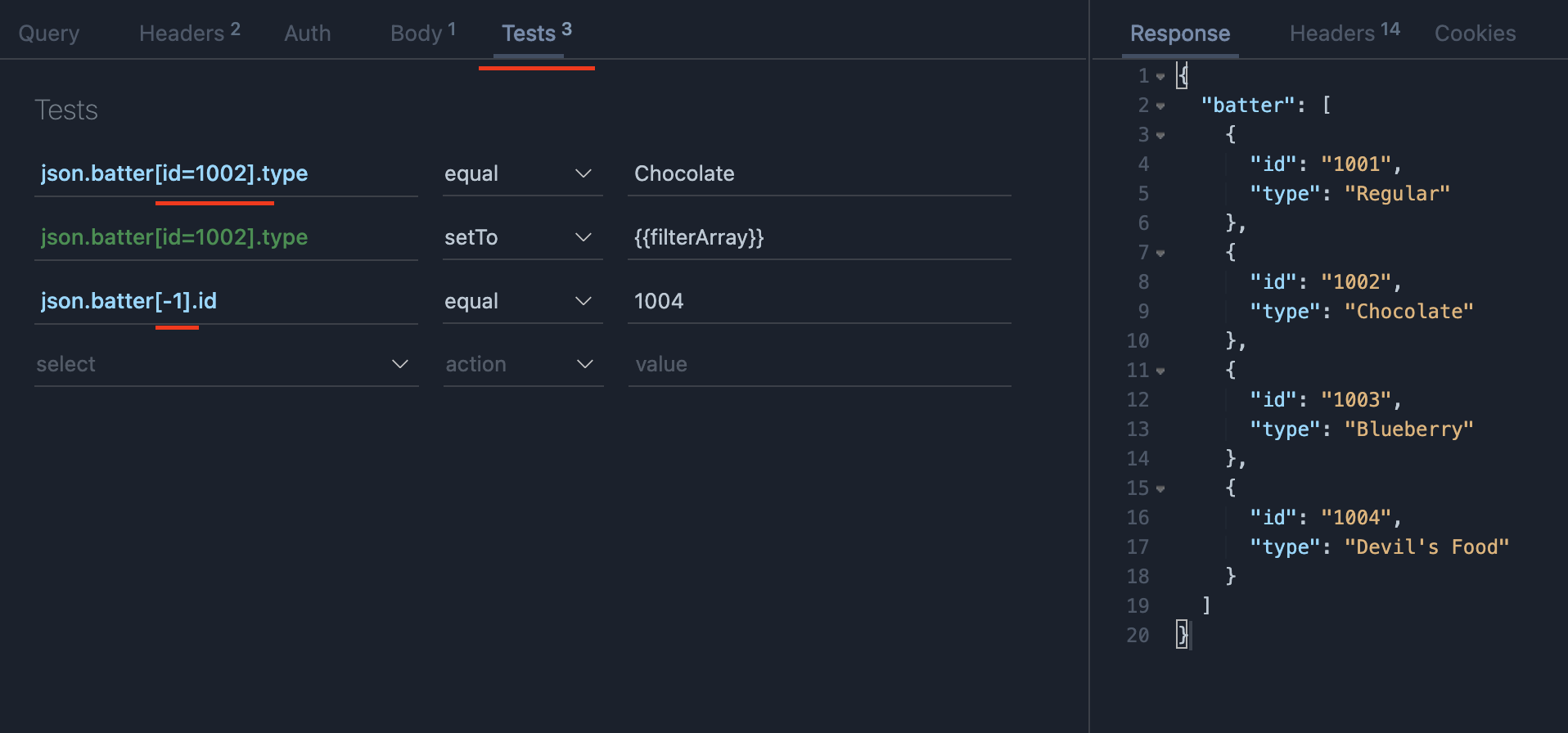
see full release notes here https://github.com/rangav/thunder-client-support/releases/tag/v1.18.3
@leezumstein we have added new array filter options in v1.18.3
- Array index with negative numbers can access array from last e.g
json.names[-1]- Tests can also filter a array with a property value e.g
json.names[name=test]
see full release notes here https://github.com/rangav/thunder-client-support/releases/tag/v1.18.3
Oh this is awesome, thank you! Also appreciate the follow up as well 😄 . Will kick the tires on this shortly.
This is definitely a step in the right direction. Although, for our use-case (which is the same as @talr1 's) we're lacking is a way to pluck out specific characters by index from a string. So for example, a challenge API response might request characters 5, 6, 7 of a password. Whilst it's possible (from the response) to store these requested indices into 3 env vars, it's not then possible to use those env vars to index into a complete string. Subscripting of env vars in a request body isn't yet possible.
Hello,
I think a possibility to do some custom script for prepare request and after request can be a very good feature. Personnaly, I use some API need this. Example:
call > /getuserinfos/123
{
  userref: '0x123456789',
  usertoken: 'azerty/123456=='
}

call > /getadditionaluserinfos/userref(without "0x")?token=usertoken(url encoded)
It seems not possible actually
In all case you do a great job !
Tx

I saw the update to filter an array but is it possible to filter the array based on a nested value? For example I would expect something like this statement to work for the following response
json.students[attributes.enrollment='active'].name
{
  "students": [
    {
      "name": "James",
      "attributes": {
        "enrollment": "active"
      }
    },
    {
      "name": "Jessie",
      "attributes": {
        "enrollment": "inactive"
      }
    }
  ]
}

This feature is now implemented and published to marketplace, please update to v2.0.0
See all features released https://github.com/rangav/thunder-client-support/releases/tag/v2.0.0
Please let me know your feedback.
@rangav is there a way to set the response headers to Env var under the Tests tab? My authorization code is present in the response headers. I need to set response headers in the env variable

@iamsethi you need to select Set Env Variable dropdown
see docs here for headers https://github.com/rangav/thunder-client-support#setenv
Let me know if you have further questions