
soloopooo



soloopooo
Edit:这个问题似乎解决了,在Nvidia控制面板进行相关设置,关闭低延迟模式(?) 问题补充: 在MaxFPS高于90fps的时候,如果进行Live,会出现演唱者时间线不同步问题。 此时,FPS不能稳定在MaxFPS中,会稍微低于MaxFPS,如:设置144fps,稳定运行于138fps;设置100fps,稳定运行于95-98fps,且CPU与显卡占用并不高(CPU:3990MHz@8%,GPU:1890MHz@45%) (MaxFPS越高,Live中同时运动或演唱的人数越高)的时候不同步现象越严重。 现在,Live可以接受的最高帧率为90-100fps。(1660TiMaxQ,笔记本)
或者可以用 zip 命令或 7z 命令将每次运行的 log 打包
怎么显示?像FRAPS那样? 全屏模式下任务栏本身会被隐藏。这功能只能说是多此一举。
使用@eritpchy构建的[版本](https://github.com/eritpchy/TrafficMonitor/actions/runs/2288673613)发现: 对于点阵字体,D2D渲染会导致程序直接崩溃,例如Terminal、Terminal Greek与Terminal Greek 869等系列点阵字体。  对于部分字体,D2D会出现 fallback 到默认字体的现象,如FOT-Aokane Std,GenSenMaruGothic TW TTF,Victor Mono等 经过检查发现,这些出现 fallback 问题所涉及到的字体,均没有使用“为所有用户安装”这一选项。 而MFC渲染则没有这个问题。    
Actually you can make your own MAIN WINDOW SKIN which can show the same info as in taskbar. 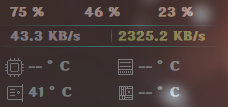 Skin maker refer to Readme.md. But Skin maker is only in...
目前,windows11 dev版本可以暂时使用StartAllBack来解决。 与StartAllBack有冲突的话,可以尝试把显示放在左边。如下图所示 
@MingDa9916 可以将您的代码(时间与最右下的量表)做一个Pull Request。
Please use Administrator Permissions while creating the task scheduler.
#1106 Download in Actions. duplicate: #1311 #1318 #1325