

 sofa-framework
BilateralInteractionConstraint issue using sofa v21.06
Problem
Description BilateralInteractionConstraint doesn't work for me anymore when I upgraded to sofa v21.06.
Steps to reproduce
v21.06 builds well on my pc.
In the demo/caduceus.scn I set the Mouse left button to “attach object using Bilateral constraint” but I can not grasp the snake using the mouse. (see screenshot attached)
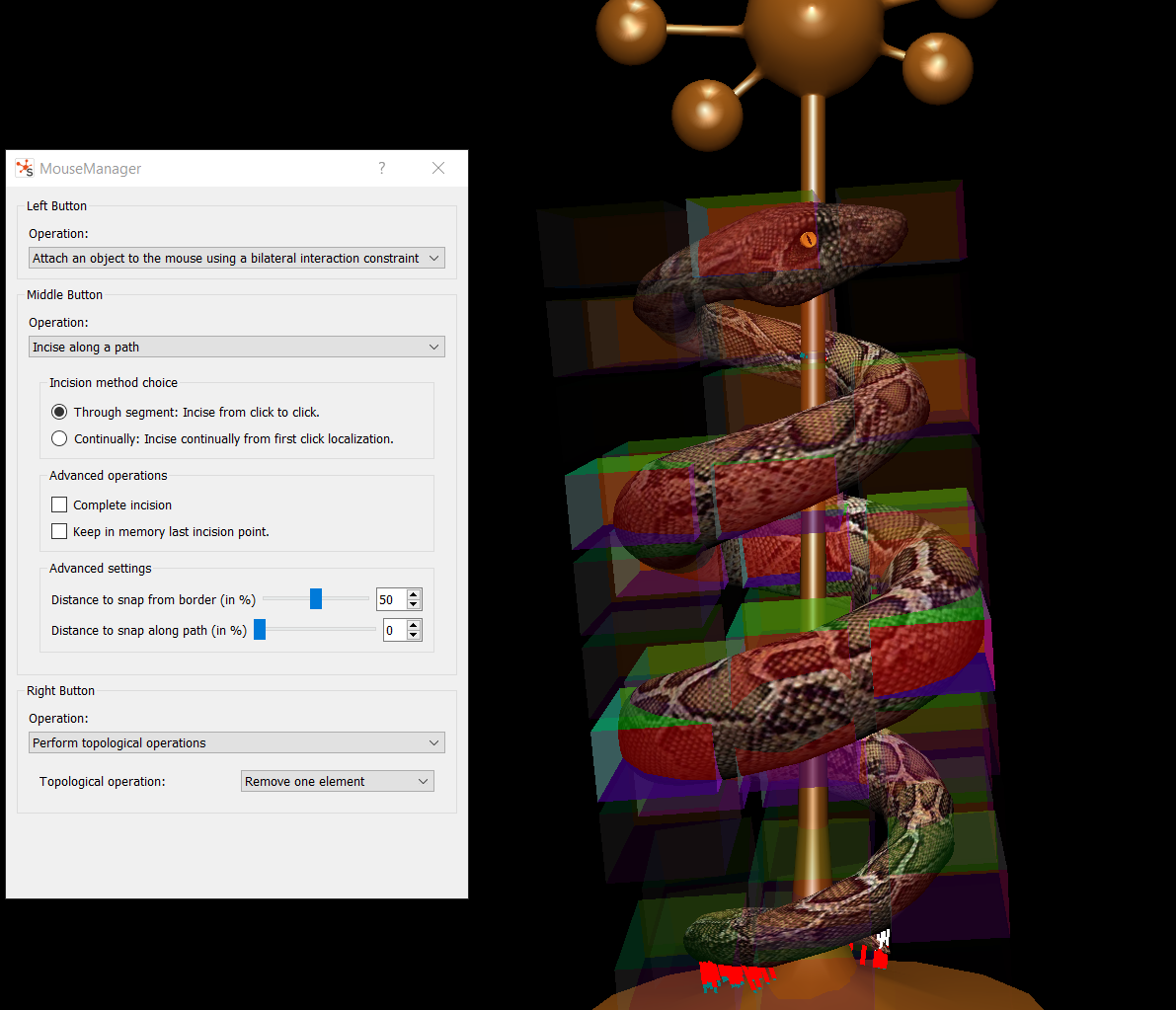
Another example is in my scene i attached the gallbladder model to the fatty tissue behind it using Bilateral constraint, i checked the rendering interactions, which visualize the Bilateral constraint contact pairs using Pink dots. Based on the screenshot, the contact points are correctly visualized but they can still move apart as if no constraints at all. (see screenshot attached)

Expected behavior In our plugins we have used the following to establish the bilaterial constraints. sofa::component::constraintset::BilateralInteractionConstraint<DataTypes>::SPtr toolState.m_constraints->addContact(c.normal, c.point[0], c.point[1], distance, index1, index2, c.point[0], c.point[1], 1, c.id);
The same codes and scene files worked well in sofa v19.12, where the bilateral constraints worked as constraining the distances between the contact pairs.
Environment
Context
- System: Windows 10
- Version of SOFA: branch v21.06.00
- State: Build directory
Command called
< COPY-PASTE YOUR COMMAND HERE >
Env vars
python -c "exec( \"import os, sys\nprint('#################')\nprint('--- sys.version ---')\nprint(sys.version)\nprint('--- PATH ---')\ntry:\n print(os.environ['PATH'])\nexcept Exception:\n pass\nprint('--- SOFA_ROOT ---')\ntry:\n print(os.environ['SOFA_ROOT'])\nexcept Exception:\n pass\nprint('--- PYTHONPATH ---')\ntry:\n print(os.environ['PYTHONPATH'])\nexcept Exception:\n pass\nprint('--- sys.path ---')\ntry:\n print(str(sys.path))\nexcept Exception:\n pass\nprint('#################')\" )"
#################
--- sys.version ---
2.7.18 (v2.7.18:8d21aa21f2, Apr 20 2020, 13:25:05) [MSC v.1500 64 bit (AMD64)]
--- PATH ---
C:\Program Files\Eclipse Foundation\jdk-8.0.302.8-hotspot\bin;C:\Python27;C:\Users\Ruiliang\AppData\Local\Programs\Python\Python39\Scripts;C:\Users\Ruiliang\AppData\Local\Programs\Python\Python39;C:\SIMULIA\Commands;C:\Program Files (x86)\Razer\ChromaBroadcast\bin;C:\Program Files\Razer\ChromaBroadcast\bin;C:\Program Files (x86)\Razer Chroma SDK\bin;C:\Program Files\Razer Chroma SDK\bin;C:\Windows\system32;C:\Windows;C:\Windows\System32\Wbem;C:\Windows\System32\WindowsPowerShell\v1.0\;C:\Windows\System32\OpenSSH\;C:\Program Files\Crucial\Crucial Storage Executive;C:\Program Files\NVIDIA Corporation\NVIDIA NvDLISR;C:\Windows\system32\config\systemprofile\AppData\Local\Microsoft\WindowsApps;C:\Users\Ruiliang\AppData\Local\Microsoft\WindowsApps;C:\Users\Ruiliang\AppData\Local\Programs\Microsoft VS Code\bin;C:\Program Files\CMake\bin;C:\Qt\5.15.2\msvc2019_64\bin;C:\Qt\5.15.2\msvc2019_64\lib;C:\local\boost_1_75_0\lib64-msvc-14.2;C:\local\boost_1_75_0;C:\Program Files\Git\cmd;;C:\WINDOWS\system32;C:\WINDOWS;C:\WINDOWS\System32\Wbem;C:\WINDOWS\System32\WindowsPowerShell\v1.0\;C:\WINDOWS\System32\OpenSSH\;C:\Program Files\dotnet\;C:\Users\Ruiliang\AppData\Local\Programs\Python\Python39\Scripts\;C:\Users\Ruiliang\AppData\Local\Programs\Python\Python39\;C:\Users\Ruiliang\AppData\Local\Microsoft\WindowsApps;C:\Users\Ruiliang\AppData\Local\Programs\Microsoft VS Code\bin;C:\Users\Ruiliang\.dotnet\tools
--- SOFA_ROOT ---
--- PYTHONPATH ---
--- sys.path ---
['', 'C:\\WINDOWS\\SYSTEM32\\python27.zip', 'C:\\Python27\\DLLs', 'C:\\Python27\\lib', 'C:\\Python27\\lib\\plat-win', 'C:\\Python27\\lib\\lib-tk', 'C:\\Python27', 'C:\\Python27\\lib\\site-packages']
#################
Logs
Full output
No Error outputs or suspicious outputs has been found.
Content of build_dir/CMakeCache.txt
< DRAG AND DROP YOUR CMAKECACHE.TXT HERE >
Thank you for your report.

@rgao15 Thanks a lot for the feedback!
I tried to reproduce your issue. On my end, I do have an error message:
[ERROR] [MouseOperation] ConstraintAttachBody performer cannot be created with the picked model.
Let us know if you have the same error message. I am also on Windows.
Anyway, I tried to understand what's happening. Why ConstraintAttachBody cannot be created?
It is supposed to be added in a factory here : https://github.com/sofa-framework/sofa/blob/323e20e4168e1ab5b67352f4621d4f1b3fa39be9/modules/SofaConstraint/src/SofaConstraint/ConstraintAttachBodyPerformer.cpp#L38
Registration in the factory works BUT not in the right factory.
The factory in modules/SofaGuiCommon/src/sofa/gui/MouseOperations.cpp and in modules/SofaConstraint/src/SofaConstraint/ConstraintAttachBodyPerformer.cpp are different. The factory is a singleton but there are 2 different instances. I confirmed it by printing the factory address. I suspect it's because they are used in different libraries.
The question is: how to solve it? And is it the same story for other factories? @fredroy @damienmarchal I would need your help

@alxbilger I got the same error (and message) with my builds on Windows. And interestingly, it is working well with my Linux setup. Therefore I am suspecting a export/import symbol mismatch or something like that.

According to @rgao15 , the issue is not fixed even after backporting the fix from #2495 in v21.06, so there is a regression somewhere unfortunately. Reopening this issue.
@rgao15 I've just compiled v21.06 (patched with the commit from #2495) and the picking with the BilateralConstraint is working well (while doing the picking with Bilaterals with the caduceus scene).
By curiosity, when you try to pick, do you do shift + left click ? (left mouse operation is only activated when shifting while left-click)

shift + left click
Yes I did hold shift down all the time (and I have been using the bilaterial constraints with no issues in sofa v19.12.)
In my case the pink small square shows the same as in your screenshot, however the snake doesn't follow the mouse (such that two pink squares have large distance apart while i moving the mouse)
Updates: I just tried it once more, the caduceus scene now works well for me, I can pick the snake using the mouse with bilaterial now. I will switch to my branch and test it with my scene file now.
Updates: I just tried it once more, the caduceus scene now works well for me, I can pick the snake using the mouse with bilaterial now. I will switch to my branch and test it with my scene file now.
Ah that is good to know 👍 Keep us in touch !
Ah that is good to know 👍 Keep us in touch !
Hi @fredroy, I tested it more and the results seem very strange to me:
For caduceus scene, in v21.06 I can only drag the caduceus to the right direction using mouse with bilaterial , none of the left, up and down directions work. And the same case happens in v19.12, only moving mouse to the right works.
While when I test my own gallbaldder scene in v19.12, all of the directions work with the mouse, but none of the directions work in v21.06.
Hi @fredroy Were you able to further look into this issues? I still have the above issue that the bilaterial constraint with mouse only works in one direction in v21.06
@rgao15 I did not really have time to investigate more unfortunately (quite busy these days) But you are right, it seems that this constraint has a big problem with directions, I could only drag in the right direction (even with the master branch). I am suspecting more a problem of the picking itself than the bilateralconstraint but I may be wrong. And I am not really an expert in constraint as well 😵 so we would need help from the constraint experts. (@Younesssss @ChristianDuriez )?
At least the example located examples/Components/BilateralInteractionConstraint.scn seems to work well (at least in the master branch) so I am quite convinced that the problem lies with the picking itself

After some investigations, it appears that the picking and dragging with BilateralInteractionConstraint never did work with the caduceus scene 👺. Or at least since v15.03 (yes I compiled and tried it 😬) and the version before this one I had (rc1) does not have this feature. For every version I tried, you can only drag on the +X axis of the mesh (not the X axis of the camera). BUT the pick/drag is working with the examples/Components/BilateralInteractionConstraint.scn 🧐 so in the end I am guessing there is something missing in the caduceus scene but I dont know what (constraintsolver ? constraintcorrection?).
Hey @ruiliang-gao I must apologize for not getting back to you on this. We discussed this topic with Fred back at the SOFA Week 2021 but I did not added the conclusion here.
The fact is that in the caduceus scene the ConstraintSolver used is a LCPConstraintSolver. As mentioned in the documentation, this solver is optimized for contact simulations, i.e. UniLateralInteractionConstraint. This optimization makes it inappropriate for attachement or other bilateral (holonomic) constraints. You should then use instead the GenericConstraintSolver
Best,
Hugo
This scene using the Mouse interaction (Edit->MouseManager-> attach with bilateral constraint) illustrates the bug @alxbilger :
<?xml version="1.0" ?>
<Node name="lroot" gravity="0 -9.81 0" dt="0.02">
    <RequiredPlugin pluginName="Sofa.Component.Constraint.Projective Sofa.Component.LinearSolver.Iterative Sofa.Component.Mapping.Linear Sofa.Component.Mass Sofa.Component.ODESolver.Backward Sofa.Component.SolidMechanics.FEM.Elastic Sofa.Component.StateContainer Sofa.GL.Component.Rendering3D Sofa.Component.Topology.Container.Dynamic Sofa.Component.IO.Mesh Sofa.Component.Constraint.Lagrangian.Solver Sofa.Component.Constraint.Lagrangian.Correction Sofa.Component.Collision.Response.Contact Sofa.Component.Collision.Geometry Sofa.Component.Collision.Detection.Intersection Sofa.Component.Collision.Detection.Algorithm Sofa.Component.AnimationLoop" />
    <DefaultVisualManagerLoop/>

    <FreeMotionAnimationLoop />
    <!-- <LCPConstraintSolver tolerance="0.001" maxIt="1000"/> -->
    <GenericConstraintSolver tolerance="0.001" maxIterations="1000" />


    <DefaultPipeline name="CollisionPipeline" verbose="0" />
    <BruteForceBroadPhase/>
    <BVHNarrowPhase/>
    <DefaultContactManager name="collision response" response="FrictionContactConstraint" />
    <DiscreteIntersection/>

    <MeshOBJLoader name="LiverSurface" filename="mesh/liver-smooth.obj" />

    <Node name="Liver" gravity="0 -9.81 0">
        <EulerImplicitSolver name="cg_odesolver"   rayleighStiffness="0.1" rayleighMass="0.1" />
        <CGLinearSolver name="linear solver" iterations="25" tolerance="1e-09" threshold="1e-09" />
        <MeshGmshLoader name="meshLoader" filename="mesh/liver.msh" />
        <TetrahedronSetTopologyContainer name="topo" src="@meshLoader" />
        <MechanicalObject name="dofs" src="@meshLoader" />
        <TetrahedronSetGeometryAlgorithms template="Vec3d" name="GeomAlgo" />
        <DiagonalMass  name="computed using mass density" massDensity="1" geometryState="@dofs" topology="@topo"/>
        <TetrahedralCorotationalFEMForceField template="Vec3d" name="FEM" method="large" poissonRatio="0.3" youngModulus="3000" computeGlobalMatrix="0" />
        <FixedConstraint  name="FixedConstraint" indices="3 39 64" />

        <UncoupledConstraintCorrection />

        <Node name="Visu" tags="Visual" gravity="0 -9.81 0">
            <OglModel  name="VisualModel" src="@../../LiverSurface" />
            <BarycentricMapping name="visual mapping" input="@../dofs" output="@VisualModel" />
        </Node>
        <Node name="Surf" gravity="0 -9.81 0">
            <SphereLoader filename="mesh/liver.sph" />
            <MechanicalObject name="spheres" position="@[-1].position" />
            <SphereCollisionModel name="CollisionModel" listRadius="@[-2].listRadius"/>
            <BarycentricMapping name="sphere mapping" input="@../dofs" output="@spheres" />
        </Node>
    </Node>
</Node>
hey @ruiliang-gao
Are you always using an UncoupledConstraintCorrection in your scene as a ConstraintCorrection?
I wonder whether this is not related to this pull-request : https://github.com/sofa-framework/sofa/pull/1369
If so, what is the mass that you are using? and what is the average vertex mass?
Here is what I tested:
- The scene that @hugtalbot provided: using the mouse does not impact the movement or the deformation. However, setting
useOdeSolverIntegrationFactorsinUncoupledConstraintCorrectionto false seems to work. - In the caduceus scene,
useOdeSolverIntegrationFactorsis already set to false. I also observe that I can pull only to the right direction.
hey @ruiliang-gao
Are you always using an
UncoupledConstraintCorrectionin your scene as a ConstraintCorrection? I wonder whether this is not related to this pull-request : #1369If so, what is the mass that you are using? and what is the average vertex mass?
Hi Hugo, Sorry to get back to you late. Yes I have always included 'UncoupledConstraintCorrection' in our scene files without modifying any of its parameters, I recall it is for the interaction between models and the haptic tool.
I have been using 'UniformMass' for the models in my scene, with vertex mass varying from 0.01 to 1.0.
hey @ruiliang-gao
I therefore think that the #1369 is responsible for the change in behavior
Have you specified a data compliance to your UncoupledConstraintCorrection?
If not, could you please retry running your scene specifying compliance as being equal to 1/vertex_mass
compliance
Thanks @hugtalbot, This works!
I currently don't have access to my UFlorida lab machine that have several versions of sofa built. But I built my sofa v21.06 on my new workstation and have tested it. Adding the compliance term made the mouse grasping works properly with our scenes.
I also tested it with the demo/caduceus, with this line:
<UncoupledConstraintCorrection useOdeSolverIntegrationFactors="0" compliance="184" " />
the snake seems still not fully movable by the mouse though.
Hi @ruiliang-gao
great ! For the caduceus scene, it is actually a crappy scene : objects are in collision at collision begin, which is supposed to be avoided. If :
- you remove the entire "Base" node
- you use a GenericConstraintSolver (handling both Uni and BiletaralInteractionConstraint)
- you use a
<UncoupledConstraintCorrection defaultCompliance="1" verbose="1"/>
Using the constraint attachment as MouseManagement you should see it moving.