
Silviu Bogan



Silviu Bogan
https://silviubogan.github.io/writing/

Currently: http://postimg.org/image/6b4sr0ebz/ . Suggested changes: http://postimg.org/image/5mv4xum1d/ . There is also much padding inside the code snippet blocks. I made the screenshots on Firefox 28, Windows 7, on an 1680x1050 display.
I made it in pull request #562.

This issue will be solved when #562 is merged.
I see the same bug in the ExampleBrowser, in [this example](https://github.com/oxyplot/oxyplot/blob/develop/Source/Examples/ExampleLibrary/Annotations/AnnotationExamples.cs). If I create a sample application to test this, I see the same bug, although the property Window.ToolTip works...
I wish to solve this issue but I am a beginner. I saw that the ToolTip is actually already set on the WPF elements at the end of the OxyPlot's...
I think about using a new attached property, `Plot.OxyToolTip`, for all the types of annotations and other components of the `Plot` that may have a tooltip to force the display...
The problem is that with, and without, the `mouseGrid`, the annotations and series still do not get mouse events other than MouseDown, so neither MouseMove nor MouseUp. I added [here](https://github.com/oxyplot/oxyplot/blob/f870702/Source/Examples/ExampleLibrary/Series/BarAndColumnSeriesExamples.cs#L372)...
The solution in that SO answer does not work for me. I've made a scheme because I am new to OxyPlot's source: 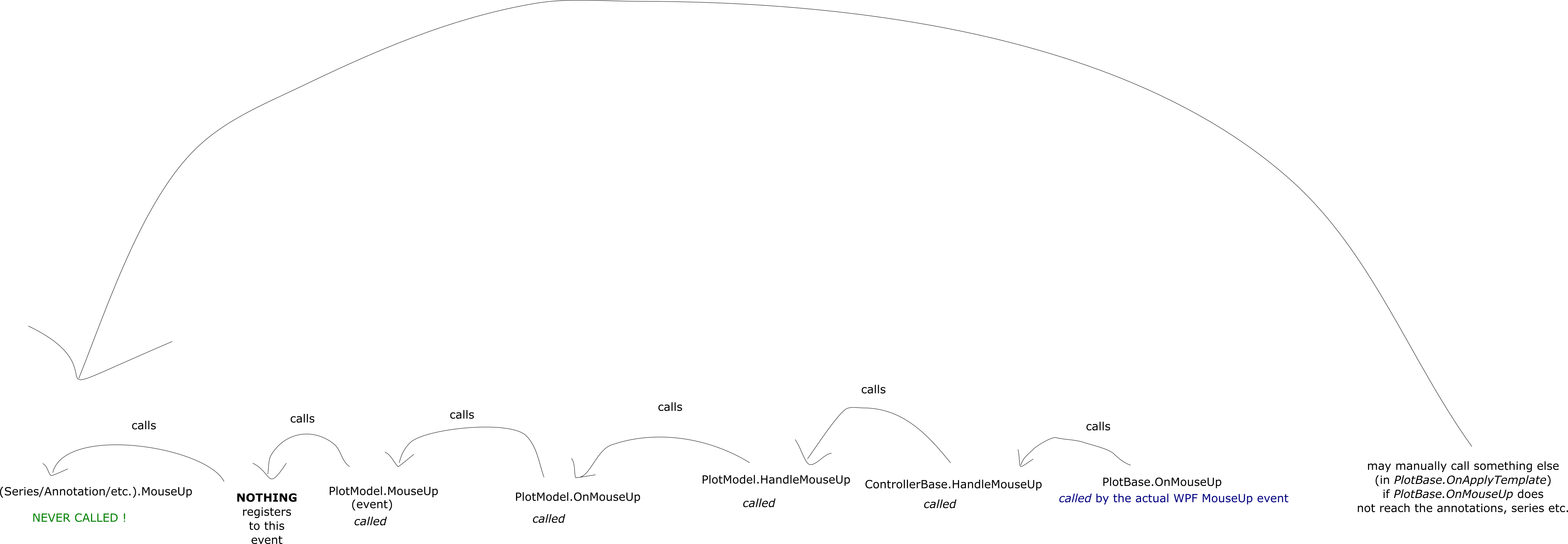 Nothing registers...
I simply did not know that I have to mark the mouse event handlers with `e.Handled = true` for Series, Annotation etc. so that, for example, after a MouseDown event...