
webvirtcloud
 webvirtcloud copied to clipboard
 retspen
WebVirtCloud is virtualization web interface for admins and users
I found the link below on how to create volumes for webvirtcloud: Is this the best way to create volumes in a production environment?

Create the website as normal,the login is successful。 When I create a compute node through ssh, I switch to Instances and report a 500 error. I use Kylin V10 system...

Hi, i use Webvirtcloud for start my vm, but i would like start a script when the server power on request is sent and when it is off would it...


it says 500 error if i opened user configuration. and it will also be 500 if i connected ssh and opened "Instances" tab. How can i fix it?:( ![Uploading Screenshot_20220626-165515381.png…]()

Hello, I just installed WebvirtCloud and connected an KVM Host. I see all VMs and can restart them, I also can open the console (changed the port to 80/tcp). Lines...

right so i installed everything and followed the guide for ubuntu and i get a 502 bad gateway error i checked logs nothing useful. http://ovirt.vitalecentral.xyz/ i tried the centos nginx...

Problem occurred with host Test: Failed to connect socket to '/var/run/libvirt/libvirt-sock': No such file or directory

please help me i'm new to webvirtcloud, there is this error " Failed to connect socket to '/var/run/libvirt/libvirt-sock': Permission denied " when i tried to create compute on local connection...

About gstfsd

run command “supervisorctl status”,it shows below: 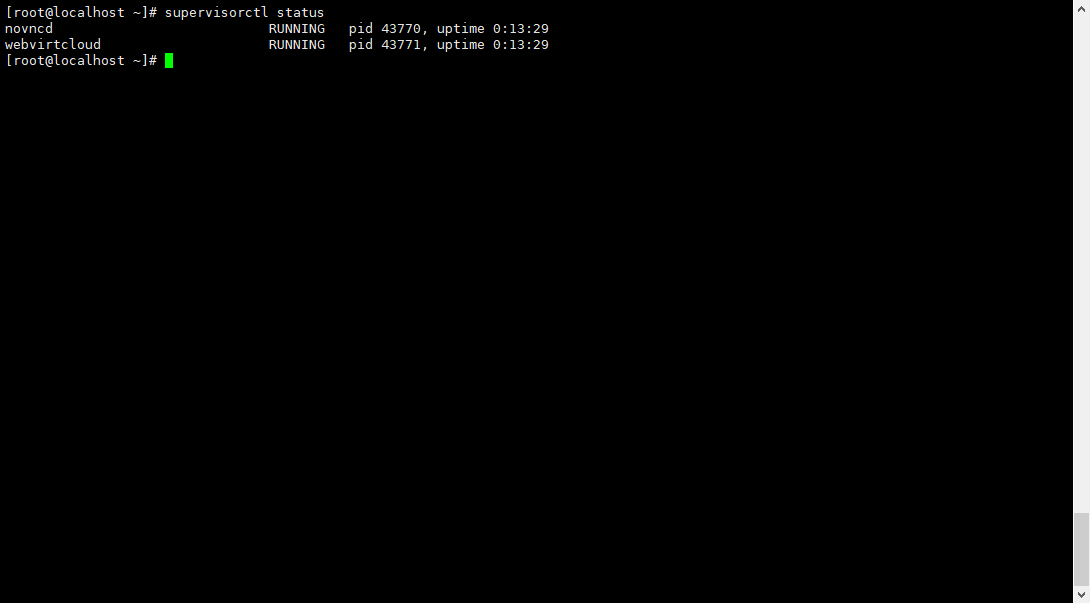 Why not show “gstfsd” process
