

 opengisch
Default value not working?
Describe the issue
A field's default value are not always appearing. Species is recorded in existing points or in new points. The fields flatenr, kprutenr and kombo in the point layers oversikt and arter get their default values (incl. apply default on update) from another point layer karplantepunkter (with two fields flatenr and kprutenr):
Get flatenr (in arter and in oversikt) from karplantepunkter:
case
 when aggregate(layer:='karplantepunkter', aggregate:='max', expression:="flatenr", filter:=intersects($geometry, geometry(@parent))) != '' then aggregate(layer:='karplantepunkter', aggregate:='max', expression:="flatenr", filter:=intersects($geometry, geometry(@parent)))
 else "flatenr"
end
Get kprutenr (in arter and in oversikt) from karplantepunkter:
case
 when aggregate(layer:='karplantepunkter', aggregate:='max', expression:="kprutenr", filter:=intersects($geometry, geometry(@parent))) != '' then aggregate(layer:='karplantepunkter', aggregate:='max', expression:="kprutenr", filter:=intersects($geometry, geometry(@parent)))
 else "kprutenr"
end
To ensure intersections between arter and karplantepunkter (and oversikt and karplantepunkter), I've set snapping on vertex and 10 pixels tolerance in point layer karplanter.
In addition the default value of kombo is set to be: "flatenr"||'-'||"kprutenr"
The user is supposed to digitize arter-points in the same position as existing karplante-points (or a new arter point in a new position. I ended up with this solution, digitizing all points due to get the relation between arter (species) and images and to ensure unique combinations of flatenr-kprutenr.)
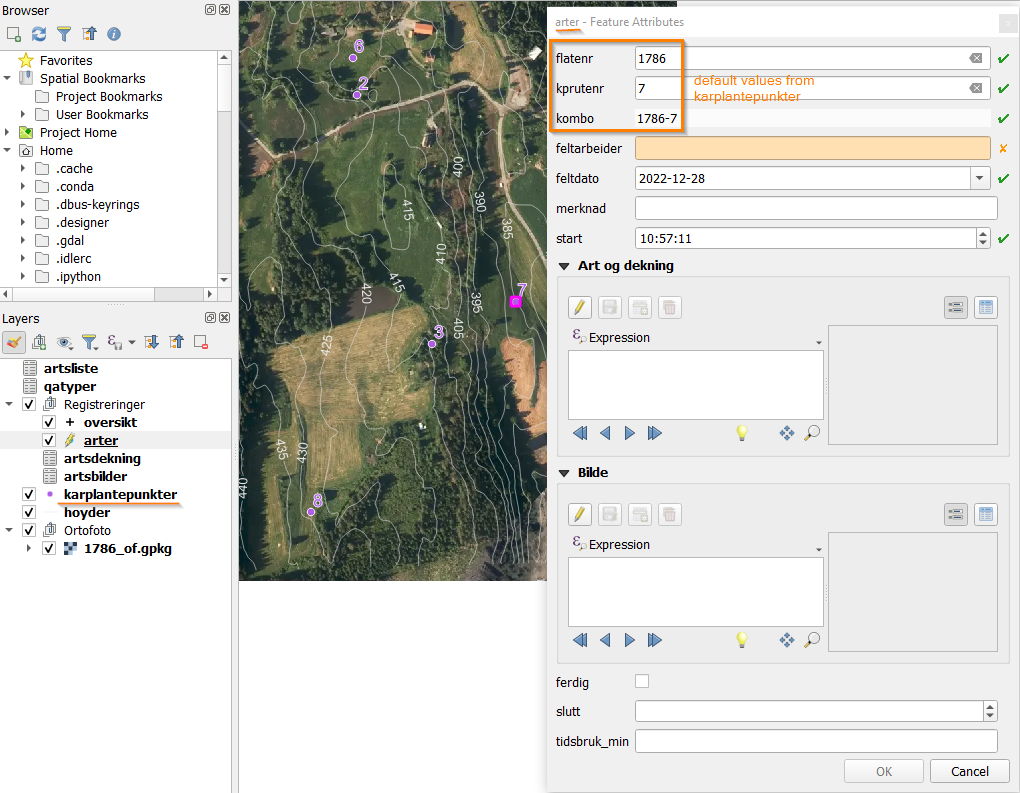
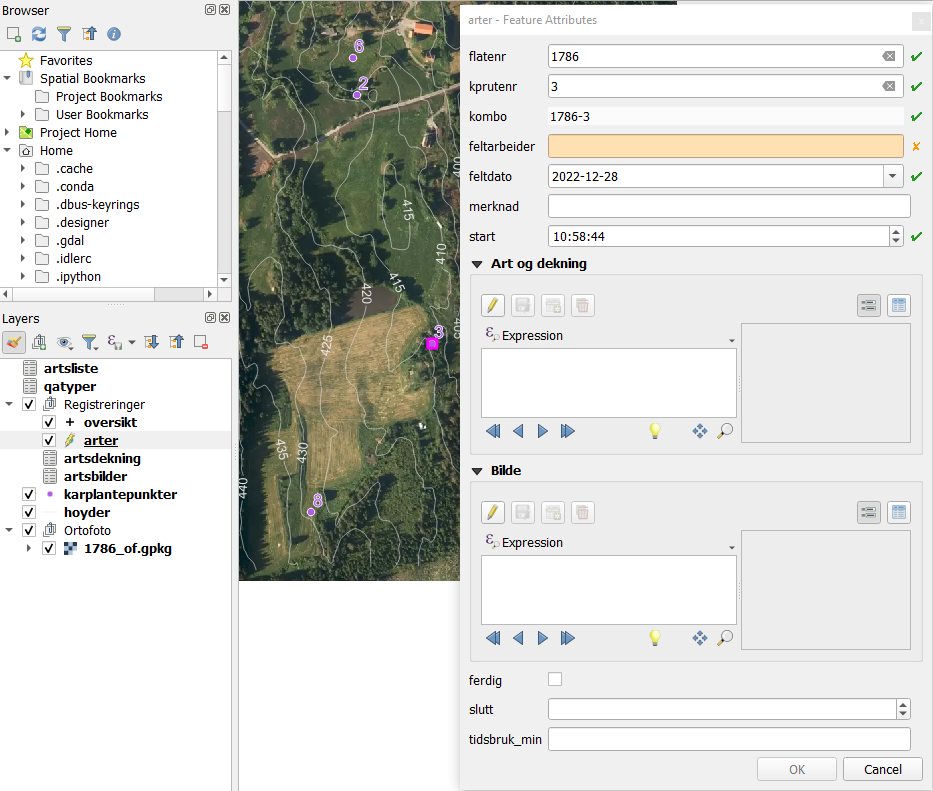
It works as expected in QGIS:
Arter point 7 (kprutenr = 7)
Arter point 3 (kprutenr = 3)
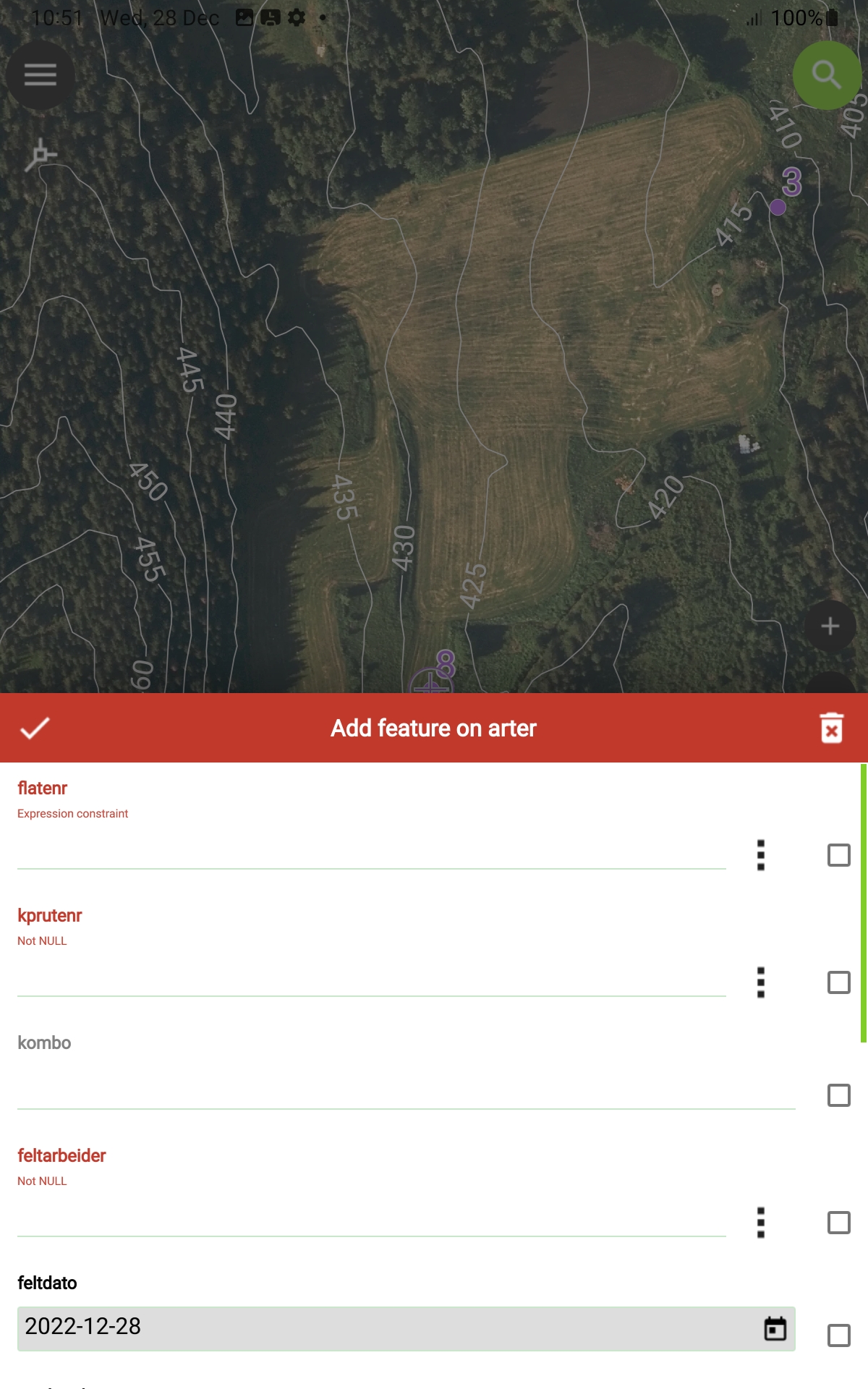
In QField, the behavior is more randomly/unexpected:
Arter point 7 - kombo is missing?!?
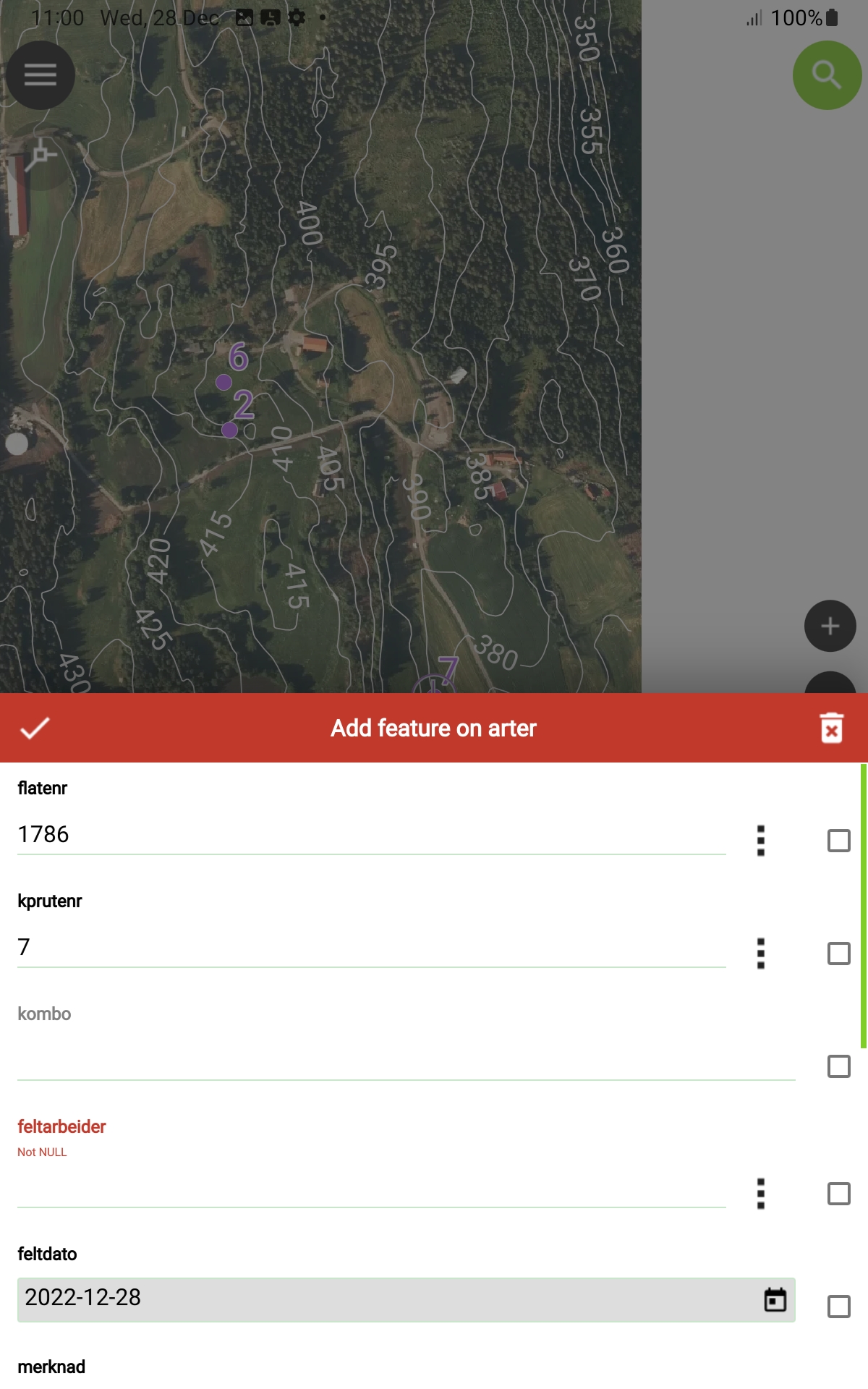
Oversikt point 7 - kombo is wrong?!?

Arter point 8 - default values are missing?!?
Reproduction steps
Unzip karplante.zip and open project in QGIS and prepare with QField (offline editing on arter, oversikt, artsdekning and artsbilder) and transfer with cable to tablet. Open project on tablet and show the layers and set arter in digitize mode and snap to an existing karplantepunkter point.
Expected behavior
Expected same behavior in QField as in QGIS: flatenr, kprutenr and kombo having correct default values inherited from karplantepunkter. (When digitizing a new arter or oversikt point in another position than an existing point in karplantepunkter, the flatenr and kprutenr must, naturally, be manually entered.)
Observed behavior
See description and images above.
Desktop (please complete the following information)
- OS: Windows 10
- QGIS Version 3.28.1
- QFieldSync Version 4.2.0
Mobile (please complete the following information)
- Device: Samsung Tab Active3
- OS: Android 13
- QField version: 2.5.7
Additional information
- Problem started happening recently, didn't happen in an older version of QField: Don't know
- Problem can be reliably reproduced, doesn't happen randomly: Yes
- Problem happens with all files and projects, not only some files or projects: [Yes/No]

I can't offer exact explanations as to why there is a discrepancy between QGIS and QField behaviour here, but here are two workarounds.
I discovered with your sample project that if I changed the Project CRS (which was EPSG:25832 to match your orthophoto), to the same one as the relevant datasets (arte and karplantepunkter - EPSG:25833), your expression was able to pick up the flatenr and kprutenr values from all underlying karplantepunkter points (previously it would work on some and not others).
I think maybe there is a difference between QGIS and QField in how snapping thresholds are calculated and geometries are digitised in relation to the intersects() condition when the project and source CRSes are different. Maybe a different PROJ version?
If you need your project to be in EPSG:25832 (i.e. different CRS from the vector datasets), consider buffering your $geometry variable by a very small amount (e.g. 0.01 metres) so that it doesn't have to exactly intersect with the underlying point in order for the default expression to return a value.
As for your kombo returning incorrect values - I wasn't able to reproduce that with the same version of QGIS and QField. It does show up as blank.
However, kombo does in fact get calculated correctly after all constraints are met and the feature is saved. For example even if the kombo field looks blank in the form, if you are able to fulfill all constraints and save the feature, then identify the feature and open the form again, the kombo field has been saved correctly. Alternatively, if you turn on 'Fast editing mode' (under Settings) you will be able to see this directly in the form without having to press the tick box, once you have met all constraints - as that setting means the feature will have been technically saved immediately without needing to press the tick box (and deleted if you decide you don't want to keep it and click the delete button).
Alternatively again, if you newly digitise a feature and then edit either flatenr or kprutenr, kombo instantly updates in the form.
I believe this is because the flatenr and kprutenr fields have default values in them derived from another layer, but these values are not actually recognised by the form in order to be able to concatenate them instantly in another field. The calculation is only triggered if a change is recorded - either in the source fields by directly editing them in the form, or by saving the feature itself.
Your workaround here is to reuse and concatenate the flatenr and kprutenr default value expressions directly in the kombo default expression, so that like flatenr and kprutenr, the value is immediately calculated at the time the form is opened, rather than waiting for a change to be recorded.
So, for example, (I have also simplified your expressions by using coalesce())
coalesce(aggregate(layer:='karplantepunkter', aggregate:='max', expression:="flatenr", filter:=intersects(buffer($geometry,0.1), geometry(@parent))), "flatenr")
||'-'||
coalesce(aggregate(layer:='karplantepunkter', aggregate:='max', expression:="kprutenr", filter:=intersects(buffer($geometry,0.1), geometry(@parent))), "kprutenr")
However it would be good to harmonise this behaviour in QField with QGIS...

Wow! I say! 👏 Thank you very much for your thorough reply. Nice workaround with the buffer-solution and the Fast editing mode. The gpkg-files and QGIS project file are generated automatically (with batch and python). I ended up with changing the CRS to 25832 for all involved files. Now it works like a charm in QField as well. 🎉
No worries!
Still curious as to why the behaviour is different between QField and QGIS though, one would reasonably expect that snapping should work between CRSes in both. Hope the devs can shed some light when they are back from their well earned break.
Good suggestions @she-weeds 🙏
It would be interesting to see some details of the snapped coordinates (e.g. converting them to wkt and showing them via default value in a field - or by checking them in qgis) All in all, I would not trust intersection on points on reprojected coordinates because of double precision/rounding errors. But other things like transformation used (e.g. missing NTv2 grids) can also be involved. For the record, qfield uses proj 9.


@nirvn, I haven't checked this specifically lately. I'll have a look in near feature as the field work season approaches.
@9ls1 , nice :) hope you'll find yourself returning to a QField that already fixed this situation.
The QField project highly values your report and would love to see it addressed. However, this issue has been left in feedback mode for the last 14 days and is being automatically marked as "stale". If you would like to continue with this issue, please provide any missing information or answer any open questions. If you could resolve the issue yourself meanwhile, please leave a note for future readers with the same problem and close the issue. In case you should have any uncertainty, please leave a comment and we will be happy to help you proceed with this issue. If there is no further activity on this issue, it will be closed in a week.
![github-actions[bot] avatar](https://avatars.githubusercontent.com/in/15368?v=4 "Published by a pub.dev verified publisher")