

 opengisch
can not save a float number
The problem is, if a decimal number is to be stored (e.g. '1.5') the value changes to '15.'.
Reproduction Steps:
- Make a QGIS Project with a Geopackage (Geom: Point, Attribute: length (real))
- Copy the Project to the tablet
- Try to chance the attribute length
- QField version: 1.7.6
- Android Version 10

@tobair I cannot reproduce on older Android, but most probably I have different configuration from yours.
Did you start experiencing this issue since 1.7.6, or you always had this issue? What language do you use on your android device? Can you please share the exact project you use to have this error, or at least the configuration you use for that field in Layer Properties -> Attributes Form?

The QField project highly values your report and would love to see it addressed. However, this issue has been left in feedback mode for the last 14 days and is being automatically marked as "stale". If you would like to continue with this issue, please provide any missing information or answer any open questions. If you could resolve the issue yourself meanwhile, please leave a note for future readers with the same problem and close the issue. In case you should have any uncertainty, please leave a comment and we will be happy to help you proceed with this issue. If there is no further activity on this issue, it will be closed in a week.
![github-actions[bot] avatar](https://avatars.githubusercontent.com/in/15368?v=4 "Published by a pub.dev verified publisher")


The QField project highly values your report and would love to see it addressed. However, this issue has been left in feedback mode for the last 14 days and is being automatically marked as "stale". If you would like to continue with this issue, please provide any missing information or answer any open questions. If you could resolve the issue yourself meanwhile, please leave a note for future readers with the same problem and close the issue. In case you should have any uncertainty, please leave a comment and we will be happy to help you proceed with this issue. If there is no further activity on this issue, it will be closed in a week.
I can confirm this bug with the following setup: QField 1.8.1 Samsung Tab Active3 Android 10
Doesn't happen on QField: 1.6.4 Samsung Tab Active2 Android 9

Switching from default Samsung Keyboard to AnySoftKeyboard resolves the issue...
Thanks, since the A Tab2 is used here, too. Was it a language problem then? Maybe the decimal separator was wrong? Or just plain crappy preinstalled stuff...

Switching from Samsung Keyboard to GBoard also fixes the problem. Qfield v1.9.6 on Samsung Galaxy S10, Android version 11.

Hi,
This bug still on Qfield 2.5.5 on Samsung tab, with Samsung Keyboard. Solved by changing the keyboard (GBoard).
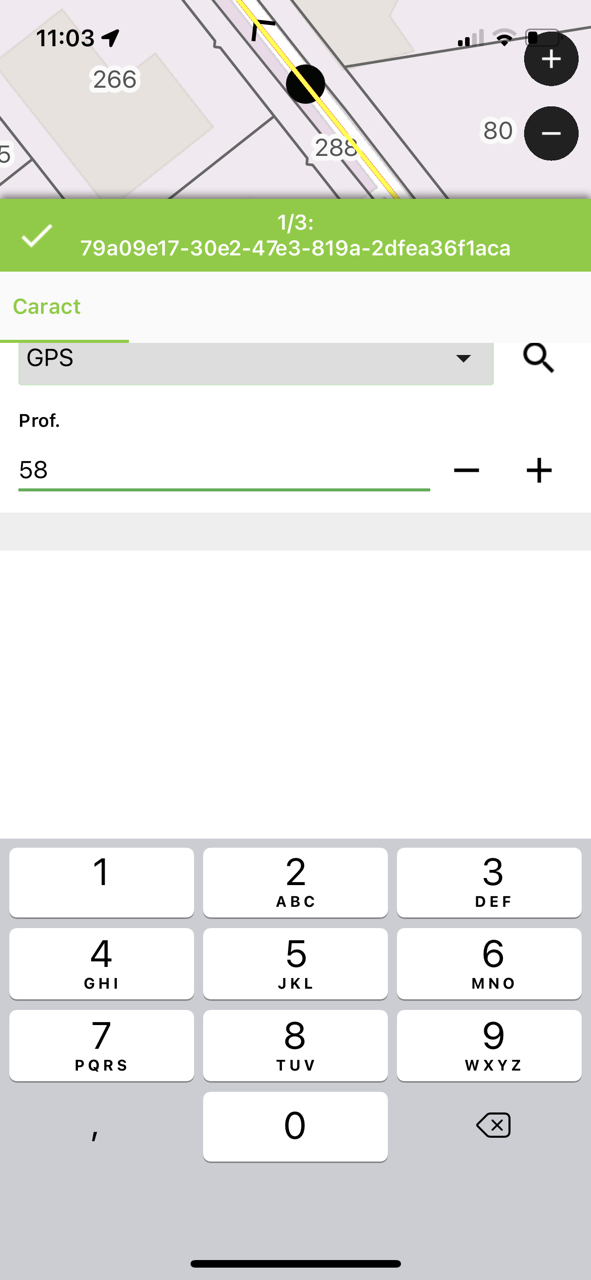
I also tested it on an iphone 12 - iOS 15.6.1 / Qfield 2.5.5. The keyboard only accepts comma, while the form only accepts points as decimal separator.

@sallib , can you check with the latest QField version on the play store, we fixed handling of floating number parsing in the last version.

@sallib , that's a fantastic news, thanks for taking the time to reporting this back. Happy field mapping!