
mintty

mintty
For the next release, some additional options are considered to be included in the Options dialog: ``` “Ligatures support” “Emojis” (or “Emoji style”) “Emoji placement” “Font weight” “Character width” “locale”...
You can fetch a repository version any time but the changes indicated above are not yet effective. I was trying to collect translations well in time before approaching a release...
Mintty does not scale emoji or other images itself. It uses Windows functions for display so all scaling is performed by Windows.
Yes, of course. However, the set of supported styles is currently fixed, due to different filename patterns by emoji respositories. That means you'd have to drop-in the rescaled emojis instead...
> the set of supported styles is currently fixed This means you cannot invent a new style name.
The option is `ColSpacing` (as described in the manual).
The same happens with double-width CJK characters. The problem is that the shell's line editing features are not fully aware of non-single-width glyphs and position the cursor just one position...
Ah right, this didn't work yet not too long ago. So maybe the shell uses out-of-date width information (a.k.a. locale).
For me, bash and mintty behave alike for characters 啕, ✅, 😀. Which mintty version do you have and which character do you try?
Forgot to ask which shell you use. Anyway, with bash I get this: 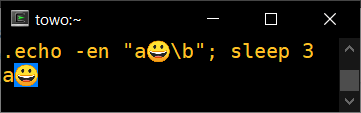 and after 3s: 