
AirSim
 AirSim copied to clipboard
 microsoft
Add gazebo airsim plugin files
Fixes: #
Related to: https://github.com/microsoft/AirSim/issues/2955
About
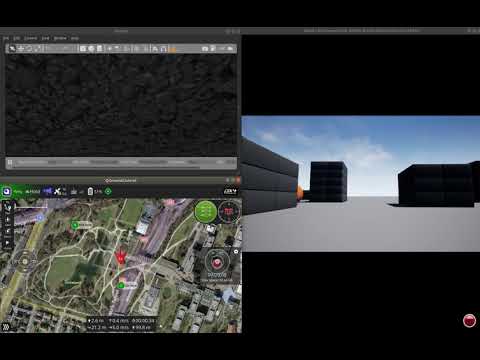
While the Gazebo environment is the most widely used environments for simulation, the rendering quality of gazebo makes it hard to test vision based applications. While Microsoft/Airsim solves this problem by using advanced game engines such as the Unreal Engine or Unity the physics Airsim can simulate are limited.
- Only multirotors are available, and none of the vehicles have gimbals
- Aerodynamic effects such as Fixedwing/VTOL vehicles are not available for PX4 SITL-Airsim
This PR provides a solution mid-way so that the capabilities not available in Unreal Airsim can be used with Gazebo.
A gazebo_airsim_plugin is implemented as a link between gazebo and Airsim. The plugin can be attached to a specific link that orients the camera in Airsim. The specific link can be defined in the sdf flile as the following.
    <plugin name='airsim_plugin' filename='libgazebo_airsim_plugin.so'>
      <robotNamespace/>
      <link_name>typhoon_h480::cgo3_camera_link</link_name>
    </plugin>
This plugin assumes that Airsim is running in "Computer Vision Mode". The configuration file of Airsim is as the following.
{
  "SeeDocsAt": "https://github.com/Microsoft/AirSim/blob/master/docs/settings.md",
  "SettingsVersion": 1.2,
  "SimMode": "ComputerVision"
}
How Has This Been Tested?
This has been integrated into the PX4 Autopilot project, and tested using the following command. (Needs inclusion of https://github.com/PX4/PX4-SITL_gazebo/pull/791)
make px4_sitl gazebo_typhoon_h480_airsim
Screenshots (if appropriate):


![microsoft-cla-retired[bot] avatar](https://avatars.githubusercontent.com/in/66420?v=4 "Published by a pub.dev verified publisher")
@jonyMarino I tried using clang-format-10 to format my code, but the settings doesn't seem to agree with what is being checked in CI.
Is there a good way to format the code that is appropriate for this repo?
-
check out your pull request
-
run
git checkout master .clang-formatin your repo's root folder -
if you don't have npm installed, download it from https://www.npmjs.com/get-npm
-
run
npm install -g clang-format -
run
clang-format -i path/to/filefor each failing file (failing files can be found in the details for the clang-format check) -
run
git add -uto track all style changes -
run
git commit -am "apply style from clang-format" -
run
git merge master -
resolve other non-style conflicts if you have any
-
push changes
I hope it helps you!

@jonyMarino Thanks for the pointers! I have addressed the style check failures
@jonyMarino I have addressed the changes! Would there be anything more that needs to be addressed?
Hey @Jaeyoung-Lim, I'm trying to test this PR with the command you mentioned:
make px4_sitl gazebo_typhoon_h480_airsim
However, I'm getting the following build errors:
ninja: error: unknown target 'gazebo_typhoon_h480_airsim'
make: *** [Makefile:230: px4_sitl] Error 1
I have your other PR https://github.com/PX4/PX4-SITL_gazebo/pull/791 checked out inside Tools/sitl_gazebo in my local PX4-Autopilot repo. Do I have to do something else to pick up the new target you added?

@zimmy87 You would also need https://github.com/PX4/PX4-Autopilot/pull/18566 which adds the make target
@Jaeyoung-Lim Thanks for continuing to work on this. Can we specifically use Multirotor instead of CV and call simSetKinematics instead of simSetVehiclePose? That way we can get the sensors from AirSim and it may be that it improves the behavior of the camera as well.
@jonyMarino Could you elaborate on where the sensor data from the airsim is being used? This is not being used from the simulation or the SITL autopilot instance
@Jaeyoung-Lim It is convenient for the AirSim user who wants to know for the photos taken what the kinematics state was at that time. This way, you could get everything from the AirSim API in a synchronized way without communicating with Gazebo. It has no impact on the flight controller or the physics of the vehicle. At the same time, Frederic from Auterion (I don't know his user name, you can ping him) reported that the camera has a better behavior using the multirotor mode with the External Physics Engine if the kinematics state is updated through simSetKinematics().