llf007

Results 11 issues of llf007

**Datart版本号** Version: 1.0.0-beta.3 **错误描述** 表格及透视表,不能按原有数据ID排序 ![002](https://user-images.githubusercontent.com/60683568/167763056-c86a3dc2-a213-42f2-8e68-6ace855dda23.png) **期望结果** 希望能按原有数据的ID排序,并不显示ID列 ![001](https://user-images.githubusercontent.com/60683568/167763206-308d562e-a720-475b-8561-07783e46cb2a.png) **其他内容** ![003](https://user-images.githubusercontent.com/60683568/167763382-93628d3e-a407-4951-b665-ecc043acae16.png) 启用小计:显示为【小记】,请改进,加油噢:)

feature request

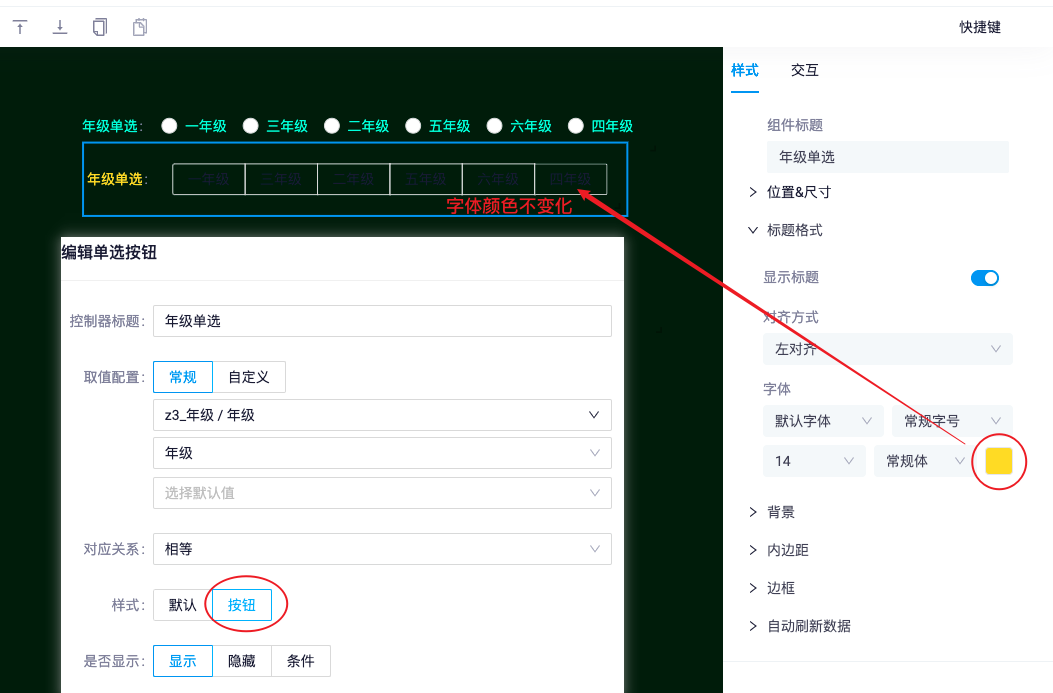
**Datart版本号** 1.0.0-beta.4 **错误描述** 单选按钮,样式为【按钮】,字体颜色不变化,希望可以修改。 单选按钮,样式为【默认】,字体颜色正常能修改。 ![d01](https://user-images.githubusercontent.com/60683568/180154622-77503b2f-4261-4461-a657-bf01e4993f14.png) **其他内容** 滑块【开启标签】后,字体颜色也不能修改;其他控制器颜色都正常。 ![d03](https://user-images.githubusercontent.com/60683568/180160676-7fa51c7e-1b6d-40a9-8be6-634449eed396.png)
improvement

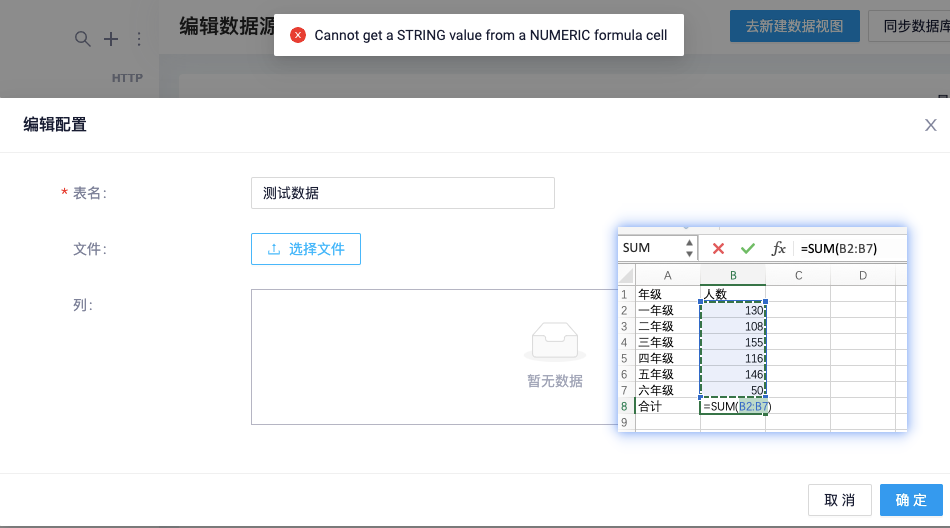
**Datart版本号** 1.0.0-beta.4 **错误描述** 数据源类型为FILE,上传EXCEL含有公式就会报错,不能上传。 **期望结果** 希望能上传含有公式的EXCEL **截图** ![image](https://user-images.githubusercontent.com/60683568/180163193-e0af6618-3c22-4d0f-abc2-8acc4ca5f916.png)
improvement

sqlitebiter is a very efficient xlsx conversion sqlite tool. But Excel DATE type will be converted to INTEGER, ![jt_2020-12-26_15-28-57](https://user-images.githubusercontent.com/60683568/103147545-73966c00-4791-11eb-9811-2c831c986626.png) Before each conversion to SQLite, the Excel date should be converted...

enhancement

### Description 1.Create test table ``` CREATE TABLE main.test (c1 DATE); insert INTO test values('2022-01-01'); ``` 2.I try add new row 3.input 2022-01-02 4.Save,See an Error synchronizing data with database...

bug
xf:data
environment
wait for review

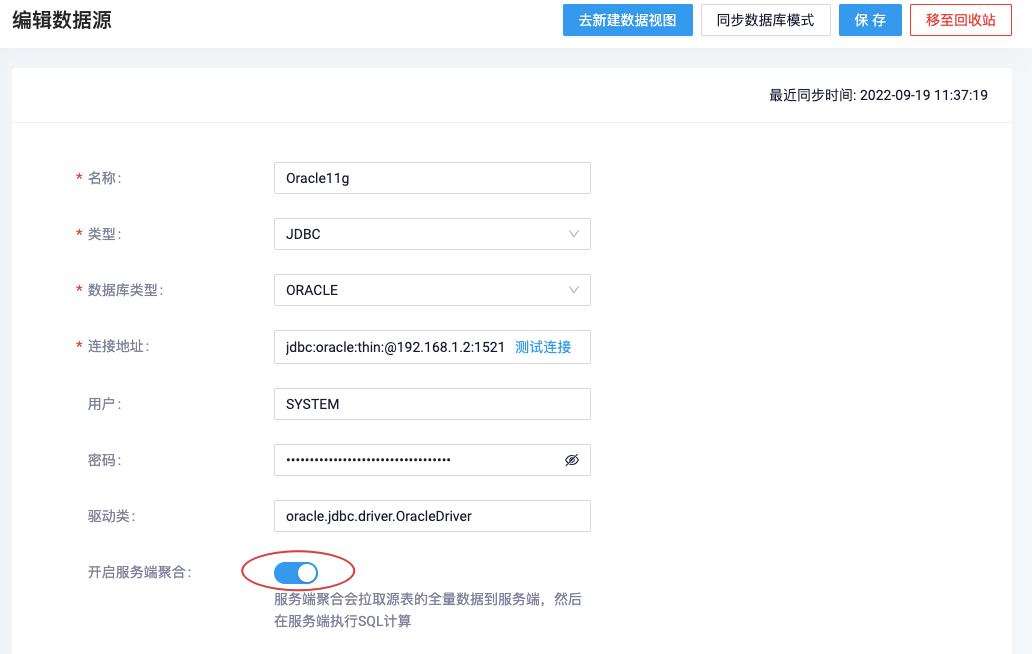
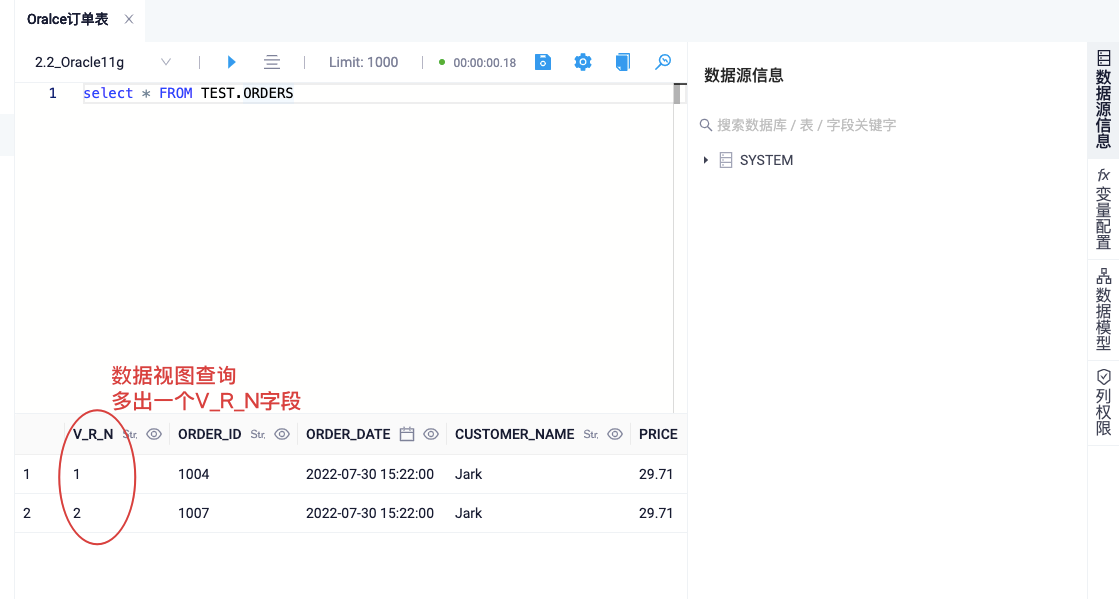
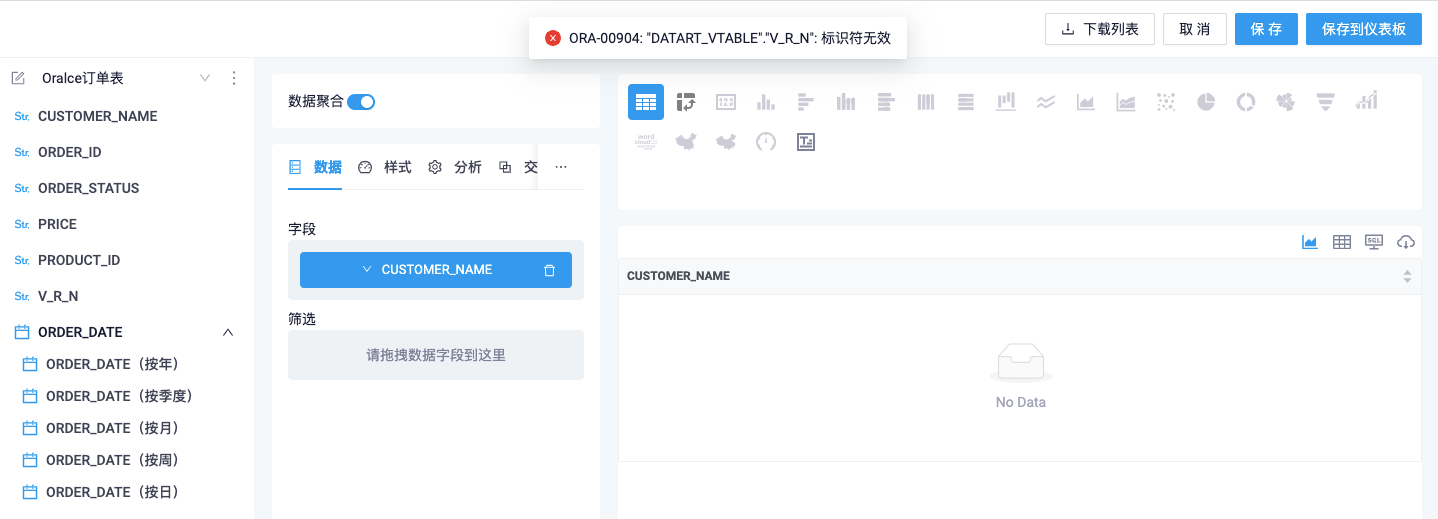
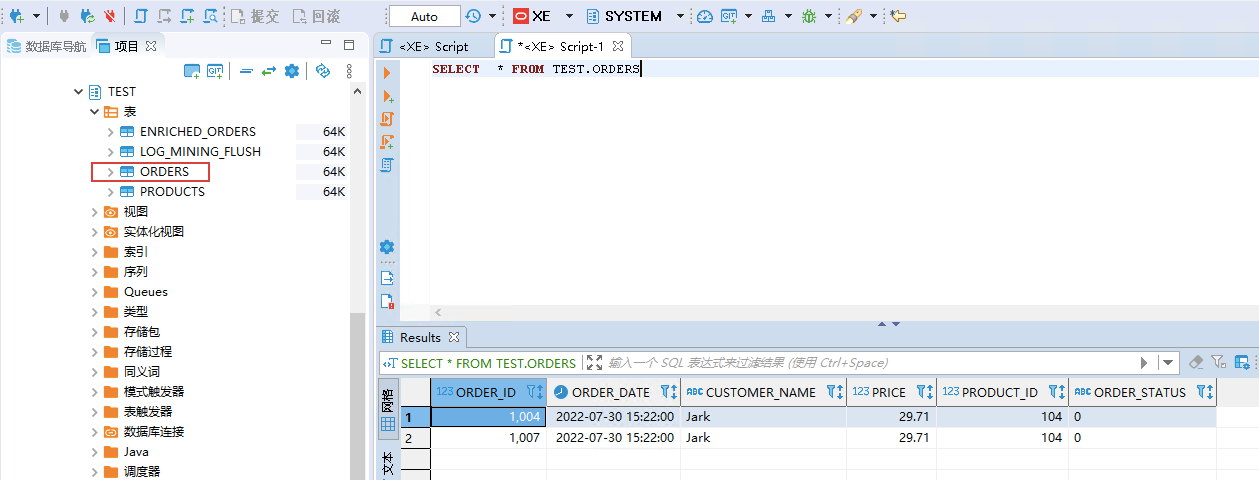
**Datart版本号** 版本: 1.0.0-rc.1 **错误描述** 使用Oracle数据源,开启服务端聚合,在可视化图时都会提示: ORA-00904: "DATART_VTABLE"."V_R_N": 标识符无效 **如何重现** ![image](https://user-images.githubusercontent.com/60683568/190945552-555f0f7e-6a9c-4af2-8b74-6f29e0738b96.png) 源数据表SELECT查询正常,没有“V_R_N”这个字段 ![image](https://user-images.githubusercontent.com/60683568/190946398-7136be71-1ddb-476c-9246-924ee2556da6.png) 使用Oracle数据源,并且开启服务端聚合 ![image](https://user-images.githubusercontent.com/60683568/190945796-75de11a0-b668-4fd2-8e86-d232b44d17f4.png) 数据视图,查询会多出“V_R_N”这个字段 ![image](https://user-images.githubusercontent.com/60683568/190946305-347c8f99-8f45-45ce-9e9e-e32b626a0eb2.png) 可视化都会提示:ORA-00904: "DATART_VTABLE"."V_R_N": 标识符无效 **期望结果** 希望大牛排查,修复数据视图多了"V_R_N"字段的Bug。 点赞👍
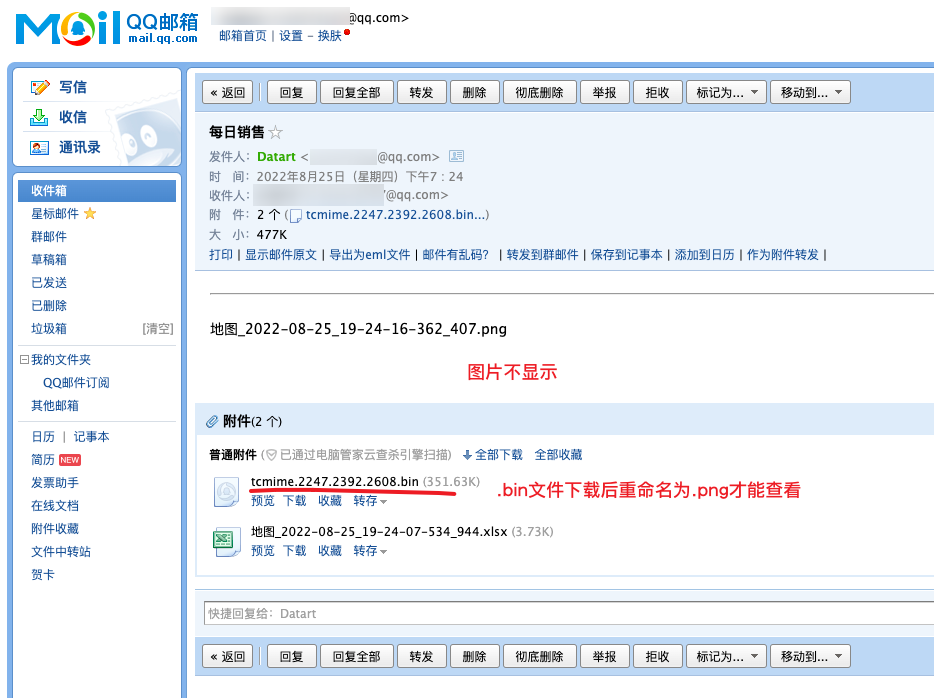
**Datart版本号** 1.0.0-rc.1 **错误描述** 定时任务,发送包含截图的邮件,图片不能正常显示。 **截图** ![jt_2022-08-25_19-30-29](https://user-images.githubusercontent.com/60683568/186654034-c0de02b2-5c4a-49b1-81bc-2d7e4cea69e7.png) **其他内容** 有关这个问题的任意其他内容 在application-config.yml配置文件中 ``` # mail config mail: host: smtp.exmail.qq.com port: 465 username: [email protected] fromAddress: [email protected] password: Password nickname: BIAdmin ``` **【fromAddress】 【nickname】** **这两个配置项,似乎不起使用。**
status: investigating

**Datart版本号** 1.0.0-rc.1 **错误描述** 数据视图数据库是SQL Server,SQL语句含有WITH,在可视化图表时,拖拽数据到字段,会提示:关键字 'WITH' 附近有语法错误。 **如何重现** 1、数据视图 WITH test as (select 'a' as a) select * from test 2、开始分析 拖拽数据至字段 **其他内容** MySQL的WITH功能正常 **期望结果** SQL Server也能支持WITH

datart 版本号: v1.0.0-rc.2 ## 希望表格有【总计】功能 ![image](https://github.com/running-elephant/datart/assets/60683568/7d82d91c-7c87-4976-a784-fd4db8e96179) 这是个1000行模拟数据,数量是从1~1000的,【总计】是列的合计值 ![image](https://github.com/running-elephant/datart/assets/60683568/a98c7683-7817-48a2-89dc-ab4fe1945072) 现在【数据汇总】功能是这样,不分页,计算结果不对。一看【总计】值就知道,还是默认100行一个分页。 ![image](https://github.com/running-elephant/datart/assets/60683568/8b40e375-155c-43c2-b69d-521c709ead0e) ### 将分页值调大后,计算正确,但表格就很卡,当数据行上3000行,就卡的不要不要的:( 如果使用分页,计算结果又只是当前分页的小计,不是整列的合计。 ![image](https://github.com/running-elephant/datart/assets/60683568/7d82d91c-7c87-4976-a784-fd4db8e96179) 所以,请参考一下如上Power BI小表格,当滑动到第1个分页底部时,加载下一个分页的数据,这样计算结果不但正确,体验又丝滑 # :)

常见柱、线、饼图等图表 如果使用渐变色,视觉上是不是会比现在单色好看些? ![image](https://github.com/running-elephant/datart/assets/60683568/16119f03-edd9-49a5-99f9-5d25617e36ad)