
David Lee



David Lee
I have the same issue. The workaround works, but it's a shame about this issue. It's still the best markdown editor in NP++
I got this error, but I'm unsure if my error is related. I'll make a comment to help others to trace through this problem. I had a new install of...
Understood, just thought it might help any investigate. The reason you cannot recreate might be because of a Database error, that doesn't exist on your system.
confirmed/duplicated on 9.10.02 / Edge
at DotNetNuke.Entities.Content.Workflow.WorkflowStateManager.AddWorkflowState(WorkflowState state) at Dnn.ExportImport.Components.Services.WorkflowsExportService.ImportData(ExportImportJob importJob, ImportDto importDto) at Dnn.ExportImport.Components.Engines.ExportImportEngine.Import(ExportImportJob importJob, ExportImportResult result, ScheduleHistoryItem scheduleHistoryItem) at Dnn.ExportImport.Components.Scheduler.ExportImportScheduler.DoWork()
This seems to be a problem with multiple languages. If we try only en-US it works. No other language works.
We have tried with and without. It seems to work when we do not have them enabled. We are retesting that now.
We had a template with 3 languages en-US (Disactivated) fr-FR (Activated) en-GB (Disactivated) We created a portal and imported, the import worked. All 3 languages existed in the new portal....
We have traced this problme down to the addition of a portal. If we import on portal/0 it works OK. If we created a new portal and import it fails...
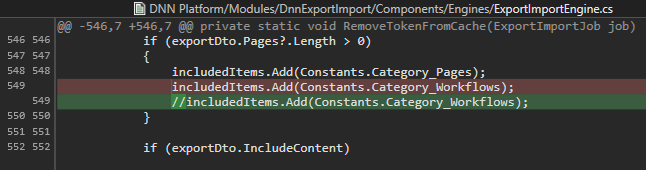 The problem is that the WORKFLOW export and import does not work. I believe it's getting the wrong data. Above is the change we made to the DNN platform....