

 jagenjo
Multiple input type
How hard would it be to make a node input accept multiple type ?
I know that you can use the 0 to make an input accept everything but it would be handy to make our own acceptance policy directly within the input declaration
I don't know if it's possible to disconnect a link by code but multiple input types will still be a really great feature I think
I though about this:
// as type mask
this.addInput('Value', string | []);

// as an array
this.addInput('Value', ['string', '[]']);

// as an arrow function
this.addInput('Value', (t => typeof t === 'string' || t instanceof Array));


Hi @atlasan !
Not yet I will, but as far as I know the type check is based only on the string so here you create a type "string, array" that won't match neither 'string' nor 'array' but 'string, array', but I might be wrong ^^
I go try and update
Just tested out, the 'string, array' notation does not work as intended it only takes the first element as type so here input only accept type string
Mh.. probably it will work with 'string,array' ^_^ sorry for that.
I'm quite sure it would. That's the way it is implemented, just probably it miss the trim() function to work with whispaces too.
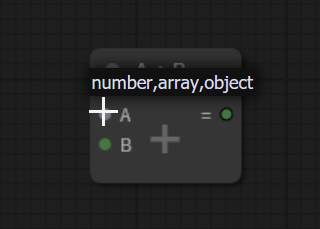 example of the 'operation node' first slot
Oh, you're right ! I didn't thought about that space would be an issue
Then yes a trim() would be a great addition 😃
Thanks for that !