

 directvt
Tiling would be useful
Ahoj, I'm impressed :)
Already used to minimal Awesome wm, I really appreciate the tiling layouts (and the keyboard navigation, but you have an issue for that...). With tiling, vtm would blow my mind :D
I imagine I could use a simple shortcut to arrange the windows in a view into tiles so they fill the desktop area. It would be great to have a few layouts available or configurable.

I think it will be easy to implement. I have queued this up for implementation. Thank you!

I get something like this concept
https://user-images.githubusercontent.com/11535558/139603085-ff94472f-3a2b-4261-b683-9cf9ea87ad21.mp4
Configurable using environment variable
VTM_TILE="h(v({ Term: \"htop\" }, h({ Term: \"man man\" }, { Term: \"bash\" })),{ Term: \"mc\" })"

this concept
It looks very good! I guess you're currently splitting horizontally or vertically in halves. In Awesome WM there are pre-set layouts:
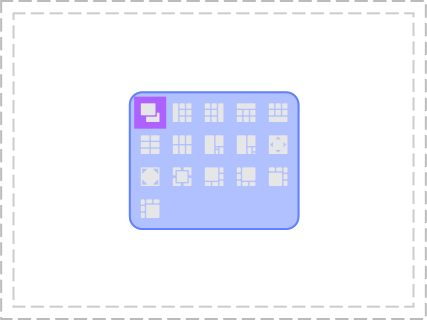
When a new window appears, it folds into the layout automatically, filling the space. Or when one is closed, the others take it's place. Most layouts also take a parameter so you can grow or shrink the most prominent part of the layout with a keystroke. You can also move the windows within the layout from one corner to another.
I hope it's not asking too much to mimic an existing solution :) please take it only as an inspiration from my side.
What would be the target use case for this new feature? I'm imagining monitoring screens running various forms of dashboards to be organized easily, efficient keyboard driven software development, k8s mission control centre...
I finished working on the UI layout prototype for this meta object. You can test and feel how it works on the demo server or build the dev/sdn branch.
Now I am implementing an environment variable parser to automatically generate the structure.
The following variable structure is suggested:
#example
VTM_PROFILE1="\"MenuName\", \"Title\", h1:1(v1:1({ \"bash -c htop\" }, h1:1({ \"bash -c man man\" }, { \"bash\" })),{ \"bash -c mc\" })"
VTM_PROFILE[n]="[2], [3], [4]"
- [1] Some literal for alphabetical order
- [2] Menu item caption
- [3] Window title
- [4] Layout/commands
Layout/command format:
[tag][ratio]([nested_object]...)
-
[ratio] Two integers N:M
-
[tag]:
- h Horizontal split
- v Vertical split
I will make format changes during implementation.
It now has a movable splitter and support for broadcast input
https://user-images.githubusercontent.com/11535558/139714062-6954f3c7-4c32-4ed0-a2b8-e198074961b6.mp4
What would be the target use case for this new feature? I'm imagining monitoring screens running various forms of dashboards to be organized easily, efficient keyboard driven software development, k8s mission control centre...
I am currently making a base object to form such structures. I play around with hand-built prototypes to get a better understanding of the use cases and how to store and generate such structures. It may be possible to make a generic scheme suitable for a large number of use cases. I will make it so that anyone can configure any number of required presets.
it works on the demo server
Tried it, truly mind blown :) Showing it to a colleague, I've noticed the multi-user interaction... that's something rather novel :D No need for screen sharing any more.
broadcast input
Please explain, sounds interesting.
You can make several windows active for input by left-clicking on them while holding Ctrl key. These windows will receive all input.
https://user-images.githubusercontent.com/11535558/139866019-e0cfafe5-df22-4493-9a54-ab22e06ea6a9.mp4
PS: This feature is disabled on the demo server. Only Ctrl+PgUp/Down and Esc available there.
I suggest the following operations on panes
Menu toolbar

-
▀█toggle maximize/restore pane (inside the manager) -
══,║vt/hz pane split -
<~>swap two selected panes (with active focus), if it is not selected then swap the current with its neighbor -
>|<set ratio to 1:1 for selected panes -
×remove selected panes
Layout mechanics
- reorganize panes/splits when
- pane is destroyed
- destroy tiling manager when the last pane is destroyed
- add the new hx/vt split (add a new pane)
- maximize (inside the manager) by double click on the pane header or using a menu toggle
- pane is destroyed
This is not a complete list, since perhaps not everything that is needed is listed here, since I have never used tile window managers. Most likely there are some panes operations that cannot be performed using the operations listed above.
Keyboard only scenario
- Press hot-key (not defined yet, something like
Alt+Spacefrom Table of keyboard shortcuts or CUA) to activate window menu- Use arrow keys (left/right) to select operation
- Press
Enter/Spaceto execute selected operation - Hit
Escto cancel/deactivate menu
I suggest the following operations on panes
- :) Maximizing/restoring is certainly my most frequently used feature -
META+M - Growing and shrinking a pane with
META+H/L. Resetting to 1:1 or default would be nice. - Jumping with focus between panes
META+J/K. - Then for moving panes around I like to press
METAand drag the pane to target location, effectively swapping them. There are also keyboard shortcuts for pushing panes around but I got used to the mouse in this case. - I think tearing a pane out of the layout or dropping one in would be needed so you could move it into another tiling layout or have it stand alone or take an existing stand alone window and drop it into the tiling manager window. This is quite specific to vtm as the layout is just a window in the space. Quite like what you'd do with a browser tab. In Awesome WM the equivalent would be moving a window between virtual desktops / tags (
META+SHIFT+number). - Sometimes I need to hide/minimize a pane and restore it again
META+N - For the case that a pane is minimized or while one pane is maximized, a list of the panes in a layout would help to restore/switch
Wow, it's really exciting to brainstorm with you and see how quickly you make progress :o) If it wasn't for the unknown waters of C++, I'd be tempted to start coding with you. Kudos.
I made automatic generation of menu items based on VTM_PROFILE* environment variables.
Generation occurs when the server vtmd starts.
Usage example
VTM_PROFILE1='"Menu label 1", "Window Title 1", h2:1(v1:1("bash -c htop", "bash -c mc"), "bash")'
VTM_PROFILE2='"Menu label 2", "Window Title 2", h( v("bash -c htop", "bash -c mc"), "bash")'
I have updated the releases for Windows, Linux and macOS.
I think that in the case of a keyboard only scenario, full-size menus are not needed, only slim ones are needed there. So I made a shrinkable menu. You can toggle the height by right clicking. Testing is available on the demo server.
https://user-images.githubusercontent.com/11535558/140645476-a43b458c-8b5c-4f05-b57f-a43d2054e687.mp4
Now any type of application can be hosted in a window manager, not just terminals.

Maximizing/restoring
https://user-images.githubusercontent.com/11535558/141484376-013e2d88-8120-4194-a0db-fc31ce43f4a9.mp4
Tile Tiling window manager is available for testing (mouse only edition)
This is an intermediate stage. I am now planning to add
- List of panes on the right side outside the window (style like window titles)
- Drag & Drop (pane is like a browser tab)
- Keyboard support
- Other things...
Detach a pane to a new window using drag&drop
https://user-images.githubusercontent.com/11535558/145707611-b20584f6-34e5-4099-b750-6cfaecad8e9d.mp4
Drag & drop support
https://user-images.githubusercontent.com/11535558/145722874-9eb6d889-c743-461b-a9eb-a7ea056b10d2.mp4
https://github.com/netxs-group/vtm/releases
List of panes (at demo server and dev/sdn)
https://user-images.githubusercontent.com/11535558/146191194-dac46200-a37f-4b1f-98a2-8eb2f0194a5b.mp4
Now you can cyclically swap any selected panes (use Ctrl to multiselect)
https://user-images.githubusercontent.com/11535558/147099157-60d95f7f-ca84-4bbb-b38d-c13a10a0f5d6.mp4
I think I'm pretty much done with the tiling window manager. Keyboard support is a separate global story #86.