

 dfki-ric
'Edit' and 'Edit Dictionary' not working
Describe the bug
I am trying to make a URDF model of existing CAD data. Experimenting with the interface I found that upon clicking on the Edit-Button in the Model Editing menu yields this error:
Traceback (most recent call last):
  File "$HOME/.config/blender/2.79/scripts/addons/phobos/operators/editing.py", line 562, in execute
    eUtils.removeProperties(obj, [self.property_name])
  File "$HOME/.config/blender/2.79/scripts/addons/phobos/utils/editing.py", line 700, in removeProperties
    elif prop[-1] == '*':
IndexError: string index out of range
Similarly, clicking the Edit Dictionary button yields:
Traceback (most recent call last):
  File "$HOME/.config/blender/2.79/scripts/addons/phobos/operators/editing.py", line 1211, in execute
    yaml.dump(bUtils.cleanObjectProperties(tmpdict), default_flow_style=False) + '"""\n',
  File "$BLENDER_DIR/2.79/python/lib/python3.5/site-packages/yaml/__init__.py", line 290, in dump
    return dump_all([data], stream, Dumper=Dumper, **kwds)
  File "$BLENDER_DIR/2.79/python/lib/python3.5/site-packages/yaml/__init__.py", line 278, in dump_all
    dumper.represent(data)
  File "$BLENDER_DIR/2.79/python/lib/python3.5/site-packages/yaml/representer.py", line 27, in represent
    node = self.represent_data(data)
  File "$BLENDER_DIR/2.79/python/lib/python3.5/site-packages/yaml/representer.py", line 48, in represent_data
    node = self.yaml_representers[data_types[0]](self, data)
  File "$BLENDER_DIR/2.79/python/lib/python3.5/site-packages/yaml/representer.py", line 207, in represent_dict
    return self.represent_mapping('tag:yaml.org,2002:map', data)
  File "$BLENDER_DIR/2.79/python/lib/python3.5/site-packages/yaml/representer.py", line 118, in represent_mapping
    node_value = self.represent_data(item_value)
  File "$BLENDER_DIR/2.79/python/lib/python3.5/site-packages/yaml/representer.py", line 52, in represent_data
    node = self.yaml_multi_representers[data_type](self, data)
  File "$BLENDER_DIR/2.79/python/lib/python3.5/site-packages/yaml/representer.py", line 317, in represent_object
    reduce = data.__reduce_ex__(2)
TypeError: can't pickle IDPropertyGroup objects
(I have replaced my home directory with $HOME and the directory where I have unpacked Blender with $BLENDER_DIR.) As I am new with phobos, I wonder if this is an actual bug or whether I just messed up something during installation.
On Blender startup, I also see this Warning (but thought this might be expected behavior due to not having updated some function):
$BLENDER_DIR/2.79/scripts/addons/phobos/defs.py:201: YAMLLoadWarning: calling yaml.load() without Loader=... is deprecated, as the default Loader is unsafe. Please read https://msg.pyyaml.org/load for full details.
To Reproduce Steps to reproduce the behavior:
- Installed Blender 2.79b as specified in dependencies
- I then followed the instructions on Installation in your wiki to install phobos
a) I started with the
1.0.1release but after noticing the errors also triedrelease-1.0andmasterbranch. - Loaded an FBX (
*.fbx) file and then wanted to setup the model for URDF export (i.e. defining phobostype for each object, creating links and joints, and so on). During this step I tried theEditandEdit Dictionarybuttons causing the aforementioned errors.
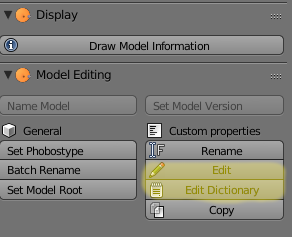
Expected behavior I would expect some popup or dropdown menu to actually edit properties.
Desktop (please complete the following information):
- OS: Ubuntu
- Version 20.04

Thanks for your issue, you can edit the dictionary in the object properties in the lower right corner of the GUI, The tab with the cube icon, right at the bottom.
But yes you are right the buttons should be working properly.

I fixed the operator on the master branch for Blender versions > 2.79. I also created a new release 1.0.3 which should work fine.
