
opal-tools
 opal-tools copied to clipboard
 daust
daust
A flexible installer to install your Oracle PL/SQL and APEX code into different environments. It is complemented by a flexible exporter to spool your Oracle objects into the file system.
During setup, we can use environment variables where appropriate, e.g. ``%USERPROFILE%`` which points to the user's home directory under Windows. It should be resolved to a physical location when prompted...

For exporting database objects, we can define a naming scheme for the export, e.g.: ``` --filename-templates default:#schema#/#object_type_plural#/#object_name#.sql package:#schema#/packages/#object_name#.pks "package body:#schema#/packages/#object_name#.pkb" ``` We need another variable ``#conn_pool_name#`` to use the connection...

When running sql scripts with SQLplus or SQLcl you can define variables in the script and you will be prompted for them, e.g.: ``` define LABEL=&&1 select user "&&LABEL." from...
Christoph made a great suggestions to replace placeholders during ``1.copy`` or ``3.install``. This way we could use a placeholder like ``#project.version#`` in the definition of the APEX application: 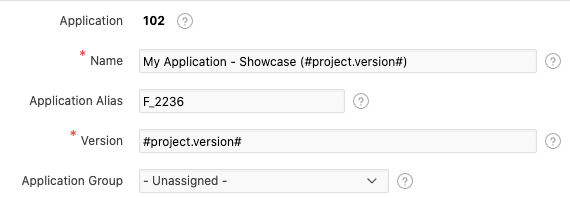 and...
Feature enhancement from @agrlica: Add version of OPAL TOOLS in validateConections (first thing I run on project/s). What about adding the database version, apex version and ords version as well...
Feature enhancement from @agrlica: Add Javadoc support on connection pool :) What exactly do you mean by that? Should I simply update the ``Customization.md`` file?
Feature enhancement from @agrlica: Add Direct connection on SQLcl on connection pool. This should be a script which will directly connect a sqlcl session with the selected connection pool. This...