
WSAPatch
 WSAPatch copied to clipboard
 cinit
cinit
Make WSA(Windows Subsystem for Android) run on Windows 10.
具体现象是当Windows10从睡眠中唤醒后, WSA会重新启动, 即使子系统资源设置是连续。 这曾经是原生的bug, 但根据https://github.com/Microsoft/WSA/issues/279, 已于Windows 11 version 10.0.22621.0中修复。 但至少Windows 10 version 10.0.19045.2788似乎仍受其影响。 我不知道问题是发生在系统进入睡眠时还是从睡眠中唤醒时。 **并非致命问题**, 在此留言, 希望能帮后人避坑。


Windows10 版本:19045.2604 WSA 版本:2210.40000.7.0、2211.40000.11.0、2301.40000.4.0  尝试了三个版本,均出现此问题 > 此处有演示 gif,稍等  adb 连接不了的话就安装不了应用了,wsl2 的网络隔离了,翻墙无能……

windows版本19045.2604 这个机器安装WSA_2210.40000.7.0是可以启动的。 按照MagiskOnWSALocal说明制作了包,也尝试过更改其中组合仍无效。 windows事件中看到 错误应用程序名称: WsaClient.exe,版本: 2301.40000.7.0,时间戳: 0x63f70972 错误模块名称: KERNELBASE.dll,版本: 10.0.19041.2546,时间戳: 0xe8e9ac9b 异常代码: 0xc0000409 错误偏移量: 0x000000000010fd12 错误进程 ID: 0x11a0 错误应用程序启动时间: 0x01d9541ccf1e4eb8 错误应用程序路径: C:\Program Files\WSA\WsaClient\WsaClient.exe 错误模块路径: C:\Windows\System32\KERNELBASE.dll 报告 ID: 70f35287-9e21-49aa-82c6-8a86d65f8674 错误程序包全名:...

win10 22H2 19045.2486 WSA_2211.40000.11.0 构建完成后无法安装 ``` Add-AppxPackage : 部署失败,原因是 HRESULT: 0x80073CF6, 无法注册包。 部署操作进程: E:\WSA\AppxManifest.xml Processing [ooooooooooooooooooooooooooooooooooooooooooooooooooooooooooooooooooooooo ] 所在位置 E:\WSA\Install.ps1:102 字符: 1 + Add-AppxPackage -ForceApplicationShutdown -ForceUpdateFromAnyVersion ... + ~~~~~~~~~~~~~~~~~~~~~~~~~~~~~~~~~~~~~~~~~~~~~~~~~~~~~~~~~~~~~~~~~~~~~ + CategoryInfo...

Windows 10 Enterprise 22H2 19045.2604 因为window系统是英文语言,安卓子系统进去之后自动也是英文,然后我去设置界面改成了中文,并且修改了一下设置来符合我的习惯。但是每次启动安卓子系统,语言、时区这些设置都会被重置。 我用的是这个人的整合版https://github.com/cinit/WSAPatch/issues/8#issue-1507735769 配合WS工具箱使用 https://apps.microsoft.com/store/detail/wsa%E5%B7%A5%E5%85%B7%E7%AE%B1/9PPSP2MKVTGT?hl=zh-cn&gl=cn   

I am using Windows 10 22H2 19045.2546. after cloning Magisk on wsa local everything went smooth after scripts/run.sh command everything completed but... Mount images mount: /tmp/wsa-build-fznfYhACuN_/system: mount failed: Operation not...

Windows ver: Windows Subsystem For Android ver:  IN DETAILS / 具体情况: Service WsaService stays in "Starting" status.  PRE-PATCHED VERSION USED / 使用了预构建版本: https://www.123pan.com/s/YFuuVv-jCBc 最后希望尽快支持Windows Server :).

Windows 10 22H2成功运行WSA,但是经常弹出系统错误窗口,老烦死了,求怎么解决啊 


Windows version? 10.0.19044.1886 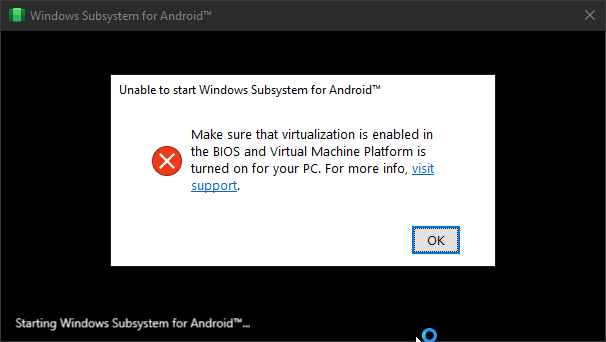 I already enabled Virtualization (VT-x) and Virtual Machine Platform on Windows Features.  WSA Ver? 2211.40000.11.0
