

 cinit
cinit
Not working even with regular WSA
Windows version? 10.0.19044.1886
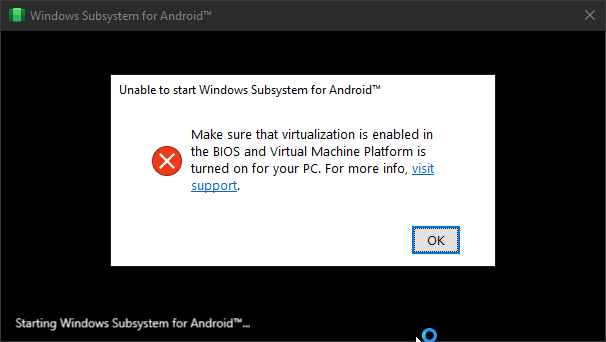 I already enabled Virtualization (VT-x) and Virtual Machine Platform on Windows Features.

WSA Ver? 2211.40000.11.0

Do you have Hyper-V enabled? Try https://learn.microsoft.com/en-us/virtualization/hyper-v-on-windows/quick-start/enable-hyper-v

1. Remove WSA
2. Go to "Turn Windows features on and off" and disable Hyper-V, Virtual Machine Platform, Windows Hypervisor Platform, and Windows Subsystem for Linux, then restart.
3. Reenable these features and restart a second time.
4. Make sure Core Isolation is turned off.
5. In registry editor (regedit), go to “\HKEY_LOCAL_MACHINE\SYSTEM\CurrentControlSet\Services\FsDepends"
Change the value of “Start” from “3” to “0”

You can change it back to 3 if it makes no difference
6. Then in CMD (Run as Adminstrator), paste:
bcdedit /set hypervisorlaunchtype auto
7. Reinstall WSA by downloading from prebuilt builds (Not self promoting but: WSABuilds) or patching it yourself using the excellent guide in this repo and running Run.bat
Hope this works for you!

Do you have Hyper-V enabled? Try https://learn.microsoft.com/en-us/virtualization/hyper-v-on-windows/quick-start/enable-hyper-v
I have it enabled.
1. Remove WSA
2. Go to "Turn Windows features on and off" and disable Hyper-V, Virtual Machine Platform, Windows Hypervisor Platform, and Windows Subsystem for Linux, then restart.
3. Reenable these features and restart a second time.
4. Make sure Core Isolation is turned off.
5. In registry editor (regedit), go to “\HKEY_LOCAL_MACHINE\SYSTEM\CurrentControlSet\Services\FsDepends"
Change the value of “Start” from “3” to “0”

You can change it back to 3 if it makes no difference
6. Then in CMD (Run as Adminstrator), paste:
bcdedit /set hypervisorlaunchtype auto7. Reinstall WSA by downloading from prebuilt builds (Not self promoting but: WSABuilds) or patching it yourself using the excellent guide in this repo and running
Run.batHope this works for you!
Doesn't work, still having the error.