

 UniversalRobots
Starting the Controllers after releasing the brakes
Versions
- ROS Driver version: 0.0.3
- Affected Robot Hardware Version(s): UR3e
- URCaps Software version(s): external_control 1.0.4, RS485
- PolyScope: 5.10
Hello all,
I have a problem that I can't start the controllers (via Python) after I released the brakes of the UR3e. I wrote a script that should do the initialization of the UR Robot. So first I release the brakes with BrakeRelease = rospy.ServiceProxy('ur_hardware_interface/dashboard/brake_release', Trigger). After the brakes are released the UR is in this mode (via rosservice get_safety_mode, get_robot_mode):
robot_mode:
  mode: 7
answer: "Robotmode: RUNNING"
success: True

safety_mode:
  mode: 1
answer: "Safetymode: NORMAL"
success: True
Teachpanel: Left Side: Status = Stopped or Paused
Teachpanel: Left bottom is green and Normal or Paused
I can initialize my controllers with SwitchJnt = rospy.ServiceProxy('/controller_manager/load_controller', LoadController) and in rqt the state of the controllers are initialized. When I try then to start the controllers with SwitchCart = rospy.ServiceProxy('/controller_manager/switch_controller', SwitchController) SwitchCart2 = SwitchCart(start_controllers=[str(name)], stop_controllers=[''], strictness=1, start_asap=False, timeout=0.0)
I get the following errors at my UR Driver terminal:
[ERROR] [1621335286.292537289]: Robot control is currently inactive. Starting controllers that claim resources is currently not possible. Not starting controller 'joint_state_controller'
[ERROR] [1621335286.292630844]: Could not switch controllers. The hardware interface combination for the requested controllers is unfeasible.
[ERROR] [1621335286.296715291]: Robot control is currently inactive. Starting controllers that claim resources is currently not possible. Not starting controller 'forward_cartesian_traj_controller'
[ERROR] [1621335286.296793376]: Could not switch controllers. The hardware interface combination for the requested controllers is unfeasible.
[ERROR] [1621335286.300911630]: Robot control is currently inactive. Starting controllers that claim resources is currently not possible. Not starting controller 'speed_scaling_state_controller'
[ERROR] [1621335286.300983984]: Could not switch controllers. The hardware interface combination for the requested controllers is unfeasible.
[ERROR] [1621335286.306255149]: Robot control is currently inactive. Starting controllers that claim resources is currently not possible. Not starting controller 'force_torque_sensor_controller'
[ERROR] [1621335286.306331574]: Could not switch controllers. The hardware interface combination for the requested controllers is unfeasible.
I use the latest beta UR driver and the new Pass-Through Controller of the FZI. I deleted the controller spawner from the ur_control.launch because when I start the Driver with the controllers before the brakes are released, the controllers won't start. Our use case is a autonomous driving robot plattform.
So my questions are, what is the best way to start the UR Robot with Python? And how can I start the controllers after I released the brakes? Is there a way that I can start the driver with the controllers before I release the brakes, so that I can switch on the controllers after releasing the brakes?
Best regards

First of all, there are two ways you can operate the driver in. The default mode and the headless mode. This is something I've wanted to document for a long time, so I might as well take my time answering this.
The headless mode can be enabled in the bringup launchfiles (e.g. ur3e_bringup.launch by providing the headless_mode:=true argument to the launchfile.
In either mode the robot needs URScript code to interpret the commands being sent from the ROS side, which resides here and will be moved to here in the near future.
While the headless_mode sends the script directly to the primary interface for execution on the robot, the "normal" mode requires the external_control URCap to be installed on the robot. This will then query the script code from a running driver and execute it inside a program on the teach pendant:
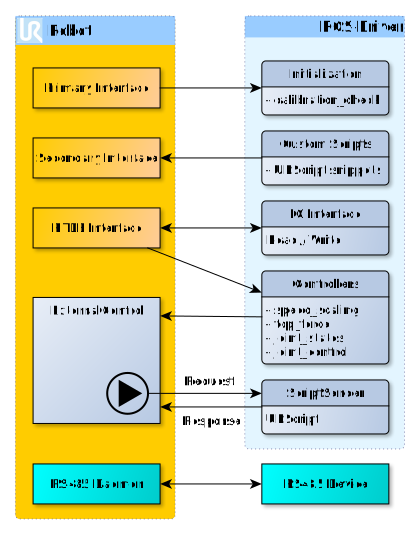
For the headless mode to work, on e-Series robots the controller has to be set into "remote_control" mode as it will otherwise ignore incoming script code.
Using either the headless_mode or the "normal" mode has certain implications:
- The
headless_moderequires "remote_control" mode enabled and active on e-Series robots (not in URSim, though) - When performing actions on the teach pendant, for example moving the robot (on CB3 robots or inside URSim) will effectively stop the robot from executing the running script. In
headless_modeyou will only notice this with an output on the ROS driver (Connection to reverse interface dropped.) or by listening to the topic/ur_hardware_interface/robot_program_running. - Restarting the robot program in "normal mode" can be done either by pressing the Play button (:arrow_forward:) on the teach pendant or through the dashboard client's
playservice (the latter requiring "remote_control" mode active, again). Note: For easier use, therobot_state_helper´](https://github.com/UniversalRobots/Universal_Robots_ROS_Driver/blob/master/ur_robot_driver/doc/ROS_INTERFACE.md#robot_state_helper) node (started by default) offers the [/ur_hardware_interface/set_mode` action to do every necessary step from starting up the robot to starting the robot program. - Restarting the robot program in
headless_modecan be done using the serviceresend_robot_programto restart control by the ROS driver.
Now, coming to your specific problem:
As long as the script code is not running on the robot controller, no (writing) ros controllers are able to run. You can still read joint states and FTS measurements and so on from the robot, but you won't be able to control the robot.
To transparently inform users about this state, the driver refuses to start controllers while no script code is running. As soon as the script code is running, you will see Robot connected to reverse interface. Ready to receive control commands. in the driver's command line output. When it loses connection (the script code is no longer running), the message Connection to reverse interface dropped. will be printed.
With the information given above, you can either:
- Put the robot into "remote_control" mode, use the
headless_modeand callresend_robot_programonce the breaks are released - Configure the robot such that it is in "remote_control" mode and by default loads a program containing the
external_controlprogram node. Then, after starting up the driver, call the/ur_hardware_interface/set_modeaction withtarget_robot_mode=7(sorry, I still have to document those) and withplay_program=true. This will do all the necessary steps (starting the robot, releasing the breaks, starting the script code) without further interaction. This can also be used to recover from any error (protective stop, EM-Stop, etc.). However, in that case I suggest to call it withplay_program=falseand calldashboard/playseparately for the reasons described here.
The URCap version will have the benefit that you will clearly see the state the robot currently is in on the teach pendant. Apart from that, they are both similar.
Note that the /ur_hardware_interface/set_mode action can also be used when using the headless_mode only that the play_program argument will play the program most recently loaded in polyscope (if any) and start that. That might not be what you want, so I wouldn't use this flag when using headless_mode.
I hope that this did answer all question related to this. If not., please let me know so we can improve this answer and add it to this driver's documentation.

Hello
thank you very much for the detailed answer!
Unfortunately, it has not yet worked with the proposed methods. And unfortunately I can't work on this topic for the next few weeks either. As soon as I can work on this topic again, I will get back to you with more detailed feedback.
However, I have a question about the "program" commands. What exactly does the command resend_robot_program mean and which program is sent to the robot again? Is it a previously loaded .urc program in the robot?
Does resend_robot_program and dashboard/play mean the same kind of program?
Many greetings
However, I have a question about the "program" commands. What exactly does the command
resend_robot_programmean and which program is sent to the robot again? Is it a previously loaded .urc program in the robot? Doesresend_robot_programanddashboard/playmean the same kind of program?
No, they don't. Basically, resend_robot_program sends this URScript code to the robot's primary interface, while dashboard/play starts the polyscope program currently loaded on the teach panel, being equivalent to pressing the "play" button.
In the end, if using a Polyscope program containing the `external_control" program node, the resulting script code mostly equivalent, the interfaces you mentioned are different.
Note to me: Merge the above documentation with the one in https://github.com/UniversalRobots/Universal_Robots_ROS_Driver/blob/master/ur_robot_driver/README.md