

 UniversalRobots
How to use test_move.py and moveit
Summary
It might be hard to control robot by using python script "test_move.py". I share simple manual.
Versions
- ROS Driver version: Melodic
- Affected Robot Software Version(s): 5.3.0
- Affected Robot Hardware Version(s): UR 3e
- Robot Serial Number: -
- UR+ product(s) installed: ExternalControl
- URCaps Software version(s): -
Solution
following Universal_Robots_ROS_Driver/ur_robot_driver/doc/ROS_INTERFACE.md
we should change the topic name from "follow_joint_trajectory" to "scaled_pos_joint_traj_controller/follow_joint_trajectory" of "~/catkin_ws/src/fmauch_universal_robot/ur_driver/test_move.py"
most Importantly, after change your "test_move.py" file. you should follow these steps.
- power on the robot.
- release brake of the robot.
- run "roslaunch ur_robot_driver [YOUR_ROBOT_MODEL]_bringup.launch robot_ip:=[YOUR_ROBOT_IP]"
- start URcap program "ExternalControl".
- run "rosrun ur_driver test_move.py "
then your robot is gonna move follow the joint value you've set in "test_move.py".
Q1 = [1.7,-1.6,-0.87996,-2.12741,1.47178,-4.60472]
Q2 = [1.6,-1.7,-0.87996,-2.12741,1.47178,-4.60472]
Q3 = [1.5,-1.8,-0.87996,-2.12741,1.47178,-4.60472]
!!! Caution !!! You should not use the default value in "test_move.py". you should check the joint value of your robot, and gotta set it safely.
Ref: https://answers.ros.org/question/344391/ur_robot_driver-test_movepy-keeps-on-waiting-for-server/?answer=377525#post-id-377525
using it with moveit!
you should aware that, we control UR by using "scaled_pos_joint_traj_controller/follow_joint_trajectory" node.
so you gotta edit something like below.
in my case, I'm using UR3e, so move to the directory.
so open the "/catkin_ws/src/fmauch_universal_robot/ur3_e_moveit_config/launch/ur3_e_moveit_planning_execution.launch" file and change
<!-- Remap follow_joint_trajectory -->
  <remap if="$(arg sim)" from="/follow_joint_trajectory" to="arm_controller/follow_joint_trajectory"/>
to
<!-- Remap follow_joint_trajectory -->
  <remap if="$(arg sim)" from="/follow_joint_trajectory" to="scaled_pos_joint_traj_controller/follow_joint_trajectory"/>
and open the "/catkin_ws/src/fmauch_universal_robot/ur3_e_moveit_config/config/controllers.yaml"
and change
controller_list:
  - name: ""
    action_ns: follow_joint_trajectory
to
controller_list:
  - name: "scaled_pos_joint_traj_controller"
    action_ns: follow_joint_trajectory
after that,
- power on the robot.
- release brake of the robot.
- run "roslaunch ur_robot_driver [YOUR_ROBOT_MODEL]_bringup.launch robot_ip:=[YOUR_ROBOT_IP]"
- start URcap program "ExternalControl".
- run "roslaunch ur3_e_moveit_config ur3_e_moveit_planning_execution.launch"
- run "roslaunch ur3_e_moveit_config moveit_rviz.launch config:=true"
then you could see the result below.
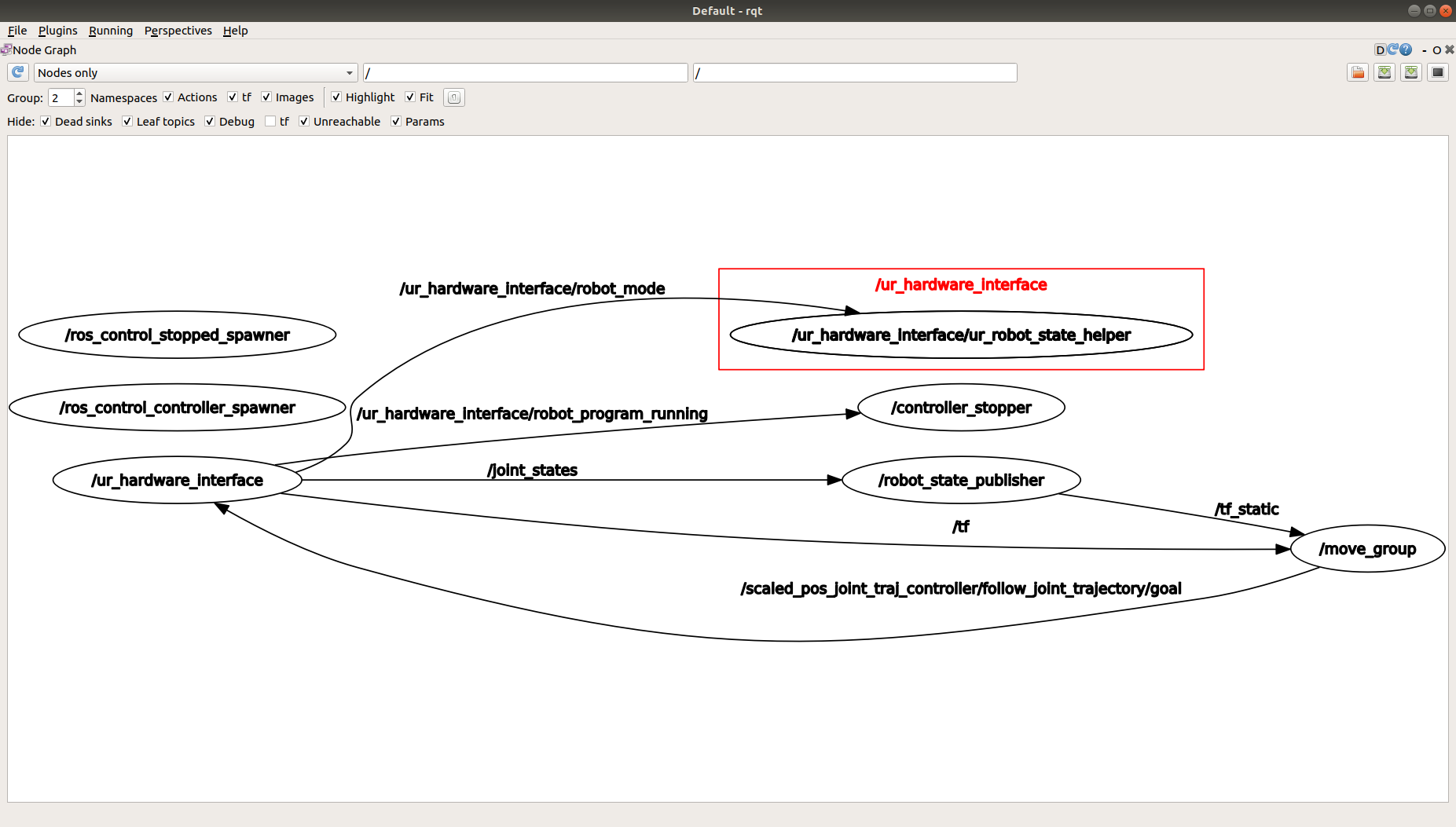
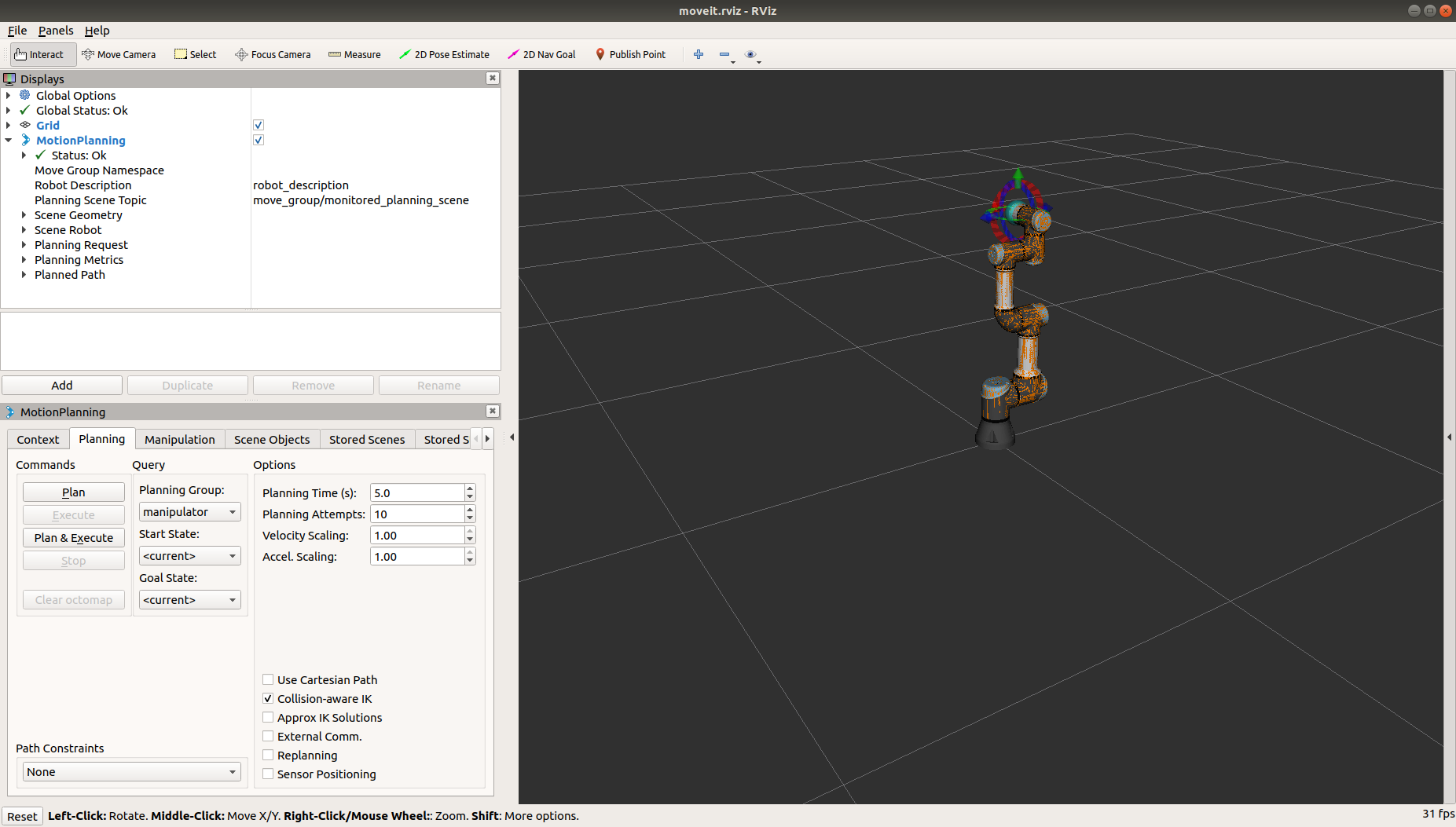

Hi,When I was debugging, I found that my "/catkin_ws/src/fmauch_universal_robot/ur3_e_moveit_config/config/" package did not contain the controllers.yaml file you mentioned, only the ros_controllers.yaml and fake_controllers.yaml files. How should I change the parameters? Thank you!

Hi,When I was debugging, I found that my "/catkin_ws/src/fmauch_universal_robot/ur3_e_moveit_config/config/" package did not contain the controllers.yaml file you mentioned, only the ros_controllers.yaml and fake_controllers.yaml files. How should I change the parameters? Thank you!
Hi @pibaopi !
I want you to check out this first, what package did you download?
as you can see the package below, there is controllers.yaml file. https://github.com/ros-industrial/universal_robot/tree/kinetic-devel/ur3_e_moveit_config/config
plz check out this one, and give me the feedback :)
Thank you very much for your reply @suho0515 !
The package I downloaded is as follows.
In this article,
https://github.com/UniversalRobots/Universal_Robots_ROS_Driver
I downloaded it directly according to the command in Building.
$ git clone -b calibration_devel https://github.com/fmauch/universal_robot.git src/fmauch_universal_robot
I'm sorry I didn't find the corresponding package, I can only show you this way.
Thanks again for your reply.
https://github.com/ros-industrial/universal_robot/tree/kinetic-devel/ur3_e_moveit_config/config is currently not supported, when using this driver. See https://github.com/ros-industrial/universal_robot/pull/538 for details. Therefore, the fork from https://github.com/fmauch/universal_robot.git src/fmauch_universal_robot, branch calibration_devel should be used (which is essentially the same as the PR mentioned earlier).
The file got renamed in newer Moveit versions by default, so I followed that.
The same methods should be applicable to that, as well.
