
AdvancedResearch
 AdvancedResearch copied to clipboard
 The-Swarm-Corporation
An open source and enterprise-grade implementation of the orchestrator-worker pattern from Anthropic's paper, "How we built our multi-agent research system," using the swarms framework.
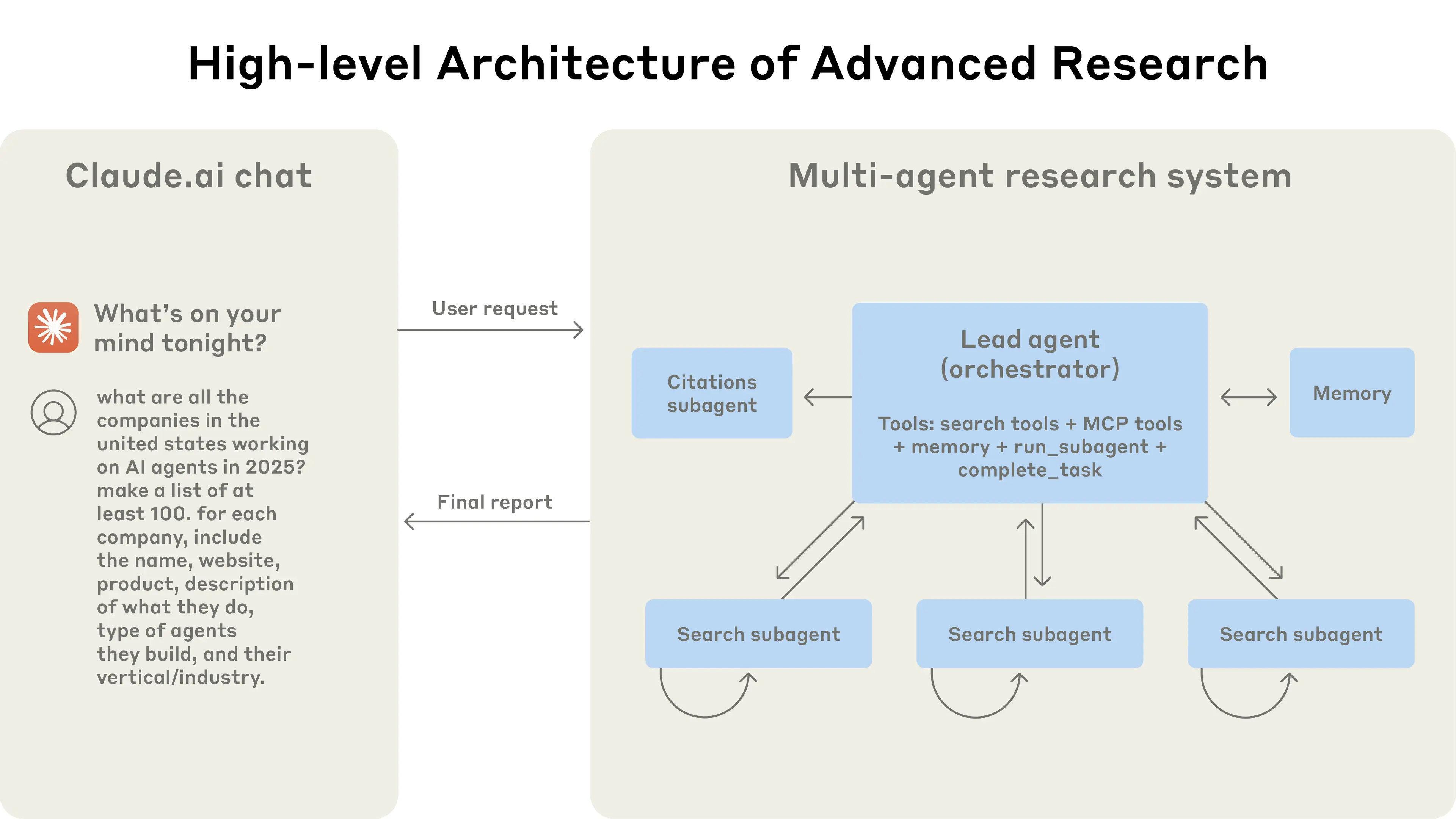
Advanced Research System (Based on Anthropic's Paper)







An enhanced implementation of the orchestrator-worker pattern from Anthropic's paper, "How we built our multi-agent research system", built on top of the bleeding-edge multi-agent framework swarms. Our implementation of this advanced research system leverages parallel execution, LLM-as-judge evaluation, and professional report generation with export capabilities.
Installation
pip3 install -U advanced-research

# uv pip install -U advanced-research
Environment Variables
# Exa Search API Key (Required for web search functionality)
EXA_API_KEY="your_exa_api_key_here"

# Anthropic API Key (For Claude models)
ANTHROPIC_API_KEY="your_anthropic_api_key_here"

# OpenAI API Key (For GPT models)
OPENAI_API_KEY="your_openai_api_key_here"

# Worker Agent Configuration
WORKER_MODEL_NAME="gpt-4.1"
WORKER_MAX_TOKENS=8000

# Exa Search Configuration
EXA_SEARCH_NUM_RESULTS=2
EXA_SEARCH_MAX_CHARACTERS=100
Note: At minimum, you need EXA_API_KEY for web search functionality. For LLM functionality, you need either ANTHROPIC_API_KEY or OPENAI_API_KEY.
Quick Start
Basic Usage
from advanced_research import AdvancedResearch

# Initialize the research system
research_system = AdvancedResearch(
    name="AI Research Team",
    description="Specialized AI research system",
    max_loops=1,
)

# Run research and get results
result = research_system.run(
    "What are the latest developments in quantum computing?"
)
print(result)
With Export Functionality
from advanced_research import AdvancedResearch

# Initialize with export enabled
research_system = AdvancedResearch(
    name="Quantum Computing Research",
    description="Research team focused on quantum computing advances",
    max_loops=1,
    export_on=True,  # Enable JSON export
)

# Run research - will automatically export to JSON file
research_system.run(
    "What are the latest developments in quantum computing?"
)
# Results will be saved to a timestamped JSON file
Advanced Configuration
from advanced_research import AdvancedResearch

# Initialize with custom settings
research_system = AdvancedResearch(
    name="Medical Research Team",
    description="Specialized medical research system",
    director_model_name="claude-3-5-sonnet-20250115",  # Use latest Claude model
    worker_model_name="claude-3-5-sonnet-20250115",
    director_max_tokens=10000,
    max_loops=2,  # Multiple research iterations
    output_type="all",  # Include full conversation history
    export_on=True,
)

# Run research with image input (if applicable)
result = research_system.run(
    "What are the most effective treatments for Type 2 diabetes?",
    img=None  # Optional image input
)
Batch Processing Multiple Queries
from advanced_research import AdvancedResearch

# Initialize the system
research_system = AdvancedResearch(
    name="Batch Research System",
    max_loops=1,
    export_on=True,
)

# Process multiple research tasks
tasks = [
    "Latest advances in renewable energy storage",
    "Current state of autonomous vehicle technology",
    "Recent breakthroughs in cancer immunotherapy"
]

# Run batch processing
research_system.batched_run(tasks)
Using Different Output Formats
from advanced_research import AdvancedResearch

# Initialize with specific output type
research_system = AdvancedResearch(
    name="Research System",
    output_type="json",  # Options: "all", "json", "markdown"
    export_on=False,  # Get results directly instead of exporting
)

# Run research and get formatted output
result = research_system.run(
    "What are the key challenges in AGI development?"
)

# Check available output methods
available_formats = research_system.get_output_methods()
print(f"Available output formats: {available_formats}")
Quick Reference
| Task | Code | Documentation |
|---|---|---|
| Basic Research | AdvancedResearch().run("query") |
Basic Usage → |
| Export Results | AdvancedResearch(export_on=True) |
Export Config → |
| Batch Processing | system.batched_run([queries]) |
Batch Processing → |
| Custom Models | AdvancedResearch(director_model_name="model") |
Advanced Config → |
| Output Formats | AdvancedResearch(output_type="json") |
Output Types → |
Examples
Ready-to-run examples demonstrating all features of the Advanced Research system:
| Example | Description | File |
|---|---|---|
| Basic Usage | Simple research with minimal configuration | examples/basic_usage.py |
| Export Functionality | Save research results to JSON files | examples/export_example.py |
| Advanced Configuration | Custom models, tokens, and multiple loops | examples/advanced_config.py |
| Custom Models | Different AI model configurations | examples/custom_models.py |
| Output Formats | JSON, markdown, and conversation history | examples/output_formats.py |
| Batch Processing | Process multiple queries efficiently | examples/batch_processing.py |
| Multi-Loop Research | Iterative research with refinement | examples/multi_loop_research.py |
| Session Management | Conversation tracking and persistence | examples/session_management.py |
| Chat Interface | Interactive web-based chat demo | examples/chat_demo.py |
Quick Start Examples:
# Basic research
python examples/basic_usage.py

# With export functionality
python examples/export_example.py

# Advanced configuration
python examples/advanced_config.py
View All Examples →
Key Features
| Feature | Description |
|---|---|
| Orchestrator-Worker Architecture | A Director Agent coordinates research strategy while specialized worker agents execute focused search tasks with Exa API integration. |
| Advanced Web Search Integration | Utilizes exa_search with structured JSON responses, content summarization, and intelligent result extraction for comprehensive research. |
| High-Performance Parallel Execution | Leverages ThreadPoolExecutor to run multiple specialized agents concurrently, achieving significant time reduction for complex queries. |
| Flexible Configuration | Customizable model selection (Claude, GPT), token limits, loop counts, and output formatting options. |
| Conversation Management | Built-in conversation history tracking with the swarms framework's Conversation class for persistent dialogue management. |
| Export Functionality | JSON export with automatic timestamping, unique session IDs, and comprehensive conversation history. |
| Multiple Output Formats | Support for various output types including JSON, markdown, and full conversation history formatting. |
| Session Management | Unique session IDs, batch processing capabilities, and step-by-step research execution control. |
Architecture
The system follows a streamlined orchestrator-worker pattern with parallel execution:
                [User Query + Configuration]
                            │
                            ▼
           ┌─────────────────────────────────┐
           │       AdvancedResearch          │ (Main Orchestrator)
           │  - Session Management          │
           │  - Conversation History        │
           │  - Export Control              │
           └─────────────────────────────────┘
                            │ 1. Initialize Research Session
                            ▼
           ┌─────────────────────────────────┐
           │      Director Agent             │ (Research Coordinator)
           │  - Query Analysis & Planning    │
           │  - Task Decomposition           │
           │  - Research Strategy            │
           └─────────────────────────────────┘
                            │ 2. Decompose into Sub-Tasks
                            ▼
       ┌─────────────────────────────────────────┐
       │     Parallel Worker Execution           │
       │   (ThreadPoolExecutor - Concurrent)     │
       └─────────────────────────────────────────┘
          │           │           │           │
          ▼           ▼           ▼           ▼
    ┌──────────┐ ┌──────────┐ ┌──────────┐ ┌──────────┐
    │Worker 1  │ │Worker 2  │ │Worker 3  │ │Worker N  │
    │Exa Search│ │Exa Search│ │Exa Search│ │Exa Search│
    │Integration│ │Integration│ │Integration│ │Integration│
    └──────────┘ └──────────┘ └──────────┘ └──────────┘
          │           │           │           │
          ▼           ▼           ▼           ▼
       ┌─────────────────────────────────────────┐
       │      Results Aggregation                │
       │  - Combine Worker Outputs               │
       │  - Format Research Findings             │
       └─────────────────────────────────────────┘
                            │ 3. Synthesize Results
                            ▼
           ┌─────────────────────────────────┐
           │    Conversation Management      │
           │  - History Tracking             │
           │  - Output Formatting            │
           │  - Export Processing            │
           └─────────────────────────────────┘
                            │ 4. Deliver Results
                            ▼
              [Formatted Report + Optional JSON Export]
Workflow Process
- Session Initialization:
AdvancedResearchcreates a unique research session with conversation tracking - Director Agent Planning: The director agent analyzes the query and plans research strategy
- Parallel Worker Execution: Multiple worker agents execute concurrent searches using Exa API
- Results Aggregation: Worker outputs are combined and synthesized into comprehensive findings
- Output Processing: Results are formatted according to specified output type (JSON, markdown, etc.)
- Export & Delivery: Optional JSON export with timestamped files and conversation history
Contributing
This implementation is part of the open-source swarms ecosystem. We welcome contributions!
- Fork the repository
- Create a feature branch (
git checkout -b feature/amazing-research-feature) - Commit your changes (
git commit -m 'Add amazing feature') - Push to the branch (
git push origin feature/amazing-research-feature) - Open a Pull Request
Development Setup with uv
# Clone and setup development environment
git clone https://github.com/The-Swarm-Corporation/AdvancedResearch.git
cd AdvancedResearch

uv venv

uv pip install -r requirements.txt

# Setup environment variables
cp .env.example .env
# Edit .env with your API keys
📄 License
This project is licensed under the MIT License. See the LICENSE file for details.
📚 Citation
If you use this work in your research, please cite both the original paper and this implementation:
@misc{anthropic2024researchsystem,
    title={How we built our multi-agent research system},
    author={Anthropic},
    year={2024},
    month={June},
    url={https://www.anthropic.com/engineering/built-multi-agent-research-system}
}

@software{advancedresearch2024,
    title={AdvancedResearch: Enhanced Multi-Agent Research System},
    author={The Swarm Corporation},
    year={2024},
    url={https://github.com/The-Swarm-Corporation/AdvancedResearch},
    note={Implementation based on Anthropic's multi-agent research system paper}
}

@software{swarms_framework,
    title={Swarms: An Open-Source Multi-Agent Framework},
    author={Kye Gomez},
    year={2023},
    url={https://github.com/kyegomez/swarms}
}
Documentation
For comprehensive API documentation, examples, and advanced usage:
View Full API Documentation →
Related Work
- Original Paper - "How we built our multi-agent research system" by Anthropic
- Swarms Framework - The underlying multi-agent AI orchestration framework
Support
- Issues: GitHub Issues
- Discussions: GitHub Discussions
- Community: Join our Discord
Built with Swarms framework for production-grade agentic applications
Metadata
Owner
 The-Swarm-Corporation
Metadata
An open source and enterprise-grade implementation of the orchestrator-worker pattern from Anthropic's paper, "How we built our multi-agent research system," using the swarms framework.