

 QwikDev
I would like to access the env property of the Cloudflare functions as part of the ResquesEvent or its RequestContext
Is your feature request related to a problem?
I've been working on integrating Qwik + Prisma + Cloudflare Pages. To achieve this we need to use Prisma Data-Proxy and read the database URL from the Cloudflare Worker context env property instead that from the process.env as you would usually do.
See https://github.com/prisma/prisma/issues/13771#issuecomment-1204295665
Describe the solution you'd like
I would like to either have the env property in the RequestEvent.
export declare interface RequestEvent {
    request: RequestContext;
    response: ResponseContext;
	env:any; // <---- this
    url: URL;
    /** URL Route params which have been parsed from the current url pathname. */
    params: RouteParams;
    /** Platform specific data and functions */
    platform: Record<string, any>;
    next: () => Promise<void>;
    abort: () => void;
}
Or in the RequestContext
export declare interface RequestContext {
    formData(): Promise<FormData>;
	env:any; // <---- this
    headers: Headers;
    json(): Promise<any>;
    method: string;
    text(): Promise<string>;
    url: string;
}
Describe alternatives you've considered
I don't have any other suggestions but I would expect other platforms like Vercel that use Cloudflare Workers to need something similar.
Additional context
No response

Interested in hearing about this too. I'm wondering how to use/access the CloudFlare KV.

@NachoVazquez Yes, seems like the env that gets passed to the CF request handlers is actually passed as-is to as platform.
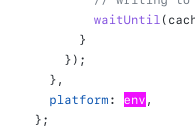
https://github.com/BuilderIO/qwik/blob/1d4a62a8cf8d2e8bb6db31012d805bdc4ecaf9de/packages/qwik-city/middleware/cloudflare-pages/index.ts#L71
Nice I was able to use it for the KV store but I wasn't sure it was also bringing the ENVIRONMENT secrets. Thanks, in that case, I can close this down!
@NachoVazquez awesome! :heart: Can you share me some code for the KV usage? I'm playing with it now and I think I'm almost getting it :D
Sure @tunnckoCore , I was planning in publishing a repo with the basic setup tomorrow, but I can show you what you need now. Give me a second I'll add the details as an update to this comment.
UPDATE
The first thing you need is to add the --kv <KV_NAMESPACE> options to the serve command in your package.json
...
"serve": "wrangler pages dev ./dist --kv <KV_NAMESPACE>",
...
Replace <KV_NAMESPACE> with the namespace you created on Cloudflare.
Then you can access it in your Qwik requests. The following is my root route but it works in any route.
import { component$, Resource } from '@builder.io/qwik';
import { DocumentHead, RequestHandler, useEndpoint } from '@builder.io/qwik-city';

export const onGet: RequestHandler<KVNamespaceListResult<unknown>['keys'], { KV_NAMESPACE: KVNamespace }> = async ({
  platform,
}) => {
  const list = (await platform.KV_NAMESPACE.list()).keys;

  return list;
};

export default component$(() => {
  const response = useEndpoint<typeof onGet>();
  return (
    <div>
      <Resource
        value={response}
        onPending={() => <div>Loading...</div>}
        onRejected={() => <div>Error</div>}
        onResolved={(data) => (
          <>
            <h1>hi</h1>
            <pre>{JSON.stringify(data, null, 2)}</pre>
          </>
        )}
      />
    </div>
  );
});

export const head: DocumentHead = {
  title: 'Welcome to Qwik',
};
Update 2
Notice that the above code is just listing the available keys for a given Namespace, but you could easily read the value of a given key or execute any other operation.
Additionally, you might want to install the @cloudflare/workers-types and configure the tsconfig.json compilerOptions to have access to the KV types
"types": ["node", "vite/client", "@cloudflare/workers-types"],
Yeah, thanks! Exactly what I did, just console logged the platform and it was there.
I added a second update with the necessary config to have access to the wrangler types.