

 NVlabs
Failed to publish a correct camera_info topic
Hi,
Thanks for developing and sharing your great tool.
I used docker to install the requirements. To start camera node, when running roslaunch dope camera.launch, I get this error:
Traceback (most recent call last):
  File "/root/catkin_ws/devel/lib/dope/camera", line 15, in <module>
    exec(compile(fh.read(), python_script, 'exec'), context)
  File "/root/catkin_ws/src/dope/nodes/camera", line 13, in <module>
    from camera_info_manager import CameraInfoManager
ModuleNotFoundError: No module named 'camera_info_manager'
Any idea?

Hi,
Thanks for developing and sharing your great tool.
I used docker to install the requirements. To start camera node, when running
roslaunch dope camera.launch, I get this error:Traceback (most recent call last): File "/root/catkin_ws/devel/lib/dope/camera", line 15, in <module> exec(compile(fh.read(), python_script, 'exec'), context) File "/root/catkin_ws/src/dope/nodes/camera", line 13, in <module> from camera_info_manager import CameraInfoManager ModuleNotFoundError: No module named 'camera_info_manager'Any idea?
Found #150 but don't know how to fix it. Should I modify the CMakeList.txt and build the docker from the scratch?
Can you give me the command to install that package manually? when I run apt-get update && apt install -y ros-noetic-camera-info-manager-py, I get the following error:
Hit:1 http://security.ubuntu.com/ubuntu focal-security InRelease
Hit:2 http://packages.ros.org/ros/ubuntu focal InRelease
Hit:3 http://archive.ubuntu.com/ubuntu focal InRelease
Get:4 http://archive.ubuntu.com/ubuntu focal-updates InRelease [114 kB]
Get:5 http://archive.ubuntu.com/ubuntu focal-backports InRelease [101 kB]
Fetched 214 kB in 1s (246 kB/s)
Reading package lists... Done
Reading package lists... Done
Building dependency tree
Reading state information... Done
E: Unable to locate package ros-noetic-camera-info-manager-py
Hmm, you're right, it looks like camera_info_manager_py has not been released to noetic yet, so there is no package ros-noetic-camera-info-manager-py. I have no idea why the other guy in #150 said it worked.
From browsing the code, it looks like the python code is python3 compatible, so it should work on noetic. Please try just cloning https://github.com/ros-perception/camera_info_manager_py into your catkin workspace. You'll probably have to modify the Dockerfile and add a git clone https://github.com/ros-perception/camera_info_manager_py command.

Thanks for your answer.
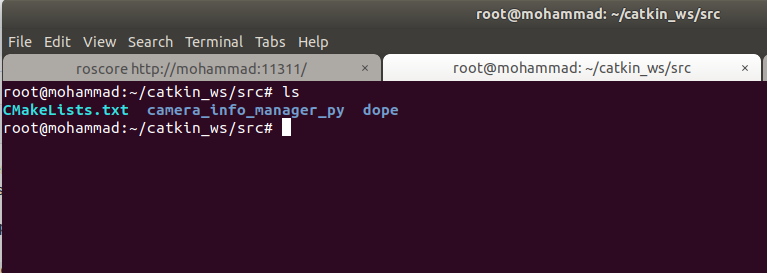
I cloned https://github.com/ros-perception/camera_info_manager_py into my workspace but still it doesn't work :(
I just added RUN git clone https://github.com/ros-perception/camera_info_manager_py to the Dockerfile but get this error:
Sending build context to Docker daemon  180.2kB
Step 1/18 : FROM ros:noetic-robot
 ---> 82be12f425e1
Step 2/18 : ENV HOME /root
 ---> Using cache
 ---> bbc8937e160b
Step 3/18 : ENV DEBIAN_FRONTEND=noninteractive
 ---> Using cache
 ---> 38954f366a3d
Step 4/18 : RUN git clone https://github.com/ros-perception/camera_info_manager_py
 ---> Running in 84a61f2387c7
/bin/sh: 1: git: not found
The command '/bin/sh -c git clone https://github.com/ros-perception/camera_info_manager_py' returned a non-zero code: 127
I just added
RUN git clone https://github.com/ros-perception/camera_info_manager_pyto the Dockerfile but get this error:Sending build context to Docker daemon 180.2kB Step 1/18 : FROM ros:noetic-robot ---> 82be12f425e1 Step 2/18 : ENV HOME /root ---> Using cache ---> bbc8937e160b Step 3/18 : ENV DEBIAN_FRONTEND=noninteractive ---> Using cache ---> 38954f366a3d Step 4/18 : RUN git clone https://github.com/ros-perception/camera_info_manager_py ---> Running in 84a61f2387c7 /bin/sh: 1: git: not found The command '/bin/sh -c git clone https://github.com/ros-perception/camera_info_manager_py' returned a non-zero code: 127
Please see my updated post (I put RUN command).
I am currently running into the same issue but neither this issue nor the one mentioned helped me solve the problem. Where exactly in Dockerfile.noetic do I need to add the "RUN git clone https://..." command? Do I just add the git clone command somewhere or do I also have to switch directory with WORKDIR ${CATKIN_WS}/src/ before I can clone the repository?

This issue helped me solve the problem: https://github.com/NVlabs/Deep_Object_Pose/issues/167