

 AuburnSounds
Windows installer permission issue
Customer A:
Hi, I tried the free version and I I bought the full version. When using it, it still says locked. I installed the full version I get this as well when installing the new version
=> sending naked plugin solved the issue, with manual installation, but this not really satisfactory.
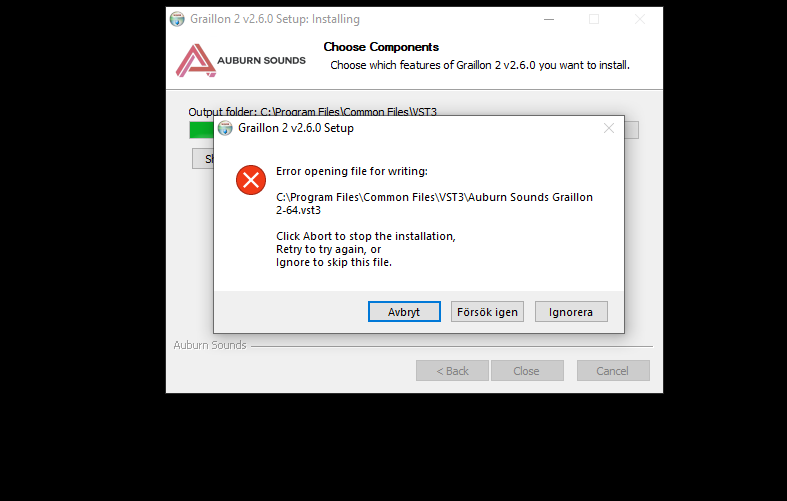

Customer B:
The sampled free version downloaded and ran no problem. Whenever I try installing the app, I get an "Error opening File for Writing" with the solution being running the app as an administrator but that hasn't helped.
Did manual installation worked?
No, I currently uninstalled the app and free versions and tried reinstalling, but now I can't do the same thing with the free version. Pictures attached to help get a look at my files.

=> sending naked plugins also solved the issue.
Most probably the customer had the plugin open in a DAW. Easy to reproduce doing that.
NSIS snippet to check if a file exists already
    ; examinates if installation program exists and it is running
     MessageBox MB_OK "Test"
    IfFileExists "$PROGRAMFILES64\VSTPlugins\Witty Audio CLIP It-64.dll" 0 skipcheck
    MessageBox MB_OK "File exists"
    Fileopen $0 "$PROGRAMFILES64\VSTPlugins\Witty Audio CLIP It-64.dll" "w"
    IfErrors 0 skipcheck
          MessageBox MB_OK|MB_ICONEXCLAMATION "Witty Audio CLIP It is running as a VST2. Please close your DAW."
          ;Quit
    skipcheck:
    FileClose $0
Fixed in 5485580e4456302c865998c9606a9992e127431f
For VST2 and VST3 but not AAX/LV2/FLP. The installer warns to close the DAW when it detects a plugin cannot be written to.