

 ApolloAuto
Problems displayed by the cyber_visualizer tool
For the cyber_visualizer tool, I have the following three questions:
1.The cyber_visualizer tool can display point clouds normally, but the topic name can only be "/apollo/sensor/velodyne64/compensator/PointCloud2". My topic "lidar_points_2" (which has been converted to apollo.drivers.PointCloud) is not supported. Can I understand that the cyber_visualizer tool only supports specific topic names?
2.According to the results of displaying images with cyber_visualizer tool , it only supports "yuyv" format data, does not support "bgr8", but when I play "/apollo/sensor/camera/traffic/image_long" or "/apollo/sensor/camera /traffic/image_short", no error is indicated, but the image is not visible, only the black screen is displayed. Why?
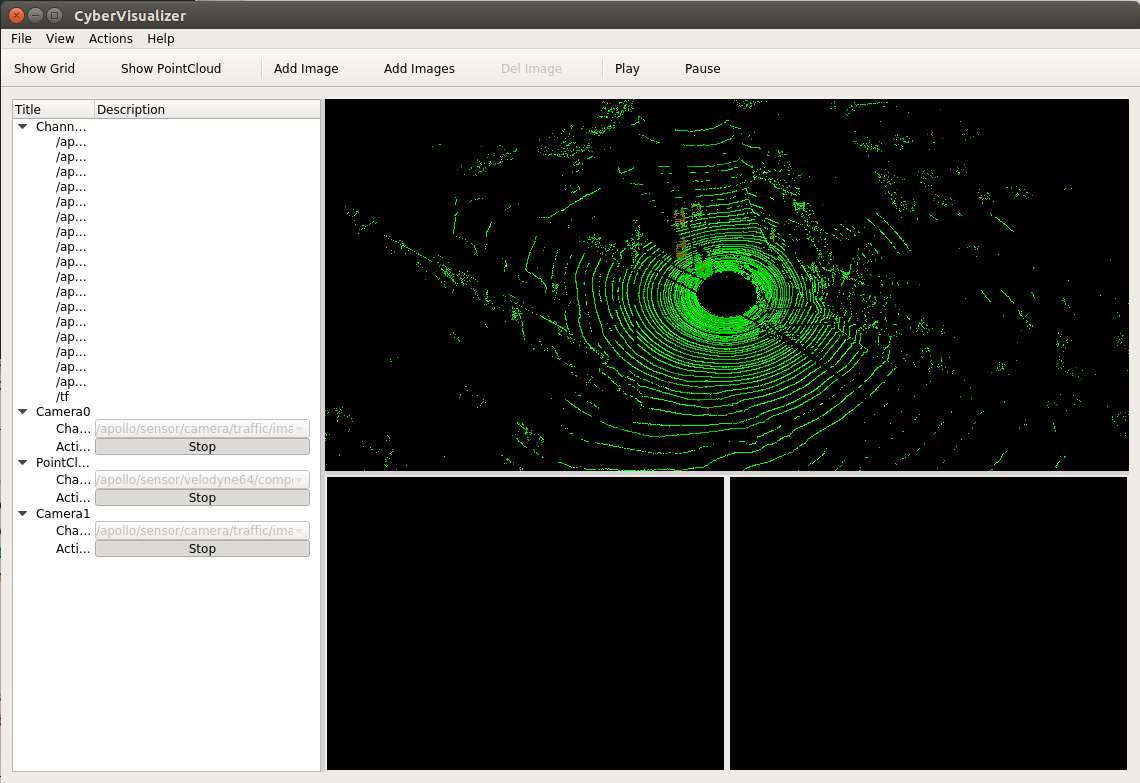
- Apollo 3.5 cyber tools should be able to add custom topic names and display them on the cyber_visualizer tool. How to do?
Thanks!


#8044 should resolve this issue.
Currently closing it as a fix is in progress. Feel free to reopen this issue if you have any additional questions. Thanks!

@lhh0916 Hi, the problem is solved. Please pull new code and try it. Thank you that much.
I use the apollo tag v7.0.0.0 . When I play "/apollo/sensor/camera/traffic/image_long" or "/apollo/sensor/camera /traffic/image_short" fetched by the data sensor_rgb.record , no error is indicated, but the image is not visible, only the black screen is displayed. Is this problem is solved?

i also encounter the same question. i add the camera imge, it not show the default_image ( no_image) and i click the play, it only show the black screen all. 2024-08-11


i use the opengl version is opengl version 4.5. the pointcloud data can show normallly. but the image data can't show. contain the first default(no_default.img) image.
Apollo 3.5 is no longer maintained. You can migrate to a newer version, such as 9.0
I use the apollo tag v7.0.0.0 . When I play "/apollo/sensor/camera/traffic/image_long" or "/apollo/sensor/camera /traffic/image_short" fetched by the data sensor_rgb.record , no error is indicated, but the image is not visible, only the black screen is displayed. Is this problem is solved?
do you solve the question?
i found the root cause. because in the renderable_object.h virtual void Draw(void) using the GL_QUADS, in the higher opengl it is removed. so it cause the black frame. can you fix it using the gl_triangle for the compatibilty for different OPENGL VERSION? i modify it. it work for me.
@briandbl Yes, we welcome contributions. You can describe your changes and submit a PR.