
0toshigami
0toshigami
You need to download https://visualstudio.microsoft.com/visual-cpp-build-tools/ first. Next, navigate to "Individual components", find these two  In your case, you should choose Windows 10 SDK 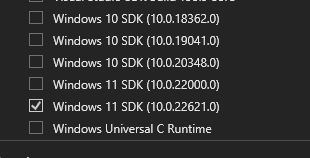
Click on the checkbox labeled ‘sd-webui-inpaint-anything’ (if not checked), then click the ‘Apply and Restart UI’ button, and wait for the requirements to finish installing
> Hi, > > I am trying to add custom avatars to this, I go in to frontend/src/stChat.tsx and change avatarUrl, but my changes are not getting saved. Any idea...
@vshankarathota Could you please tell me more in detail about the issues you're having with the `npm build` and `python setup.py` ?
Hi @thomasrife, it's looks like you're missing the `requirements.txt` file, please take a look at their [documentation](https://docs.streamlit.io/streamlit-community-cloud/get-started/deploy-an-app/app-dependencies). Also, in your `requirements.txt` file, there should be a line `streamlit-chat` and any...