
Mateo




Mateo
Hello, I was struggling with the same, my solution: dependencies: crontab or any job scheduler that allows running on boot / startup / login ```bash crontab -e ``` contents: ```...
Did you set up the project structure correctly? Do you have your renderer.js file like the one in the [example](https://github.com/PaulLeCam/react-native-electron/blob/master/example/src/renderer.js)?
I just tried running the example and I'm getting a blank window as well. I installed electron, react-native and react-native-web, but it's not working as intended Errors: https://pastebin.com/RU0mG0Jd React hooks...
This shows no warnings for me: ```tsx import withPWA from 'next-pwa' import runtimeCaching from 'next-pwa/cache.js' /** * @type {import('next').NextConfig} */ const nextConfig = { reactStrictMode: true, swcMinify: true, pwa: {...
Ugly but works for monorepos (I'm using turborepo): ```json "scripts": { "format": "prettier --ignore-path
Pretty sure just adding os_prober as an additional package does the job. Just make sure you've partitioned your disk properly from windows diskmgmt.
The workaround works fine but it'd be cleaner to have native support for it. +1
I'm having the same problem using Fedora, so it's not Windows related. I tried different node version but got no luck.
Alt+j and Alt+k are the default keybindings to cycle through the opened windows, is that what you are referring to by moving focus? 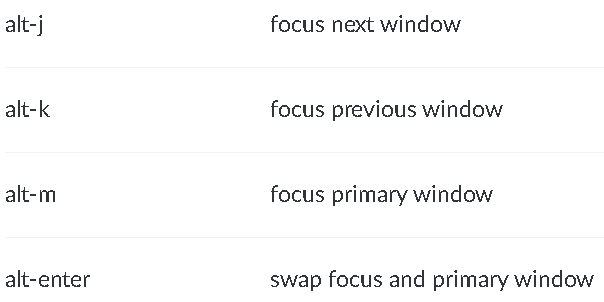 [docs](https://workspacer.org/keybindings/)
Should we add a "Troubleshooting" section including this? There's a way to disable Win + L but It won't let you lock Windows ever again unless you edit the registry....