
internet-pi
 internet-pi copied to clipboard
 geerlingguy
Raspberry Pi config for all things Internet.

I already have Pi-Hole, Prometheus and grafana Dockers running on my Pi as I have a dashboard setup for monitoring the rpi. Is there any way I can set up...

Hello! Just wanted to leave a record of something I ran into. If you're trying to use custom subdomains for your services, that relies internally on `nginx-proxy`. That gets spun...

it appears that speedtest is not working without the secure flag set How do I ensure that speedtest always runs with the --secure flag. ?

I am getting infrequent return values like -9.22Bil. Any ideas? Otherwise internet-monitoring and pi-hole are both working fine. Is it OK to put pi-vpn on the same rpi 8GB box?...

I noticed, that sometimes the speed test seems to fail - resulting in a "gap" in the graph. Is it somehow possible to check if the value for the test...

I am on day 3 and have searched all over the internet for answers. I set up Raspberry PI on two separate laptops and both have led to the following...

Add more connectivity-oriented domains for the ping hosts in the monitoring config example: - Remove github and apple, make google HTTPS - Add speedtest - Add AWS and Akamai status...

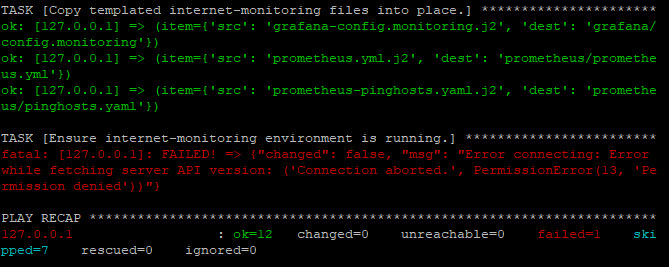 Hi, can anyone advise on how to fix this issue, see the attached image? I have looked through other issues and tried the following commands as posted by others...

See: https://github.com/geerlingguy/internet-pi/pull/179 That didn't add any documentation for how things work in the README, but I'd like to do that.

It says "no data points", also under "http request duration". Download/Upload/Ping/Speedtest graph all look good. No error in Prometheus. No issues seen when running docker-compose logs. Advice?

Metadata
Owner
Metadata
Raspberry Pi config for all things Internet.