

 zzzprojects
BulkDelete for PostgresSQL throws exception if other properties except ColumnPrimaryKey are empty.
Description
I use BulkDelete for object ClientAffected = { Id = 0, ClientId = 123} (Id - primary key), ClientId set in ColumnPrimaryKeyExpression option. Similar MS SQL implementation works fine, but Postgres throw exception.
Exception
Exception message: "An error occured while resolving mapping by name. See the inner exception for details"
Stack trace:
{System.Exception: Missing Colum : id
On entity : ClientAffected
On Table : "public"."clientaffected"
at Z.BulkOperations.BulkOperation.(String , Boolean , Boolean , Boolean )
at Z.BulkOperations.BulkOperation.()}
Fiddle or Project:
I don't know how to run Fiddle on Postgres but here's the general idea: https://dotnetfiddle.net/JZWOWA
Further technical details
- EF version: 6.4.0
- EF Extensions version: 5.1.16
- Database Provider: Devart.Data.PostgreSql

Hello @Ma4eteGT ,
I might be wrong but it looks that the issue is about case sensitivity. Even if you don't use the column id for your key, we still need to use it on our side when we will perform the delete.
We will look at it, perhaps we missed a case escaping for this provider.
Best Regards,
Jon

Hello @DmitriyMarov ,
My developer made a few tests by switching cases and using data annotations but everything works as expected.
Perhaps you have a configuration that we don't have on our side.
Is it possible for you to provide a runnable project that throws the error? It will faster if we can fix the problem instead of passing time to try to reproduce it. You can send it in private here if you want: [email protected]
Best Regards,
Jon
I created simple demo that reproduces an issue - https://github.com/DmitriyMarov/BulkDeleteDemo. Don't forget to change connection string in app.config and run createtables.sql script on your postgres db. Also, during the creation of the demo, I found that this issue reproducible for any bulk method, not delete only (even with filled properties), so it seems like common mapping problem.
Hello @DmitriyMarov ,
My developer was not able to reproduce your issue with your project.
Is it possible to have your version of your PostgreSQL server? Do you have any special configurations?
Since we cannot reproduce it, it looks more like an issue with a missing configuration on our part to reproduce it.
We reproduced this issue on PostgreSQL 9.5 and it still occurs after migration to 12.3.
Hello @DmitriyMarov ,
I did several tests on my side to make sure my developer didn't miss something but we are both not able to reproduce the issue even with your project which is pretty weird.
However, we release a new version to help us to debug this issue.
Could you try v5.1.20 and let us know what is the column name that's returned by our library with this new method?
var table = Z.BulkOperations.InformationSchemaManager.GetTable(context.Database.GetEntityConnection().StoreConnection, "clientaffected");
var columns = string.Join(",", table.Columns.Select(x => x.Name));
On our side, the variables columns have the following values: id,client_id
Which is exactly what we are expecting.
Let me know what you got.
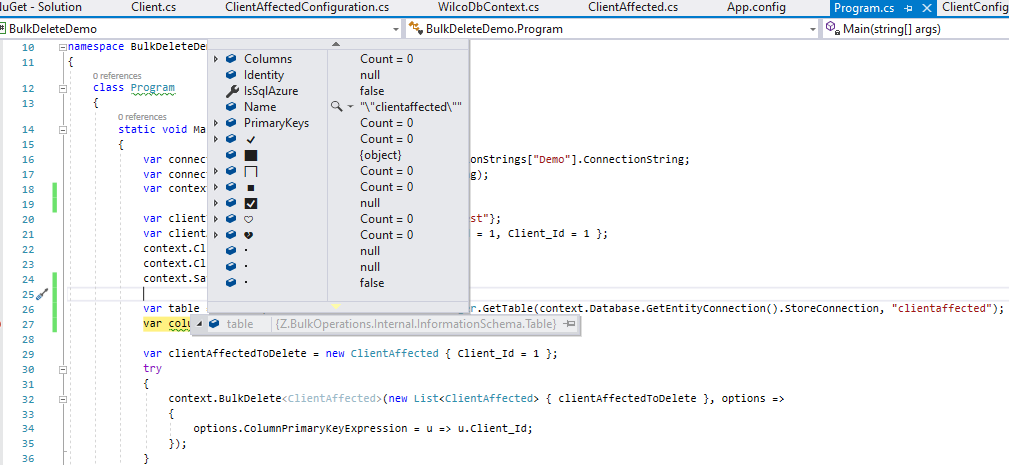
That means our library for an unknown reason yet is not able to retrieve any column information from your database but still succeeds to execute the SQL. Which explains why you are getting the error and not us.
We don't know why yet this is happening but now we have a good idea of where to look (we never expected this one).
@JonathanMagnan My bad, it seems that we added DevArt libs to demo project incorrectly, please check updated version.
Thank,
However, I don't think it will changes anything since we were already using the v7.11.1190.0
Hello @DmitriyMarov ,
Could you run the following code and check how many rows is returned by the GetSchemaTable() which should correspond to the number of columns. The count is 2 on our case but should be 0 on your case.
var clientToCreate = new Client { Id = 2, Name = "test" };
var clientAffectedToCreate = new ClientAffected { Id = 2, Client_Id = 2 };
context.Clients.Add(clientToCreate);
context.ClientAffected.Add(clientAffectedToCreate);
context.SaveChanges();

var contextConnection = context.Database.Connection;
contextConnection.Open();
using (var command = contextConnection.CreateCommand())
{
	command.CommandText = @"SELECT COUNT(1) FROM public.""clientaffected""";
	var test2 = command.ExecuteScalar();

	command.CommandText = @"SELECT * FROM public.""clientaffected"" limit 0 ";
	var data = command.ExecuteReader(System.Data.CommandBehavior.KeyInfo);

	var test3 = data.GetSchemaTable();
	var rowsCount = test3.Rows.Count;
}
We know that some providers when specifying an invalid table, no error is thrown but simply a "table" with no column. Perhaps we are getting something similar.
Depending on the number of columns for your table you get, that will give us some information.
If you still get 0 columns (so 0 rows from the SchemaTable), it might be easier for your side to check why this simple query is returning 0 instead of 2 as we don't have the issue on our side.
Let me know about your result.
Best Regards,
Jon
In this case,
Only you can debug this and find out why this simple query returns 0 columns.
We currently have no idea how to reproduce it or why it could happen (perhaps a security issue?) but at least, we now know what causes the original issue.
If you find out anything, please let us know as we are very interested in this issue since we don't know how to go deeper on our side.
Hello @DmitriyMarov ,
Since our last conversation, we haven't heard from you.
Were you able to find out anything?
Don't hesitate to contact us if you do, since we don't know how to go deeper on our side.
Looking forward to hearing from you,
Jon
@JonathanMagnan Unfortunately, I could not understand what exactly needs to be find out in debug, maybe you can explain it in detail?
Hello @DmitriyMarov ,
The code should return 3 columns (all columns in your table). This is the purpose of doing ExecuteReader(System.Data.CommandBehavior.KeyInfo);, to return table metadata.
Now the problem on your side, it returns nothing and that's how our library gets table information for that provider.
We currently have no idea why that's happening and we are not able to reproduce it on our side since this always returns columns for us. Even more, as we have demonstrated, the issue is not related to our library since the code doesn't use it at all.
So we are left with 2 solutions:
- Trying on your side to find out if there is something special with your server/machine configuration. For example, could you try the simple example on a different computer (home computer for example) with a new project and see if you also get the issue? Perhaps that will give some hint for the next step to do.
- Asking
DevArtif they have an idea why the method returns nothing
We would like to do more here but since none of our computers have this issue, we are a little bit stuck about what we can do.
Let me know if that helps you to continue to investigate this issue.
Hello @DmitriyMarov ,
Since our last conversation, we haven't heard from you.
As mentioned in my previous message, none of our computers have this issue.
Let us know if there is any progress on your side,
Best regards,
Jon
Hello @DmitriyMarov
A simple reminder that we are here to assist you!
Feel free to contact us if there is any progress on your side.
Looking forward to hearing from you,
Jon
Issue was fixed after DevArt dotConnect for PostgreSQL upgrade to 7.20, thank you for assistance in bug investigation.
Awesome @DmitriyMarov !
We are glad to hear that the issue has been fixed!
Don't hesitate to contact us with any questions or further assistance,
Jon