
node-zwave-js
 node-zwave-js copied to clipboard
 zwave-js
Heltun HE-HLS01 missin Thermostat mode parameters
Is your problem within Home Assistant (Core or Z-Wave JS Integration)?
NO, my problem is NOT within Home Assistant or the ZWave JS integration
Is your problem within ZWaveJS2MQTT?
NO, my problem is NOT within ZWaveJS2MQTT
Checklist
-
[X] I have checked the troubleshooting section and my problem is not described there.
-
[X] I have read the changelog and my problem was not mentioned there.
Describe the bug
The device can be installed in two modes, binary switch or thermostat. Both modes have slightly different parameter lists. Regardless of the state the device is set to, the same binary switch parameters are displayed. Can you also add support for thermostat mode parameters.
The manual where the parameters are displayed can be downloaded from the Heltun website Direct link to the document: https://drive.google.com/file/d/1Cq096wYg-5X-7n8yloEaAXbWGpXze-Mw/view?usp=sharing
Device information
Manufacturer: Heltun Model name: High Load Switch HE-HLS01 Node ID in your network: 50
How are you using node-zwave-js?
- [ ]
zwavejs2mqttDocker image (latest) - [ ]
zwavejs2mqttDocker image (dev) - [ ]
zwavejs2mqttDocker manually built (please specify branches) - [ ]
ioBroker.zwave2adapter (please specify version) - [X]
HomeAssistant zwave_jsintegration (please specify version) - [ ]
pkg - [ ]
node-red-contrib-zwave-js(please specify version, double click node to find out) - [ ] Manually built from GitHub (please specify branch)
- [ ] Other (please describe)
Which branches or versions?
version: 9.0.7 serverversion: 1.16.1
Did you change anything?
no
If yes, what did you change?
No response
Did this work before?
No, it never worked anywhere
If yes, where did it work?
No response
Attach Driver Logfile
Z-Wave JS -lokiviestit tilattu…
2022-05-10T11:34:43.350Z SERIAL » 0x0118001332119f038700949bd8532c6848295d83aa9978255f82 (26 bytes)
2022-05-10T11:34:43.352Z DRIVER » [Node 050] [REQ] [SendData]
│ transmit options: 0x25
│ callback id: 95
└─[Security2CCMessageEncapsulation]
│ sequence number: 135
└─[ConfigurationCCSet]
parameter #: 7
reset to default: false
value size: 1
value format: SignedInteger
value: 1
2022-05-10T11:34:43.356Z SERIAL « [ACK] (0x06)
2022-05-10T11:34:43.362Z SERIAL « 0x0104011301e8 (6 bytes)
2022-05-10T11:34:43.365Z SERIAL » [ACK] (0x06)
2022-05-10T11:34:43.367Z DRIVER « [RES] [SendData]
was sent: true
2022-05-10T11:34:43.379Z SERIAL « 0x010700135f000002b6 (9 bytes)
2022-05-10T11:34:43.381Z SERIAL » [ACK] (0x06)
2022-05-10T11:34:43.383Z DRIVER « [REQ] [SendData]
callback id: 95
transmit status: OK
2022-05-10T11:34:44.408Z SERIAL » 0x01160013320f9f038800fdb39a430958e42524f646256005 (24 bytes)
2022-05-10T11:34:44.412Z DRIVER » [Node 050] [REQ] [SendData]
│ transmit options: 0x25
│ callback id: 96
└─[Security2CCMessageEncapsulation]
│ sequence number: 136
└─[ConfigurationCCGet]
parameter #: 7
2022-05-10T11:34:44.415Z SERIAL « [ACK] (0x06)
2022-05-10T11:34:44.420Z SERIAL « 0x0104011301e8 (6 bytes)
2022-05-10T11:34:44.422Z SERIAL » [ACK] (0x06)
2022-05-10T11:34:44.423Z DRIVER « [RES] [SendData]
was sent: true
2022-05-10T11:34:44.438Z SERIAL « 0x010700136000000289 (9 bytes)
2022-05-10T11:34:44.440Z SERIAL » [ACK] (0x06)
2022-05-10T11:34:44.442Z DRIVER « [REQ] [SendData]
callback id: 96
transmit status: OK
2022-05-10T11:34:44.453Z SERIAL « 0x011700040032119f03c900db9916b6e41f6c82ca330b9accc9 (25 bytes)
2022-05-10T11:34:44.457Z CNTRLR [Node 050] [~] [Configuration] 7: 1 => 1
2022-05-10T11:34:44.459Z SERIAL » [ACK] (0x06)
2022-05-10T11:34:44.461Z DRIVER « [Node 050] [REQ] [ApplicationCommand]
└─[Security2CCMessageEncapsulation]
│ sequence number: 201
└─[ConfigurationCCReport]
parameter #: 7
value size: 1
value: 1
2022-05-10T11:34:46.093Z SERIAL » 0x0118001332119f038900d0a4ee4c7c9ad895533e2dc7b62561ca (26 bytes)
2022-05-10T11:34:46.096Z DRIVER » [Node 050] [REQ] [SendData]
│ transmit options: 0x25
│ callback id: 97
└─[Security2CCMessageEncapsulation]
│ sequence number: 137
└─[ConfigurationCCSet]
parameter #: 7
reset to default: false
value size: 1
value format: SignedInteger
value: 0
2022-05-10T11:34:46.102Z SERIAL « [ACK] (0x06)
2022-05-10T11:34:46.105Z SERIAL « 0x0104011301e8 (6 bytes)
2022-05-10T11:34:46.107Z SERIAL » [ACK] (0x06)
2022-05-10T11:34:46.109Z DRIVER « [RES] [SendData]
was sent: true
2022-05-10T11:34:46.123Z SERIAL « 0x010700136100000288 (9 bytes)
2022-05-10T11:34:46.124Z SERIAL » [ACK] (0x06)
2022-05-10T11:34:46.127Z DRIVER « [REQ] [SendData]
callback id: 97
transmit status: OK
2022-05-10T11:34:47.153Z SERIAL » 0x01160013320f9f038a0030e62fa67260a143c451ba256216 (24 bytes)
2022-05-10T11:34:47.155Z DRIVER » [Node 050] [REQ] [SendData]
│ transmit options: 0x25
│ callback id: 98
└─[Security2CCMessageEncapsulation]
│ sequence number: 138
└─[ConfigurationCCGet]
parameter #: 7
2022-05-10T11:34:47.158Z SERIAL « [ACK] (0x06)
2022-05-10T11:34:47.163Z SERIAL « 0x0104011301e8 (6 bytes)
2022-05-10T11:34:47.165Z SERIAL » [ACK] (0x06)
2022-05-10T11:34:47.171Z DRIVER « [RES] [SendData]
was sent: true
2022-05-10T11:34:47.181Z SERIAL « 0x01070013620000028b (9 bytes)
2022-05-10T11:34:47.183Z SERIAL » [ACK] (0x06)
2022-05-10T11:34:47.185Z DRIVER « [REQ] [SendData]
callback id: 98
transmit status: OK
2022-05-10T11:34:47.196Z SERIAL « 0x011700040032119f03ca00267b24bb3564c5c48433409397f8 (25 bytes)
2022-05-10T11:34:47.200Z CNTRLR [Node 050] [~] [Configuration] 7: 0 => 0
2022-05-10T11:34:47.202Z SERIAL » [ACK] (0x06)
2022-05-10T11:34:47.205Z DRIVER « [Node 050] [REQ] [ApplicationCommand]
└─[Security2CCMessageEncapsulation]
│ sequence number: 202
└─[ConfigurationCCReport]
parameter #: 7
value size: 1
value: 0
2022-05-10T11:34:49.079Z SERIAL « 0x01140004002b0e3202a1640003a490003c0003a3cc58 (22 bytes)
2022-05-10T11:34:49.082Z CNTRLR [Node 043] [~] [Meter] value[66561]: 238.54 => 238.736 [Endpoint 0]
2022-05-10T11:34:49.086Z SERIAL » [ACK] (0x06)
2022-05-10T11:34:49.089Z DRIVER « [Node 043] [REQ] [ApplicationCommand]
└─[MeterCCReport]
type: Electric
scale: V
rate type: Consumed
value: 238.736
time delta: 60 seconds
prev. value: 238.54
2022-05-10T11:34:49.248Z SERIAL « 0x01140004002b0e3202a16c00000000003c000000000b (22 bytes)
2022-05-10T11:34:49.251Z CNTRLR [Node 043] [~] [Meter] value[66817]: 0 => 0 [Endpoint 0]
2022-05-10T11:34:49.253Z SERIAL » [ACK] (0x06)
2022-05-10T11:34:49.257Z DRIVER « [Node 043] [REQ] [ApplicationCommand]
└─[MeterCCReport]
type: Electric
scale: A
rate type: Consumed
value: 0
time delta: 60 seconds
prev. value: 0
2022-05-10T11:34:49.399Z SERIAL « 0x011c00040032169f03cb00946313838141241ae5afecc04b1359ae89713c (30 bytes)
2022-05-10T11:34:49.403Z CNTRLR [Node 050] [~] [Meter] value[65537]: 0 => 0 [Endpoint 0]
2022-05-10T11:34:49.407Z SERIAL » [ACK] (0x06)
2022-05-10T11:34:49.409Z DRIVER « [Node 050] [REQ] [ApplicationCommand]
└─[Security2CCMessageEncapsulation]
│ sequence number: 203
└─[MeterCCReport]
type: Electric
scale: kWh
rate type: Consumed
value: 0
time delta: 0 seconds
2022-05-10T11:34:49.768Z SERIAL « 0x01140004002b0e3202216400066f8b003c00066f8b83 (22 bytes)
2022-05-10T11:34:49.772Z CNTRLR [Node 043] [~] [Meter] value[65537]: 421.771 => 421.771 [Endpoint 0]
2022-05-10T11:34:49.775Z SERIAL » [ACK] (0x06)
2022-05-10T11:34:49.778Z DRIVER « [Node 043] [REQ] [ApplicationCommand]
└─[MeterCCReport]
type: Electric
scale: kWh
rate type: Consumed
value: 421.771
time delta: 60 seconds
prev. value: 421.771
2022-05-10T11:34:50.030Z SERIAL « 0x011a00040032149f03cc00e36970cc325d308b5aa18af60352afb4b8 (28 bytes)
2022-05-10T11:34:50.037Z CNTRLR [Node 050] [~] [Meter] value[66049]: 0 => 0 [Endpoint 0]
2022-05-10T11:34:50.040Z SERIAL » [ACK] (0x06)
2022-05-10T11:34:50.042Z DRIVER « [Node 050] [REQ] [ApplicationCommand]
└─[Security2CCMessageEncapsulation]
│ sequence number: 204
└─[MeterCCReport]
type: Electric
scale: W
rate type: Consumed
value: 0
time delta: 0 seconds
2022-05-10T11:34:50.259Z SERIAL « 0x01180004002b12600d01003202a1640003a490003c0003a3cc24 (26 bytes)
2022-05-10T11:34:50.263Z CNTRLR [Node 043] [~] [Meter] value[66561]: 238.54 => 238.736 [Endpoint 1]
2022-05-10T11:34:50.267Z SERIAL » [ACK] (0x06)
2022-05-10T11:34:50.269Z DRIVER « [Node 043] [REQ] [ApplicationCommand]
└─[MultiChannelCCCommandEncapsulation]
│ source: 1
│ destination: 0
└─[MeterCCReport]
type: Electric
scale: V
rate type: Consumed
value: 238.736
time delta: 60 seconds
prev. value: 238.54
2022-05-10T11:34:50.546Z SERIAL « 0x01180004002b12600d01003202a1640003a490003c0003a3cc24 (26 bytes)
2022-05-10T11:34:50.550Z CNTRLR [Node 043] [~] [Meter] value[66561]: 238.736 => 238.736 [Endpoint 1]
2022-05-10T11:34:50.553Z SERIAL » [ACK] (0x06)
2022-05-10T11:34:50.557Z DRIVER « [Node 043] [REQ] [ApplicationCommand]
└─[MultiChannelCCCommandEncapsulation]
│ source: 1
│ destination: 0
└─[MeterCCReport]
type: Electric
scale: V
rate type: Consumed
value: 238.736
time delta: 60 seconds
prev. value: 238.54
2022-05-10T11:34:50.591Z SERIAL « 0x011a00040032149f03cd00bf5fce89efd0eb87bee8acbeec7cd9deb1 (28 bytes)
2022-05-10T11:34:50.595Z CNTRLR [Node 050] [~] [Meter] value[66561]: 241 => 240 [Endpoint 0]
2022-05-10T11:34:50.599Z SERIAL » [ACK] (0x06)
2022-05-10T11:34:50.603Z DRIVER « [Node 050] [REQ] [ApplicationCommand]
└─[Security2CCMessageEncapsulation]
│ sequence number: 205
└─[MeterCCReport]
type: Electric
scale: V
rate type: Consumed
value: 240
time delta: 0 seconds
2022-05-10T11:34:51.030Z SERIAL « 0x01180004002b12600d02003202a16400039e9c003c0003a1bf60 (26 bytes)
2022-05-10T11:34:51.033Z CNTRLR [Node 043] [~] [Meter] value[66561]: 238.015 => 237.212 [Endpoint 2]
2022-05-10T11:34:51.036Z SERIAL » [ACK] (0x06)
2022-05-10T11:34:51.039Z DRIVER « [Node 043] [REQ] [ApplicationCommand]
└─[MultiChannelCCCommandEncapsulation]
│ source: 2
│ destination: 0
└─[MeterCCReport]
type: Electric
scale: V
rate type: Consumed
value: 237.212
time delta: 60 seconds
prev. value: 238.015
2022-05-10T11:34:51.173Z SERIAL « 0x011a00040032149f03ce00fe2de82c2fee40e21d77740e6600c93f61 (28 bytes)
2022-05-10T11:34:51.177Z CNTRLR [Node 050] [~] [Meter] value[66817]: 0 => 0 [Endpoint 0]
2022-05-10T11:34:51.180Z SERIAL » [ACK] (0x06)
2022-05-10T11:34:51.182Z DRIVER « [Node 050] [REQ] [ApplicationCommand]
└─[Security2CCMessageEncapsulation]
│ sequence number: 206
└─[MeterCCReport]
type: Electric
scale: A
rate type: Consumed
value: 0
time delta: 0 seconds
2022-05-10T11:34:51.481Z SERIAL « 0x01180004002b12600d03003202a1640003a5bf003c0003a4d714 (26 bytes)
2022-05-10T11:34:51.485Z CNTRLR [Node 043] [~] [Meter] value[66561]: 238.807 => 239.039 [Endpoint 3]
2022-05-10T11:34:51.489Z SERIAL » [ACK] (0x06)
2022-05-10T11:34:51.491Z DRIVER « [Node 043] [REQ] [ApplicationCommand]
└─[MultiChannelCCCommandEncapsulation]
│ source: 3
│ destination: 0
└─[MeterCCReport]
type: Electric
scale: V
rate type: Consumed
value: 239.039
time delta: 60 seconds
prev. value: 238.807
2022-05-10T11:34:51.697Z SERIAL « 0x01180004002b12600d01003202a16c00000000003c0000000077 (26 bytes)
2022-05-10T11:34:51.699Z CNTRLR [Node 043] [~] [Meter] value[66817]: 0 => 0 [Endpoint 1]
2022-05-10T11:34:51.702Z SERIAL » [ACK] (0x06)
2022-05-10T11:34:51.705Z DRIVER « [Node 043] [REQ] [ApplicationCommand]
└─[MultiChannelCCCommandEncapsulation]
│ source: 1
│ destination: 0
└─[MeterCCReport]
type: Electric
scale: A
rate type: Consumed
value: 0
time delta: 60 seconds
prev. value: 0

👋 Hey @jarmokentta!
It looks like you copied the contents of a logfile. Please attach it as a file instead, so it is easier to work with.
Note: You can just drag & drop files into the textbox. Just make sure to use a supported file extension like .log or .txt

We could add the missing ones and mention which ones are only available in which mode.
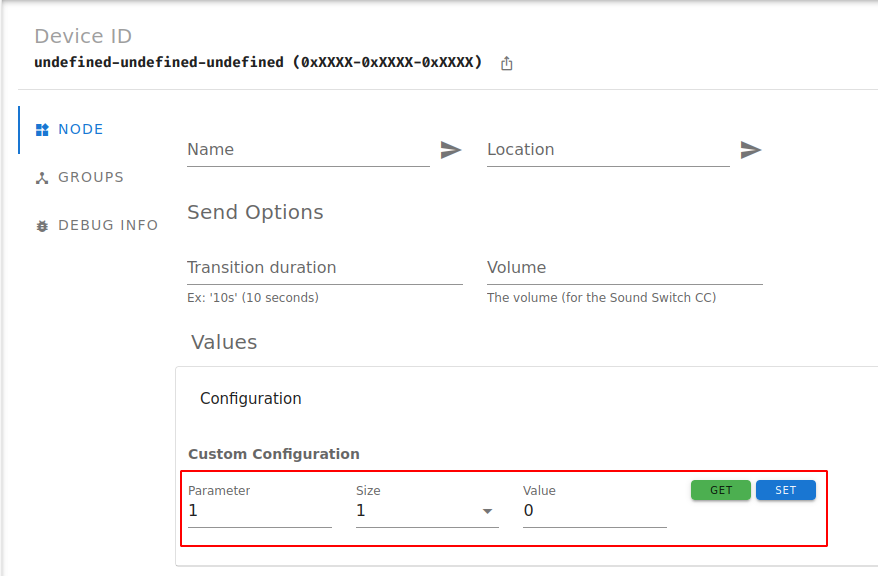
But it looks like some of the parameters are actually different in size and ranges etc. depending on the mode. We definitely don't support that.
To set those parameters correctly, you will need to use zwavejs2mqtt and enter these values according to the manual:

Because of the large amount of Z-Wave devices, we cannot write all configuration files ourselves. Help from the community is required, so we can focus our time on improving Z-Wave JS itself. 🙏🏻
This issue has been labeled "Help wanted", meaning we kindly ask anyone who wants to help out for support. Here are a few resources to get you started - don't hesitate to ask if you are having problems:
We may get around to doing it ourselves at some point, but community support will speed up this process immensely.
Thanks!
![zwave-js-assistant[bot] avatar](https://avatars.githubusercontent.com/in/95628?v=4 "Published by a pub.dev verified publisher")
Accepting PRs to add the missing parameters. Please do mention in the description which mode they belong to.
For those schizophrenic parameters please do the same and refer to setting the parameter manually for the other mode.