

 zwave-js
Strange issue with EcoDim dimmer's value
Checklist:
- [X] I am not using HomeAssistant. Or: a developer has told me to come here.
- [X] I am not using ZWaveJS2MQTT. Or: a developer has told me to come here.
- [X] I have checked the troubleshooting section and my problem is not described there.
- [X] I have read the changelog problem was not mentioned there.
Describe the bug
This is a continuation of the little chat we had on discord. A few people contacted me about really weird problems with their EcoDim dimmers in recent Z-Wave JS integration. Basically it boils down to the state (currentValue) being not in sync with the actual state of the device.
By trial and error we came to a few conclusions:
- The issue is NOT present in zwave-js 6.1.0 and below.
- The issue is present in 6.2 and above. We couldn't test a version in between.
- The issue is most likely caused by the additional GET after set for MultiLevelSwitch CC, introduced in zwavejs 6.1.1
- The device is using supervision.
- When sending a new brightness (setValue to targetValue) command, there are 2 responses (value updated event) immediately returned (so no 5 seconds delay, they both come in within 100's of milliseconds).
- The value that in the second "value updated" event is wrong, causing the state mismatch.
- Issuing a pollValue some time after corrects the issue but this should be properly tested again to be 100% sure.
- It seems that this device does not need that additional get after set. Without that all is fine and the currentValue always matches the actual lightdimmer's state.
Some things to consider:
- Maybe there's a compat flag needed to not perform the GET on this device ?
- Why is the second "value updated" event returned right after the SET. You would expect this to be 5 seconds after the SET
Device information
Which device(s) is/are affected (make/model)?
What are the node IDs?
Did you change anything?
- [ ] Yes: (please describe)
- [X] No
Did this use to work before?
- [ ] Don't know, this is a new device
- [ ] No, it never worked anywhere
- [X] Yes, in: zwavejs version 6.1.0 and below
How are you using node-zwave-js
- [X]
zwavejs2mqtt(latest) docker image - [X]
zwavejs2mqtt(dev) docker image - [ ]
zwavejs2mqttManual Docker buildnode-zwave-jsbranch:zwavejs2mqttbranch:
- [ ] ioBroker.zwave2 adapter
- [X]
HomeAssistantversion XYZ - [ ] Pkg
- [ ] Manual Docker build
node-zwave-jsbranch:zwavejs2mqttbranch:
- [ ] Manually built (as described in the docs)
- [ ] Other:
To Reproduce
See description above.
Scenario 1: device is already on, we want to adjust brightness Issue a setValue to MultiLevel CC for e.g. value 35 value updated event with value 35 value updated event with value totally out of order, e.g. 0 or 20 the brightness "slider" in the client application (in this case HA) doesn't match the light
Scenario 2: device is off (currentValue 0), we want to turn it on Issue a setValue to MultiLevel CC with value 255 (previous state) or some other brightness value updated event with value set above value updated event with value 0 the light is off in HA it's actually ON
Additional context
Strangely enough, there seems to be a little bit of difference between these devices (firmware level maybe) ? @MarkGrootObbink contacted me with the above issue report (and I tried debugging it remotely) while another user, @pascalwinters has this same dimmers (although with newer firmware version) and in his case the issue is reversed. First the wrong value event comes in and seconds report is the correct one. Because these value events were still not 5 seconds apart, I still think it's strange.
In anyway people with these dimmers (and maybe other devices too) will have issues when using a newer version of zwavejs so that's the reason I created this issue.
Logfile:
@pascalwinters are you available to provide more details such as logging on request ?

@pascalwinters has sent me a log for scenario 1 yesterday:
18:51:12.391 DRIVER » [Node 006] [REQ] [SendData]
                      │ transmit options: 0x25
                      │ callback id:      74
                      └─[SupervisionCCGet]
                        │ session id:      2
                        │ request updates: true
                        └─[MultilevelSwitchCCSet]
                            target value: 35
18:51:12.440 DRIVER « [Node 006] [REQ] [ApplicationCommand]
                      └─[SupervisionCCReport]
                          session id:          2
                          more updates follow: false
                          status:              Success
                          duration:            [Duration: 0seconds]
The device tells us that the change worked, so zwave-js optimistically updates the current value to 35. We then receive two unsolicited reports from the device in quick succession:
18:51:12.468 DRIVER « [Node 006] [REQ] [ApplicationCommand]
                      └─[MultilevelSwitchCCReport]
                          current value: 40
...
18:51:12.571 DRIVER « [Node 006] [REQ] [ApplicationCommand]
                      └─[MultilevelSwitchCCReport]
                          current value: 35
Because supervision is used, we do not verify the change with a GET manually. So it looks like the device isn't sure which value it is at 🤷🏻♂️

Because supervision is used, we do not verify the change with a GET manually. So it looks like the device isn't sure which value it is at 🤷🏻♂️
Ah OK, so the device itself sends an unsolicited report with the incorrect value. Z-Wave JS skips the additional verify GET because the device uses supervision. So what did change that broke this ? Maybe before there actually was an addition GET after X seconds so the issue was "hidden" because it auto corrected over time ?
We used to request the current value whenever a Supervision Report (success or in progress) is received - but that misses the entire point of the Supervision CC and causes additional traffic. However it looks like the device above has always reported its level on its own, so the additional GET just caused another update between the two unsolicited ones.
When I do an Supervision SWITCH_MULTILEVEL_SET command with the Z-Wave PC Controller application, I receive correctly an Supervision report and after that 1 Multilevel report. How can this difference in behavior happen?
Scenario: off -> 35%
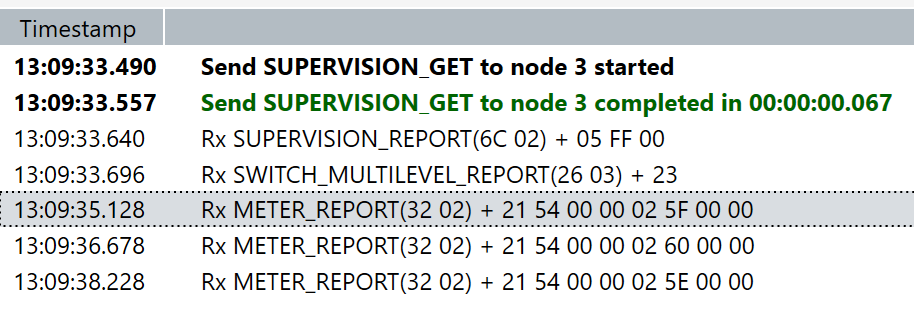

@pascalwinters did you include the node in a different network to test with PC controller? If so, can you make out any differences in associations between zwave-js and PC controller?
@AlCalzone I placed the Controller in my laptop and run the software. No inclusion or exclusion.
AFAIK the software has a way to dump its traffic as zwlf files - could you send me that, so I can compare the serial data and see if I spot any differences?
off -> 35%
Supervision CC GET: Multilevel Switch -> 35
18:15:40.871 >> 01 0F 00 13 03 08 6C 01 84 04 26 01 23 00 25 08 2C
(was sent)
18:15:40.876 << 01 04 01 13 01 E8
(was acknowledged)
18:15:40.919 << 01 07 00 13 08 00 00 05 E6

Supervision SUCCESS
18:15:40.996 << 01 0B 00 04 00 03 05 6C 02 04 FF 00 63

Multilevel Switch Report: currentValue = 35
18:15:41.040 << 01 09 00 04 00 03 03 26 03 23 F4

Multilevel Switch Report: currentValue = 35
18:15:41.109 << 01 09 00 04 00 03 03 26 03 23 F4

Meter Report (don't care)
18:15:42.851 << 01 10 00 04 00 03 0A 32 02 21 54 00 00 02 3A 00 00 9F
18:15:44.157 << 01 10 00 04 00 03 0A 32 02 21 54 00 00 02 37 00 00 92
18:15:45.697 << 01 10 00 04 00 03 0A 32 02 21 54 00 00 02 3A 00 00 9F
35% -> off
Supervision CC GET: Multilevel Switch -> 0
18:17:54.330 >> 01 0F 00 13 03 08 6C 01 85 04 26 01 00 00 25 09 0F
(was sent)
18:17:54.335 << 01 04 01 13 01 E8
(was acknowledged)
18:17:54.385 << 01 07 00 13 09 00 00 05 E7

Supervision SUCCESS
18:17:54.516 << 01 0B 00 04 00 03 05 6C 02 05 FF 00 62

Multilevel Switch Report: currentValue = 0
18:17:54.793 << 01 09 00 04 00 03 03 26 03 00 D7

Meter Report (don't care)
18:17:56.308 << 01 10 00 04 00 03 0A 32 02 21 54 00 00 00 00 00 00 A7
18:17:57.821 << 01 10 00 04 00 03 0A 32 02 21 54 00 00 00 00 00 00 A7
18:17:59.336 << 01 10 00 04 00 03 0A 32 02 21 54 00 00 00 00 00 00 A7`
off -> 255(on)
Supervision CC GET: Multilevel Switch -> 255
18:18:38.954 >> 01 0F 00 13 03 08 6C 01 86 04 26 01 FF 00 25 0A F0
(was sent)
18:18:38.959 << 01 04 01 13 01 E8
(was acknowledged)
18:18:39.002 << 01 07 00 13 0A 00 00 05 E4

Supervision SUCCESS
18:18:39.076 << 01 0B 00 04 00 03 05 6C 02 06 FF 00 61
Multilevel Switch Report: currentValue = 35
18:18:39.119 << 01 09 00 04 00 03 03 26 03 23 F4
Multilevel Switch Report: currentValue = 35
18:18:39.233 << 01 09 00 04 00 03 03 26 03 23 F4

Meter Report (don't care)
18:18:40.680 << 01 10 00 04 00 03 0A 32 02 21 54 00 00 02 3E 00 00 9B
18:18:42.225 << 01 10 00 04 00 03 0A 32 02 21 54 00 00 02 34 00 00 91
18:18:43.857 << 01 10 00 04 00 03 0A 32 02 21 54 00 00 02 34 00 00 91
@AlCalzone See logs above. When you need anymore, you know how to find me.
off -> 35% (HA) core-2021.3.0b6 / 0.1.10
18:56:10.870 SERIAL » 0x010e001303076c01820326012325517a                                  (16 bytes)
18:56:10.872 DRIVER » [Node 003] [REQ] [SendData]
                      │ transmit options: 0x25
                      │ callback id:      81
                      └─[SupervisionCCGet]
                        │ session id:      2
                        │ request updates: true
                        └─[MultilevelSwitchCCSet]
                            target value: 35
18:56:10.875 SERIAL « [ACK]                                                                   (0x06)
18:56:10.881 SERIAL « 0x0104011301e8                                                       (6 bytes)
18:56:10.882 SERIAL » [ACK]                                                                   (0x06)
18:56:10.884 DRIVER « [RES] [SendData]
                        was sent: true
18:56:10.898 SERIAL « 0x0107001351000003b9                                                 (9 bytes)
18:56:10.899 SERIAL » [ACK]                                                                   (0x06)
18:56:10.901 DRIVER « [REQ] [SendData]
                        callback id:     81
                        transmit status: OK
18:56:10.919 SERIAL « 0x010b00040003056c0202ff0065                                        (13 bytes)
18:56:10.920 SERIAL » [ACK]                                                                   (0x06)
18:56:10.923 DRIVER « [Node 003] [REQ] [ApplicationCommand]
                      └─[SupervisionCCReport]
                          session id:          2
                          more updates follow: false
                          status:              Success
                          duration:            [Duration: 0seconds]
18:56:10.929 CNTRLR   [Node 003] [~] [Multilevel Switch] currentValue: 0 => 35          [Endpoint 0]
18:56:10.994 SERIAL « 0x01090004000303260323f4                                            (11 bytes)
18:56:10.997 CNTRLR   [Node 003] [~] [Multilevel Switch] currentValue: 35 => 35         [Endpoint 0]
18:56:10.999 SERIAL » [ACK]                                                                   (0x06)
18:56:11.002 DRIVER « [Node 003] [REQ] [ApplicationCommand]
                      └─[MultilevelSwitchCCReport]
                          current value: 35
18:56:12.536 SERIAL « 0x0110000400030a32022154000002430000e6                              (18 bytes)
35% -> off (HA) core-2021.3.0b6 / 0.1.10
18:57:20.050 SERIAL » 0x010e001303076c01830326010025525b                                  (16 bytes)
18:57:20.052 DRIVER » [Node 003] [REQ] [SendData]
                      │ transmit options: 0x25
                      │ callback id:      82
                      └─[SupervisionCCGet]
                        │ session id:      3
                        │ request updates: true
                        └─[MultilevelSwitchCCSet]
                            target value: 0
18:57:20.057 SERIAL « [ACK]                                                                   (0x06)
18:57:20.062 SERIAL « 0x0104011301e8                                                       (6 bytes)
18:57:20.063 SERIAL » [ACK]                                                                   (0x06)
18:57:20.065 DRIVER « [RES] [SendData]
                        was sent: true
18:57:20.079 SERIAL « 0x0107001352000003ba                                                 (9 bytes)
18:57:20.081 SERIAL » [ACK]                                                                   (0x06)
18:57:20.083 DRIVER « [REQ] [SendData]
                        callback id:     82
                        transmit status: OK
18:57:20.100 SERIAL « 0x010b00040003056c0203ff0064                                        (13 bytes)
18:57:20.101 SERIAL » [ACK]                                                                   (0x06)
18:57:20.104 DRIVER « [Node 003] [REQ] [ApplicationCommand]
                      └─[SupervisionCCReport]
                          session id:          3
                          more updates follow: false
                          status:              Success
                          duration:            [Duration: 0seconds]
18:57:20.111 CNTRLR   [Node 003] [~] [Multilevel Switch] currentValue: 35 => 0          [Endpoint 0]
18:57:20.506 SERIAL « 0x01090004000303260300d7                                            (11 bytes)
18:57:20.510 CNTRLR   [Node 003] [~] [Multilevel Switch] currentValue: 0 => 0           [Endpoint 0]
18:57:20.512 SERIAL » [ACK]                                                                   (0x06)
18:57:20.516 DRIVER « [Node 003] [REQ] [ApplicationCommand]
                      └─[MultilevelSwitchCCReport]
                          current value: 0
18:57:22.017 SERIAL « 0x0110000400030a32022154000000000000a7                              (18 bytes)
off -> 255(on) (HA) core-2021.3.0b6 / 0.1.10
18:58:19.892 SERIAL » 0x010e001303076c0184032601ff2553a2                                  (16 bytes)
18:58:19.894 DRIVER » [Node 003] [REQ] [SendData]
                      │ transmit options: 0x25
                      │ callback id:      83
                      └─[SupervisionCCGet]
                        │ session id:      4
                        │ request updates: true
                        └─[MultilevelSwitchCCSet]
                            target value: 255
18:58:19.900 SERIAL « [ACK]                                                                   (0x06)
18:58:19.903 SERIAL « 0x0104011301e8                                                       (6 bytes)
18:58:19.904 SERIAL » [ACK]                                                                   (0x06)
18:58:19.906 DRIVER « [RES] [SendData]
                        was sent: true
18:58:19.920 SERIAL « 0x0107001353000002ba                                                 (9 bytes)
18:58:19.921 SERIAL » [ACK]                                                                   (0x06)
18:58:19.923 DRIVER « [REQ] [SendData]
                        callback id:     83
                        transmit status: OK
18:58:19.941 SERIAL « 0x010b00040003056c0204ff0063                                        (13 bytes)
18:58:19.942 SERIAL » [ACK]                                                                   (0x06)
18:58:19.945 DRIVER « [Node 003] [REQ] [ApplicationCommand]
                      └─[SupervisionCCReport]
                          session id:          4
                          more updates follow: false
                          status:              Success
                          duration:            [Duration: 0seconds]
18:58:19.966 SERIAL « 0x01090004000303260323f4                                            (11 bytes)
18:58:19.968 CNTRLR   [Node 003] [~] [Multilevel Switch] currentValue: 0 => 35          [Endpoint 0]
18:58:19.970 SERIAL » [ACK]                                                                   (0x06)
18:58:19.972 DRIVER « [Node 003] [REQ] [ApplicationCommand]
                      └─[MultilevelSwitchCCReport]
                          current value: 35
18:58:20.067 SERIAL « 0x01090004000303260323f4                                            (11 bytes)
18:58:20.070 CNTRLR   [Node 003] [~] [Multilevel Switch] currentValue: 35 => 35         [Endpoint 0]
18:58:20.072 SERIAL » [ACK]                                                                   (0x06)
18:58:20.074 DRIVER « [Node 003] [REQ] [ApplicationCommand]
                      └─[MultilevelSwitchCCReport]
                          current value: 35
18:58:21.608 SERIAL « 0x0110000400030a32022154000002440000e1                              (18 bytes)
35% -> 59% (HA) core-2021.3.0b6 / 0.1.10
19:02:23.815 SERIAL » 0x010e001303076c01850326013b255460                                  (16 bytes)
19:02:23.817 DRIVER » [Node 003] [REQ] [SendData]
                      │ transmit options: 0x25
                      │ callback id:      84
                      └─[SupervisionCCGet]
                        │ session id:      5
                        │ request updates: true
                        └─[MultilevelSwitchCCSet]
                            target value: 59
19:02:23.820 SERIAL « [ACK]                                                                   (0x06)
19:02:23.828 SERIAL « 0x0104011301e8                                                       (6 bytes)
19:02:23.829 SERIAL » [ACK]                                                                   (0x06)
19:02:23.830 DRIVER « [RES] [SendData]
                        was sent: true
19:02:23.843 SERIAL « 0x0107001354000003bc                                                 (9 bytes)
19:02:23.844 SERIAL » [ACK]                                                                   (0x06)
19:02:23.845 DRIVER « [REQ] [SendData]
                        callback id:     84
                        transmit status: OK
19:02:23.863 SERIAL « 0x010b00040003056c0205ff0062                                        (13 bytes)
19:02:23.865 SERIAL » [ACK]                                                                   (0x06)
19:02:23.867 DRIVER « [Node 003] [REQ] [ApplicationCommand]
                      └─[SupervisionCCReport]
                          session id:          5
                          more updates follow: false
                          status:              Success
                          duration:            [Duration: 0seconds]
19:02:23.874 CNTRLR   [Node 003] [~] [Multilevel Switch] currentValue: 35 => 59         [Endpoint 0]
19:02:23.889 SERIAL « 0x0109000400030326033bec                                            (11 bytes)
19:02:23.891 CNTRLR   [Node 003] [~] [Multilevel Switch] currentValue: 59 => 59         [Endpoint 0]
19:02:23.892 SERIAL » [ACK]                                                                   (0x06)
19:02:23.895 DRIVER « [Node 003] [REQ] [ApplicationCommand]
                      └─[MultilevelSwitchCCReport]
                          current value: 59
19:02:25.431 SERIAL « 0x0110000400030a320221540000043b000098                              (18 bytes)
off -> 40% (HA) core-2021.3.0b6 / 0.1.10
19:19:20.883 SERIAL » 0x010e001303076c018603260128252501                                  (16 bytes)
19:19:20.885 DRIVER » [Node 003] [REQ] [SendData]
                      │ transmit options: 0x25
                      │ callback id:      37
                      └─[SupervisionCCGet]
                        │ session id:      6
                        │ request updates: true
                        └─[MultilevelSwitchCCSet]
                            target value: 40
19:19:20.889 SERIAL « [ACK]                                                                   (0x06)
19:19:20.895 SERIAL « 0x0104011301e8                                                       (6 bytes)
19:19:20.896 SERIAL » [ACK]                                                                   (0x06)
19:19:20.898 DRIVER « [RES] [SendData]
                        was sent: true
19:19:20.912 SERIAL « 0x0107001325000002cc                                                 (9 bytes)
19:19:20.913 SERIAL » [ACK]                                                                   (0x06)
19:19:20.914 DRIVER « [REQ] [SendData]
                        callback id:     37
                        transmit status: OK
19:19:20.931 SERIAL « 0x010b00040003056c0206ff0061                                        (13 bytes)
19:19:20.932 SERIAL » [ACK]                                                                   (0x06)
19:19:20.935 DRIVER « [Node 003] [REQ] [ApplicationCommand]
                      └─[SupervisionCCReport]
                          session id:          6
                          more updates follow: false
                          status:              Success
                          duration:            [Duration: 0seconds]
19:19:20.940 CNTRLR   [Node 003] [~] [Multilevel Switch] currentValue: 0 => 40          [Endpoint 0]
19:19:20.958 SERIAL « 0x0109000400030326031ec9                                            (11 bytes)
19:19:20.961 CNTRLR   [Node 003] [~] [Multilevel Switch] currentValue: 40 => 30         [Endpoint 0]
19:19:20.963 SERIAL » [ACK]                                                                   (0x06)
19:19:20.966 DRIVER « [Node 003] [REQ] [ApplicationCommand]
                      └─[MultilevelSwitchCCReport]
                          current value: 30
19:19:21.061 SERIAL « 0x01090004000303260328ff                                            (11 bytes)
19:19:21.064 CNTRLR   [Node 003] [~] [Multilevel Switch] currentValue: 30 => 40         [Endpoint 0]
19:19:21.066 SERIAL » [ACK]                                                                   (0x06)
19:19:21.068 DRIVER « [Node 003] [REQ] [ApplicationCommand]
                      └─[MultilevelSwitchCCReport]
                          current value: 40
19:19:22.609 SERIAL « 0x0110000400030a32022154000002a7000002                              (18 bytes)
We've narrowed this down to the device sending false reports, but we haven't found which sequence triggers the behavior. Most likely the combination of a GET while the device is on and later SETs.
@AlCalzone Would it be better to undo the supervision CC for these, like we just did for the fan switches?

@blhoward2 I will contact the manufacturer first to see if they can find and fix it in the firmware.
This issue has not seen any recent activity and was marked as "cannot fix ❌". Closing for housekeeping purposes... 🧹
Feel free to reopen if the issue persists.
![zwave-js-assistant[bot] avatar](https://avatars.githubusercontent.com/in/95628?v=4 "Published by a pub.dev verified publisher")
@blhoward2 I will contact the manufacturer first to see if they can find and fix it in the firmware.
Hi @pascalwinters, did you solve this issue? I think I've the same problem.

@blhoward2 I will contact the manufacturer first to see if they can find and fix it in the firmware.
Hi @pascalwinters, did you solve this issue? I think I've the same problem.
I don't use the zwave version anymore (too much issues). Currently I have the Zigbee variants, much more stable. I can recommended those.
Thanks, will try a different zwave controller first, too much ecodimmers here
I have the ECO dimmers running flawlessly with SmartThings. I suppose it's not a firmware issue.
Not necessarily. I’m not sure that SmartThings uses the Supervision CC and some things work differently. We have seen devices that only have bugs discovered once they’re used with zwavejs, but which are actual bugs with the device fw.
@dimedime if you're still interested in helping fix this, we can try and see if disabling Supervision CC for this device eliminates its erratic behavior. Let me know.
@AlCalzone Thanks for your suggestion, I have too little time to test in the next few months. Also, 2 of my built-in dimmers from ecodim have failed (manually they work, but is no longer possible to set up a zw connection). The other built-ins still work fine with ST. I will not buy new built-in dimmers from Ecodim. I had previously returned 1 dimmer for the same reason. So the need is not there now either. But again thanks for the offer, normally I would have been happy to participate.
@pascalwinters did you manage to solve this? Or at least get a working scenario again?
I have multiple Z-Wave dimmer modules (ecodim.10) installed as well as zigbee dimmer modules (ecodim.10) installed.
All the zigbee dimmers work perfect, no issues with any strange toggled or anything. Off = off, on = on.
However, the z-wave dimmers in combination with zwavejs (and zwavejsui) show different behavior:
- On = on
- off = off, on, off
So in the last case, you see a very strange piece of behavior, but the end result is correct: the light is off.
In the first case, I didn't observe any issues, except for one dimmer. That dimmer triggers an "on", but then immediately followed by off. This makes me literally unable to turn on the light. I can't turn it on with the physical pulse switch, I can't turn it on via zwavejsui, I can't turn it on via home assistant. All other dimmers don't have this issue.
The unfortunate thing is that we have 15 of these dimmers, combined with 15 zigbee dimmers, to create a good mesh throughout the entire house with both protocols.
So I would love to see this fixed. Or analyzed in such a way that it would lead to pointers for ecodim to fix the firmware because there is a bug.
@AlCalzone what can I do to contribute to more information being available and/or the issue being fixed?
