

 zulip
zulip
Windows: Notification shown even on lock screen
A user reported -
In Windows 10 I have the following problem - when PC is locked and I get a message then via lock screen a desktop notification is shown with all content. It is obviously a security issue. My friend also has the same issue, also in Windows 10

There a windows setting, "Show notification on the lock screen", to control this behavior. It in Settings > Notifications & Actions (search Notification in search bar of settings app).
Screenshot (Setting highlighted in red box):
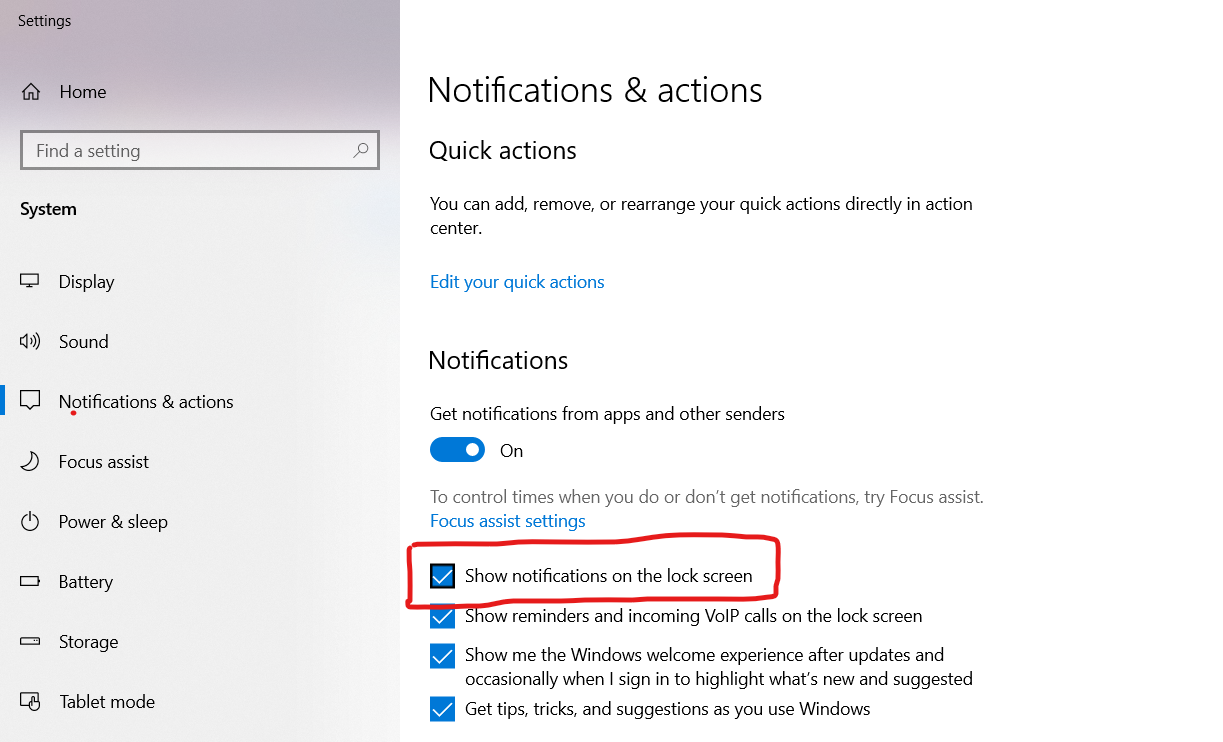

Yeah, though the user says -
Could you please say if something is planned to do inside Zulip to make notification not be shown at lock screen? Since for other apps I don't need to make any setting
OK, we might be able to detect the if the screen is locked by using electron-notification-state but it might be tricky to stop the notification since they are from the webapp side.
We should look at how other Electron app do this; it might be that there's something cleaner one can do than just checking if the screen is locked.

Is there a simple way to add an Electron app to the list of notification senders in the settings app so the user can use those Windows settings to turn such notifications on/off?

Okay, I think we'll be needing more info from user to fix this. Since if the Show notifications on the lock screen is on then the Zulip app should not show the notification.
OK, we might be able to detect the if the screen is locked by using electron-notification-state but it might be tricky to stop the notification since they are from the webapp side.
To enhance the Zulip Desktop application's user experience, we can intelligently manage notifications using Electron's powerMonitor module. By detecting system lock and unlock events, we can temporarily suppress notifications when the system is locked, preventing unnecessary distractions. Users can customize this behavior in the settings, ensuring a seamless and personalized notification experience.

Hello @avijitdas126!
Thanks for your interest in Zulip! You have attempted to claim an issue without the label "help wanted". You can only claim and submit pull requests for issues with the help wanted label.
If this is your first time here, we recommend reading our guide for new contributors before getting started.
