
e6e5psj


e6e5psj
我找到了必现的办法: 使用ab或者go-stress-testing进行压测. ab -n1000 -c1000 http://......这个地址(使用frp进行TCP映射的一个IIS地址) 压测几次,就必现了.这个HTTP服务器是正常的,但是通过FRP映射的端口就无法访问了. 这时只能重启FRPS才能恢复.
直接压测IIS的时候,没有挂过, 即使是短时间内不能服务,也只是在压测的时候,关闭压测就恢复了. 而FRP无法恢复. 当FRP不能访问时,IIS确认是正常的.所以这个肯定是和FRP有关,并不是系统的原因. 不过有可能 是FRP的和系统交互的过程中有问题.
我把这个端口的frp代理,换成了Nginx来做, 目前没有问题了. 有十足的把握是frp的原因,同样的端口代理,使用Nginx没有这个问题. 使用FRP就会有. 对比测试是FRP的原因比较大. 再跑一个月看看nginx会不会出现同类问题.
> Reproduced on my side when the number of active connections on a port is over 1000 is there a way to solve this problem Restart FRPS at regular intervals...
@yuyulei 有进一步结论吗?
> 思路 -暴力美学: 每 12 小时,重启所有的 docker 程序,彻底解决各种各样幺蛾子的问题;重启 docker 只有很短的时间,对用户影响很小; /usr/local/bin/docker restart $(docker ps -a | awk '{ print $1}' | tail -n +2) 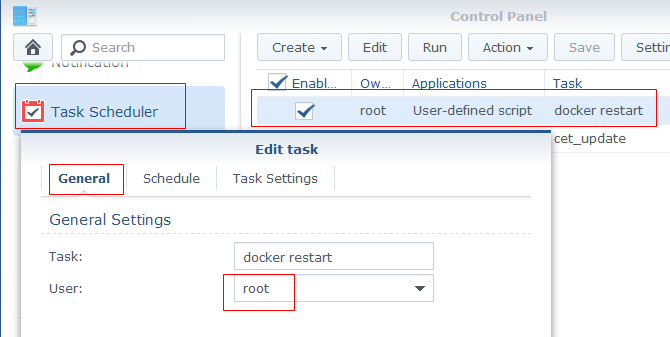 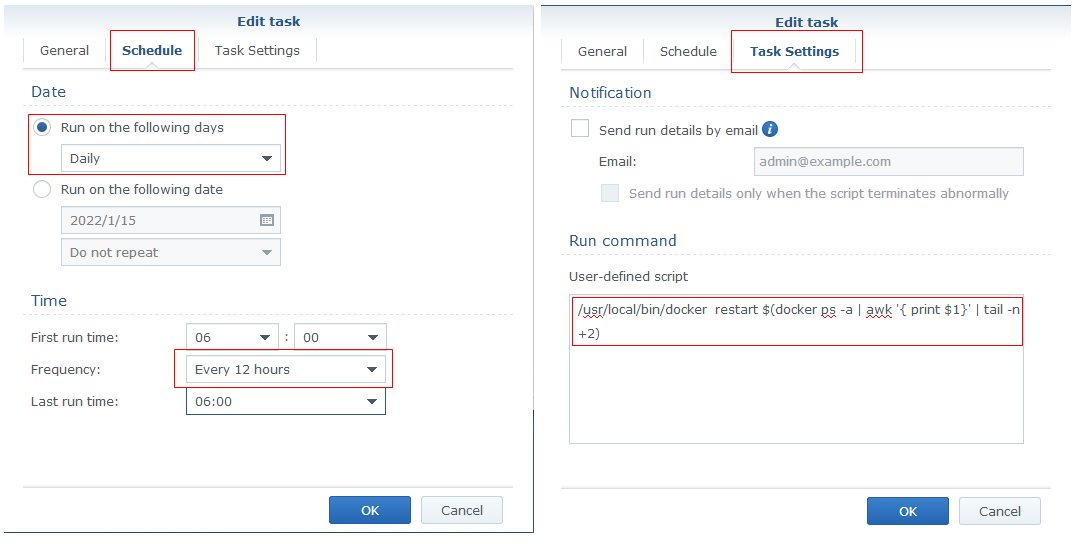 > > 同理: linux...
 这个功能稍弱了。
上传的图片,全部变成了:image  这就没法管理了。
老板威武