


Miles
是的,Mac 得开启辅助功能才能自动排列
看起来是网络原因,重试一下?
> > 看起来是网络原因,重试一下? > > 重试了,还是这样,用的clash 梯子 viem 用的是公共的 rpc, 拥堵的时候是会有这样的问题,我给刷新 nonce 增加了异常处理,会自动进行重试到成功,你拉最新代码再试试,如果不行,你可以考虑使用自己的 rpc, 参考文档:https://viem.sh/docs/actions/test/setRpcUrl.html#setrpcurl
> 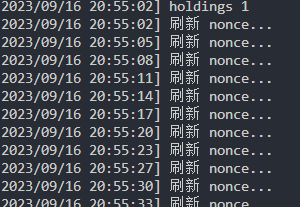 这样是成功了吗? 没有成功,建议你试一下自定义rpc, 这个问题大概是你网络环境引起,或者尝试用 clash 的 TUN 模式
> 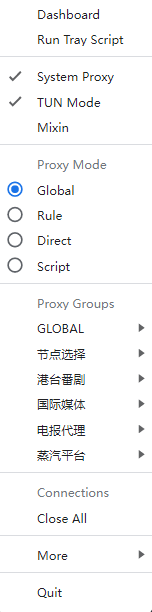 换了也没用,自定义rpc的话怎么搞,调整哪些代码? https://viem.sh/docs/clients/transports/http.html#url-optional 看这个文档,改这里的代码就可以了,你可以试着用 https://base-mainnet.blastapi.io/fe9c30fc-3bc5-4064-91e2-6ab5887f8f4d,这个是 friendtech 使用的 rpc 
> >  换了也没用,自定义rpc的话怎么搞,调整哪些代码? > > https://viem.sh/docs/clients/transports/http.html#url-optional 看这个文档,改这里的代码就可以了,你可以试着用 [https://base-mainnet.blastapi.io/fe9c30fc-3bc5-4064-91e2-6ab5887f8f4d,这个是](https://base-mainnet.blastapi.io/fe9c30fc-3bc5-4064-91e2-6ab5887f8f4d%EF%BC%8C%E8%BF%99%E4%B8%AA%E6%98%AF) friendtech 使用的 rpc  是否可以了?
> > > >  换了也没用,自定义rpc的话怎么搞,调整哪些代码? > > > > > > > > > https://viem.sh/docs/clients/transports/http.html#url-optional 看这个文档,改这里的代码就可以了,你可以试着用 [https://base-mainnet.blastapi.io/fe9c30fc-3bc5-4064-91e2-6ab5887f8f4d,这个是](https://base-mainnet.blastapi.io/fe9c30fc-3bc5-4064-91e2-6ab5887f8f4d%EF%BC%8C%E8%BF%99%E4%B8%AA%E6%98%AF) friendtech 使用的 rpc  > > > > > > 是否可以了? >...
还是不行只能检查网络环境了,今天帮了好些人跑起来了,没有其他人存在这个问题,本机网络环境的话我也帮不了你的哈😂
> > > >  换了也没用,自定义rpc的话怎么搞,调整哪些代码? > > > > > > > > > https://viem.sh/docs/clients/transports/http.html#url-optional 看这个文档,改这里的代码就可以了,你可以试着用 [https://base-mainnet.blastapi.io/fe9c30fc-3bc5-4064-91e2-6ab5887f8f4d,这个是](https://base-mainnet.blastapi.io/fe9c30fc-3bc5-4064-91e2-6ab5887f8f4d%EF%BC%8C%E8%BF%99%E4%B8%AA%E6%98%AF) friendtech 使用的 rpc  > > > > > > 是否可以了? >...
可能不是你的网络问题,我这边也出现这个问题了,主要是 base 网络的公共 rpc 太拥挤了,自行选择更换 rpc 吧