

 zilliztech
reverse proxy by nginx error
Describe the bug: behind nginx with a sub path, how to set the resource root path with the sub path such as: http://example.com/path/to/milvus
nginx config:
  location /path/to/milvus/ {
    proxy_pass http://11.132.42.228:30006;
    proxy_set_header Host $http_host;
  }
request the url:http://example.com/path/to/milvus,response the error:
Attu version: zilliz/attu:v2.2.8

Try this?
location /path/to/milvus/ {
    proxy_pass http://11.132.42.228:30006/;
    proxy_set_header Host $http_host;
  }

Try this?
location /path/to/milvus/ {
    proxy_pass http://11.132.42.228:30006/;
    proxy_set_header Host $http_host;
  }
Connect request url 404,request directly from the root path https://example.com/api/v1/milvus/connect without including subpath /path/to/milvus/, it should be https://example.com/path/to/milvus/api/v1/milvus/connect
Try this?
location /path/to/milvus/ {
    proxy_pass http://11.132.42.228:30006/;
    proxy_set_header Host $http_host;
  }
Connect request url 404,request directly from the root path
https://example.com/api/v1/milvus/connectwithout including subpath/path/to/milvus/, it should behttps://example.com/path/to/milvus/api/v1/milvus/connect
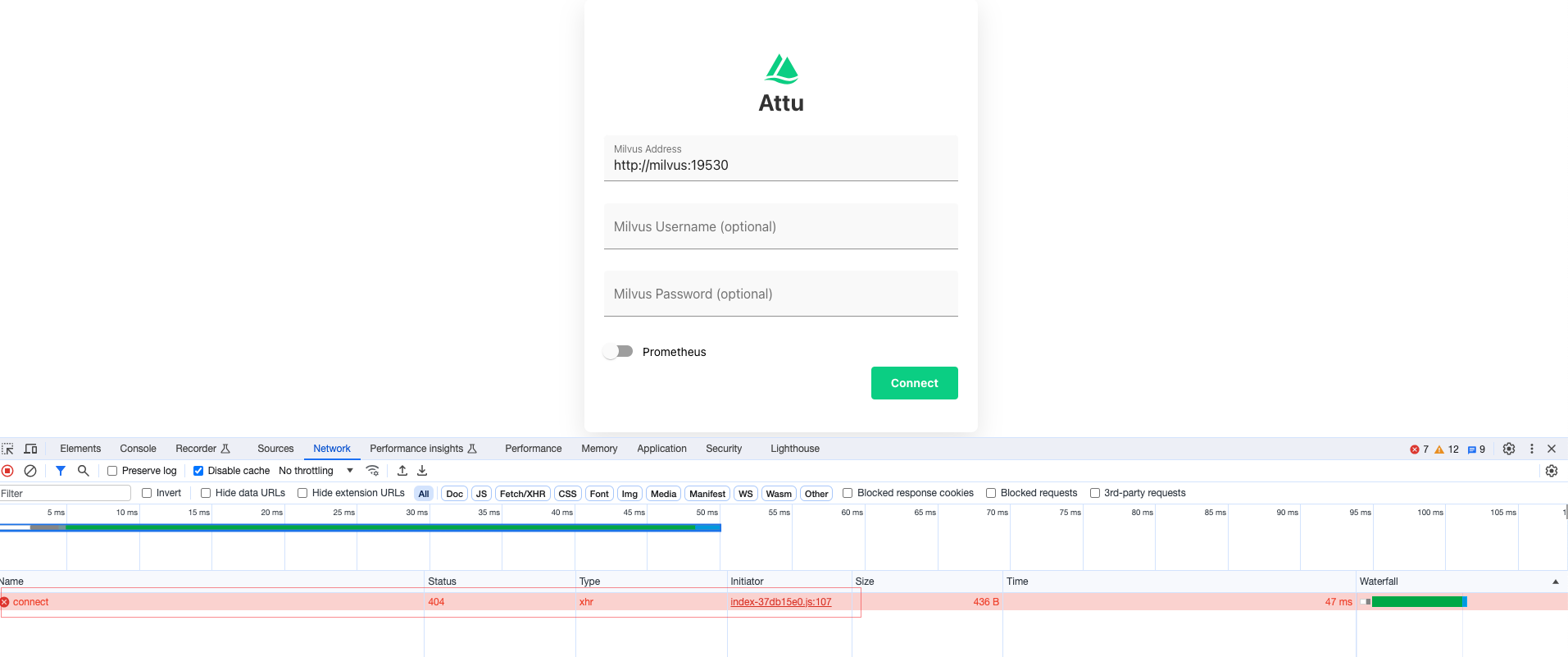
I'm not the expert of nginx. From the case, it looks like you should proxy https://example.com/path/to/milvus/api/* to http://11.132.42.228:30006/api/*; not sure how to write the rule, you can do some experiments.
This url https://example.com/api/v1/milvus/connect seems to be returned by attu's backend, like$root_url/api/v1/milvus/connect, Is there any way to modify the root_url to https://example.com/path/to/milvus of attu?
Just like run-grafana-behind-a-proxy:
https://grafana.com/tutorials/run-grafana-behind-a-proxy/ @shanghaikid

Did the problem fixed? Have met the same problem of the url /api/xxx
For the release v2.3.3, you can setup HOST_URL as the docker env, then you can set a correct root url.
Did the problem fixed? Have met the same problem of the url /api/xxx
For the release
v2.3.3, you can setupHOST_URLas the docker env, then you can set a correct root url.
o thank u is there an example of HOST_URL setting i am using nginx proxy, too
I don't have the env, but I can give you an example, you need to test it by yourself:)
location /path/to/milvus/ {
    proxy_pass http://11.132.42.228:30006/;
    proxy_set_header Host $http_host;
  }
dock run -e HOST_URL= /path/to/milvus/ -p 30006:3000 zilliz/attu:v2.3.3
For this case, all the requests send from you browsers should be prefixed with /path/to/milvus/ . and it should go to the real address behind the /path/to/milvus/
I don't have the env, but I can give you an example, you need to test it by yourself:)
location /path/to/milvus/ {
    proxy_pass http://11.132.42.228:30006/;
    proxy_set_header Host $http_host;
  }
dock run -e HOST_URL= /path/to/milvus/ -p 30006:3000 zilliz/attu:v2.3.3For this case, all the requests send from you browsers should be prefixed with
/path/to/milvus/. and it should go to the real address behind the/path/to/milvus/
ok, it works
dock run -e HOST_URL= /path/to/milvus/ -p 30006:3000 zilliz/attu:v2.3.3
location /example/vec/ {
proxy_pass http://localhost:30006/;
proxy_set_header Host $host;
proxy_set_header X-Real-IP $remote_addr;
proxy_set_header X-Forwarded-For $proxy_add_x_forwarded_for;
proxy_set_header X-Forwarded-Proto $scheme;
}
location /path/to/milvus/ {
proxy_pass http://localhost:30006/;
proxy_set_header Host $host;
proxy_set_header X-Real-IP $remote_addr;
proxy_set_header X-Forwarded-For $proxy_add_x_forwarded_for;
proxy_set_header X-Forwarded-Proto $scheme;
}
I don't have the env, but I can give you an example, you need to test it by yourself:)
location /path/to/milvus/ {
    proxy_pass http://11.132.42.228:30006/;
    proxy_set_header Host $http_host;
  }
dock run -e HOST_URL= /path/to/milvus/ -p 30006:3000 zilliz/attu:v2.3.3For this case, all the requests send from you browsers should be prefixed with
/path/to/milvus/. and it should go to the real address behind the/path/to/milvus/ok, it works dock run -e HOST_URL= /path/to/milvus/ -p 30006:3000 zilliz/attu:v2.3.3 location /example/vec/ { proxy_pass http://localhost:30006/; proxy_set_header Host $host; proxy_set_header X-Real-IP $remote_addr; proxy_set_header X-Forwarded-For $proxy_add_x_forwarded_for; proxy_set_header X-Forwarded-Proto $scheme; }
location /path/to/milvus/ { proxy_pass http://localhost:30006/; proxy_set_header Host $host; proxy_set_header X-Real-IP $remote_addr; proxy_set_header X-Forwarded-For $proxy_add_x_forwarded_for; proxy_set_header X-Forwarded-Proto $scheme; }
Thanks! I meet the same problem. Now I followed this configuration and I can login to see users, roles and metrics. But I cannot see the database! (see the figure below. There should be a database and a collection.)
Milvus is deployed at host 10.15.85.78, attu is deployed at host 10.15.86.23, nginx is deployed at local. The docker-compose for attu is as follows:
version: '3.8'

services:
  attu:
    image: zilliz/attu:v2.3.9
    container_name: attu
    restart: always
    hostname: attu
    environment:
      - MILVUS_URL=10.15.85.78:19530
      - HOST_URL=/attu
    ports:
      - 5949:3000
The configuration of nginx:
location /attu/ {
            proxy_set_header Host $http_host;
            proxy_set_header X-Real-IP $remote_addr;
            proxy_set_header X-Forwarded-For $proxy_add_x_forwarded_for;
            proxy_set_header X-Forwarded-Proto $scheme;
            proxy_pass http://10.15.86.23:5949/;
            proxy_set_header Upgrade $http_upgrade;
            proxy_set_header Connection "Upgrade";
}
Any help would be greatly appreciated.

I don't have the env, but I can give you an example, you need to test it by yourself:)
location /path/to/milvus/ {
    proxy_pass http://11.132.42.228:30006/;
    proxy_set_header Host $http_host;
  }
dock run -e HOST_URL= /path/to/milvus/ -p 30006:3000 zilliz/attu:v2.3.3For this case, all the requests send from you browsers should be prefixed with
/path/to/milvus/. and it should go to the real address behind the/path/to/milvus/ok, it works dock run -e HOST_URL= /path/to/milvus/ -p 30006:3000 zilliz/attu:v2.3.3 location /example/vec/ { proxy_pass http://localhost:30006/; proxy_set_header Host $host; proxy_set_header X-Real-IP $remote_addr; proxy_set_header X-Forwarded-For $proxy_add_x_forwarded_for; proxy_set_header X-Forwarded-Proto $scheme; } location /path/to/milvus/ { proxy_pass http://localhost:30006/; proxy_set_header Host $host; proxy_set_header X-Real-IP $remote_addr; proxy_set_header X-Forwarded-For $proxy_add_x_forwarded_for; proxy_set_header X-Forwarded-Proto $scheme; }
Thanks! I meet the same problem. Now I followed this configuration and I can login to see users, roles and metrics. But I cannot see the database! (see the figure below. There should be a database and a collection.)
Milvus is deployed at host 10.15.85.78, attu is deployed at host 10.15.86.23, nginx is deployed at local. The docker-compose for attu is as follows:
version: '3.8'

services:
  attu:
    image: zilliz/attu:v2.3.9
    container_name: attu
    restart: always
    hostname: attu
    environment:
      - MILVUS_URL=10.15.85.78:19530
      - HOST_URL=/attu
    ports:
      - 5949:3000
The configuration of nginx:
location /attu/ {
            proxy_set_header Host $http_host;
            proxy_set_header X-Real-IP $remote_addr;
            proxy_set_header X-Forwarded-For $proxy_add_x_forwarded_for;
            proxy_set_header X-Forwarded-Proto $scheme;
            proxy_pass http://10.15.86.23:5949/;
            proxy_set_header Upgrade $http_upgrade;
            proxy_set_header Connection "Upgrade";
}
Any help would be greatly appreciated.

looks like the websocket is not forwarded. can you enable the big request rows on chrome inspector?
looks like the websocket is not forwarded. can you enable the
big request rowson chrome inspector?

Thank you. I enable the big request rows on chrome inspector. Please see the screenshots blew.
And also the header info:
@sky-cloud can you check this, if this is empty, I think the HOST_URL is not set correctly.
@sky-cloud can you check this, if this is empty, I think the
HOST_URLis not set correctly.

@shanghaikid Thanks for you reply. The _env_.HOST_URL is as follows:
@shanghaikid Some additional notes may be helpful.
- Although I cannot see the database or collection, I can create new collection in default database. see the screenshots follow:
I create a collection named new_col and see the notification of success:
- If I use
location / {...}other thanlocation /somepath {...}in nginx, then everything is OK. Under this condition the env variableHOST_URLis also not necessary for running zilliz/attu. Now I can see the collectionnew_colin the default database:
server {
  listen 8080;
  server_name localhost;

  location /attu/ {
    proxy_pass http://localhost:3000/;
    proxy_http_version 1.1;
    proxy_set_header Upgrade $http_upgrade;
    proxy_set_header Connection "upgrade";
    proxy_set_header Host $host;
    proxy_set_header X-Real-IP $remote_addr;
    proxy_set_header X-Forwarded-For $proxy_add_x_forwarded_for;
    proxy_set_header X-Forwarded-Proto $scheme;
    rewrite ^/attu/(.*)$ /$1 break;
  }
}
This conf works for me.