KAMI
 KAMI copied to clipboard
Published
20 hours ago •
 zeroeightysix
zeroeightysix
Text widgets render over (or under) vanilla HUD, causing them to be unreadable
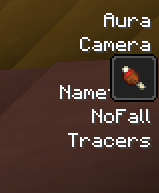
Not sure what the plan of action here should be. In KAMI forge, the widget would just render right below the effects.
Maybe we can have it 'skip' that height range instead - creating a gap in the text.

Future works around this by having an option to
- disable the vanilla potion UI, replace it with a text based one like so

- Move the vanilla potion UI out of the way
- Don't do anything, just let them overlap