

 zed-industries
Vim mode search should act like non-Vim mode when not triggered with `/`
Summary
When searching with / in Vim mode, hitting enter moves the cursor to the next line in the buffer being searched, matching Vim's behavior. This is at odds with how enter behaves in a non-Vim-mode buffer search, jumping to the next result. We should refine the action here to behave like non-Vim mode unless / is used to start the search.

Hey @shinebayar-g! I cannot reproduce this. When I search in the buffer and the search input is focused, enter gets me to the next search result.
See here: https://github.com/zed-industries/zed/assets/1185253/ec3eb75e-0464-43bd-b52f-03f4b6b330ca
Or do you use Vim mode by any chance?

Or do you use Vim mode by any chance?
The enable vim-mode same will enter new lines

Or do you use Vim mode by any chance?
Hey @mrnugget , thanks for the hint. I noticed that It's only reproducible in Vim mode.
Okay, I see. But where does this expectation come from? As far as I know (and I just checked again): by default Vim doesn't bind <enter> to go-to-next-search-result. It's bound to n and <cr> is equivalent to ctrl-m.
Okay, I see. But where does this expectation come from? As far as I know (and I just checked again): by default Vim doesn't bind
<enter>to go-to-next-search-result. It's bound tonand<cr>is equivalent toctrl-m.
And. The shift-enter useful in vim-mode (prev-result)? If so, it would be more intuitive to bind enter to the search input(box)
I still can't reproduce this. When I search in Vim mode with / and then hit <enter> I only jump the next line, just like in Vim.
https://github.com/zed-industries/zed/assets/1185253/b30ef37c-70ac-485a-a7a5-32353dc01dfd
I still can't reproduce this. When I search in Vim mode with
/and then hit<enter>I only jump the next line, just like in Vim. screenshot-2024-02-13-16.49.37.mp4
You beat me to it 😄 . Try the same when you're in INSERT mode.
I still can't reproduce this. When I search in Vim mode with
/and then hit<enter>I only jump the next line, just like in Vim.screenshot-2024-02-13-16.49.37.mp4
Disable all my custom keymap and use "/" + "cmd+shift+f" <enter> not work
vim-mode "n" / "shift-n" prev/next result it work
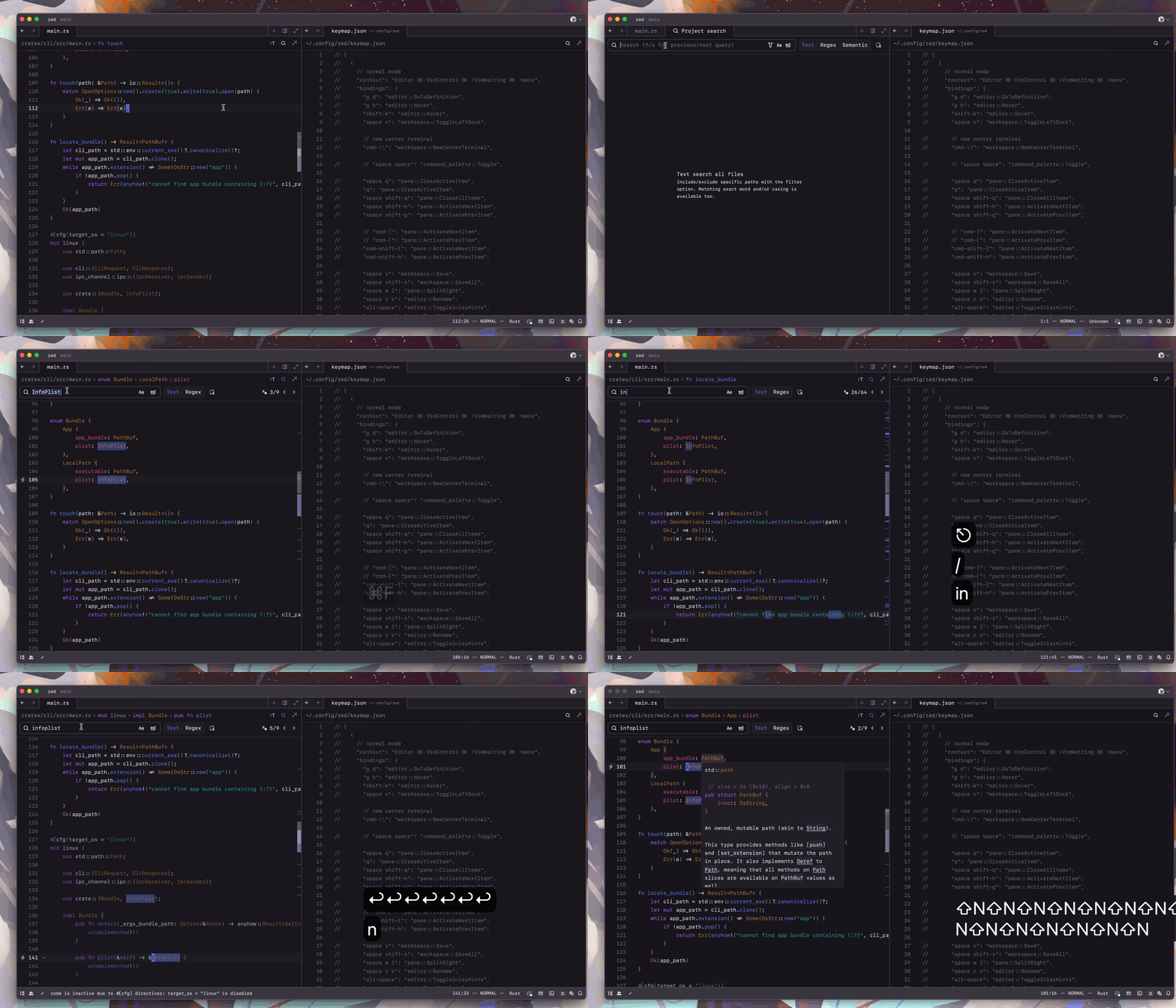
Okay, so you want to work like in non-vim-mode when you trigger a search through cmd+f/cmd-shift-f even though you're in Vim mode, yes?
Yeah I would be glad if certain base functionalities work the same across vim/non-vim modes.. Like search.
I think that when the search-input is focused, triggering enter should trigger an operation (such as next-result), rather than unfocus and jump to the result. This is not in line with the habits we have developed using other applications.
I think that when the search-input is focused, triggering
entershould trigger an operation (such as next-result), rather than unfocus and jump to the result. This is not in line with the habits we have developed using other applications.
I personally prefer that, because it's exactly how it works in Vim: you start a search with /, you finish it by hitting enter, you jump to the next search results with n/N. That's at least the habit I've developed over a decade of using Vim :)
But I think the solution here would be to change the behaviour depending on whether the search was started via cmd-f or via /.
This is what I wanted to say. There is a difference between searching in NORMAL vs INSERT mode. NORMAL mode works as expected. return key jumps to the next result. In INSERT mode it doesn't. It inserts new line instead.
https://github.com/zed-industries/zed/assets/3091558/efba782a-5c60-416d-bd18-ce063181beb3
Hi there! 👋 We're working to clean up our issue tracker by closing older issues that might not be relevant anymore. Are you able to reproduce this issue in the latest version of Zed? If so, please let us know by commenting on this issue and we will keep it open; otherwise, we'll close it in a week. Feel free to open a new issue if you're seeing this message after the issue has been closed. Thanks for your help!
![github-actions[bot] avatar](https://avatars.githubusercontent.com/in/15368?v=4 "Published by a pub.dev verified publisher")

Can this issue be re-evaluated? Without enter working, ctrl+f is kind of useless. Whenever I press enter it just moves cursor to the next line instead of jumping to the next match.
Clicking n to navigate to the next match works only if the find bar is not in focus. If the find bar is still in focus it adds n to the search input. So UX around is not so great.
Hi there! 👋 We're working to clean up our issue tracker by closing older bugs that might not be relevant anymore. If you are able to reproduce this issue in the latest version of Zed, please let us know by commenting on this issue, and it will be kept open. If you can't reproduce it, feel free to close the issue yourself. Otherwise, it will close automatically in 14 days. Thanks for your help!